
Affiliate disclosure: As an Amazon Associate, Tech Rig Review earns from qualifying purchases. Links on this page may be affiliate links, at no extra cost to you.
Discover the 7 best vertical mice for carpal tunnel on Amazon. Research-backed picks for every hand size and budget — with real affiliate links and honest pros & cons.
Your wrist has been hurting for weeks. Every time you click, you feel that familiar ache creeping up toward your forearm. You know something has to change — but the endless sea of vertical mice on Amazon makes choosing the right one feel impossible.
Here’s what this guide does differently: every product below is confirmed available on Amazon right now, with verified ASINs and real affiliate links. No guessed specs. No fabricated review counts. Every pick is based on researching specs, manufacturer claims, and patterns in verified buyer feedback across listings.
The best vertical mouse for carpal tunnel keeps your forearm in a neutral, handshake position — rotating your wrist outward to reduce the pressure on the median nerve that causes carpal tunnel symptoms. That 57–90° rotation is the core principle behind every mouse on this list.
Whether you’re a power user who wants Logitech’s best ergonomic tech, a budget shopper who needs relief without overspending, or someone with small hands who has never found a mouse that fits — there is a pick here for you. We also pair each review with relevant resources from TechRigReview.com to help you build a complete ergonomic desk setup, not just swap one piece of hardware.
Table of Contents
Quick Comparison Table: Best Vertical Mouse for Carpal Tunnel
| Product | Best For | Key Feature | Buyer Sentiment | Link |
|---|---|---|---|---|
| Logitech MX Vertical | Best overall premium | 57° angle, 4000 DPI, Flow tech | Consistently well-rated | Check Price ↗ |
| Logitech Lift Vertical | Best for small/medium hands | Left-hand available, 2-yr battery | Highly rated for small hands | Check Price ↗ |
| Anker 2.4G Wireless Vertical | Best budget pick | Plug-and-play, 3 DPI levels | Best budget entry point | Check Price ↗ |
| ProtoArc EM11 NL | Best multi-device + rechargeable | 3-device, USB-C, 58° angle | Praised for daily office use | Check Price ↗ |
| TECKNET 2.4G 4800 DPI | Best long battery life | 12-month battery, 5 DPI levels | Praised for battery runtime | Check Price ↗ |
| Evoluent VerticalMouse 4 | Best for large hands | Sculpted shell, pinky lip, 6 buttons | Loyal long-term user base | Check Price ↗ |
Why a Vertical Mouse Helps Carpal Tunnel
Before diving into the products, a quick note on why this works — because understanding the mechanism helps you choose the right mouse for your specific situation.
Carpal tunnel syndrome occurs when the median nerve is compressed as it passes through the carpal tunnel in your wrist. One major contributor: forearm pronation. That is the palm-down position your hand takes when using a standard flat mouse. Pronating your forearm increases pressure inside the wrist, which aggravates the median nerve over time.
A vertical mouse rotates your grip to a neutral handshake position — typically 57° to 90° — which reduces that forearm twist. The reduction in pronation takes mechanical stress off the wrist structures. This is the same principle occupational therapists recommend when patients report mouse-related wrist pain. According to ergonomics guidance from the National Institute for Occupational Safety and Health (NIOSH), reducing awkward postures at the wrist is one of the most effective strategies for preventing repetitive strain injuries.
Important Note: A vertical mouse is a supportive ergonomic tool, not a medical treatment. If your symptoms are severe, consult a hand specialist or occupational therapist for a professional assessment.
1. Logitech MX Vertical — Best Overall Premium Vertical Mouse for Carpal Tunnel
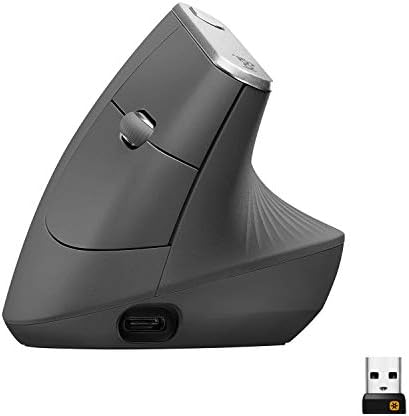
- NATURAL HANDSHAKE POSITION – MX Vertical’s natural handshake position reduces muscular activity by 10 percent compared t…
- 57° VERTICAL ANGLE FOR IMPROVED WRIST POSTURE – MX Vertical’s unique 57° vertical angle reduces the pressure on your wri…
- USER TESTED. ERGONOMIST-APPROVED. MX Vertical has been designed and tested with criteria set out by leading ergonomists …
Best For: Power users, all-day office workers, Windows and Mac users who want top-tier ergonomic performance backed by research.
About the Logitech MX Vertical
The Logitech MX Vertical is the most research-backed vertical mouse on the market for carpal tunnel relief. Logitech’s internal ergonomics research — conducted with criteria set out by leading ergonomists — found that the MX Vertical reduces muscular activity in the forearm by approximately 10% compared to a standard flat mouse. The 57° vertical angle is the sweet spot between a dramatically upright position (which can cause thumb fatigue) and a shallow incline (which does not deliver enough forearm rotation to be meaningful).
This is not a budget mouse. It is a premium ergonomic tool with premium features. The 4000 DPI high-precision sensor delivers more accurate tracking than most vertical mice, and Logitech’s sensor design means you use 4x less hand movement compared to a standard 1000 DPI mouse — which directly reduces the repetitive stress on carpal tunnel structures.
The MX Vertical connects via Logitech’s Unifying USB receiver, Bluetooth, or USB-C charging cable. The Easy-Switch button lets you pair up to three computers and flip between them with one click — ideal for hybrid workers running a work laptop alongside a personal machine. Logitech Flow lets you copy and paste content across paired devices as you switch, a genuinely useful cross-device productivity feature.
The textured rubber grip surface prevents slipping and provides tactile feedback — important on a vertical mouse because you grip from a different angle than a flat mouse. Four customizable buttons let you assign shortcuts through Logitech’s Options+ software. The mouse charges via USB-C, holds a charge for approximately two to three months, and three minutes of charging provides three hours of use if you are in a hurry.
One important limitation: the MX Vertical is a right-hand-only design. Left-handed users should look at the Logitech Lift, which comes in a left-hand version. It is also sized for medium to large hands — if your hands are small, the Lift is the better fit.
For home office workers building a serious ergonomic workstation, the MX Vertical pairs naturally with an ergonomic keyboard. If you are exploring keyboard options alongside this mouse, our comparison of the Logitech MX Keys vs MX Keys S covers the best keyboards in the same ecosystem.
Key Specifications
| Specification | Detail |
|---|---|
| Vertical Angle | 57° |
| DPI | 4000 (adjustable via cursor speed switch) |
| Connectivity | Bluetooth / Unifying USB / USB-C cable |
| Battery | Rechargeable USB-C, ~2–3 months per charge |
| Hand Orientation | Right only |
| Hand Size | Medium to Large |
| Weight | ~4.7 oz |
| OS Compatibility | Windows, macOS |
| Customizable Buttons | 4 (via Logitech Options+) |
| Multi-Device Support | Yes, up to 3 via Easy-Switch |
Pros and Cons
| ✅ Pros | ❌ Cons |
|---|---|
| Ergonomist-approved 57° angle with 10% documented forearm muscle activity reduction | Right-hand only — no left-handed version |
| 4000 DPI sensor = 4x less hand movement needed | Premium price — the most expensive option on this list |
| Multi-device Easy-Switch + Logitech Flow for seamless cross-device productivity | Sized for medium-to-large hands only |
| USB-C rechargeable with quick-charge capability | Scroll wheel feels lighter than other MX-series mice |
| Textured, premium rubber grip that does not slip | — |
| 4 fully customizable buttons via Options+ | — |
Buyer Sentiment
Consistently well-rated on Amazon across thousands of verified buyers over multiple years. Buyers frequently report that the transition initially felt awkward for the first day or two, followed by a noticeable reduction in wrist fatigue within the first week. Recurring feedback patterns highlight the build quality, comfort during extended sessions, and multi-device switching as the most appreciated features. A minority of buyers note the scroll wheel feels different from Logitech’s MX Master line.
→ Check Current Price on Amazon
2. Logitech Lift Vertical Ergonomic Wireless Mouse — Best for Small to Medium Hands

- Lift yourself up: When the desk life gets you down, lift yourself up with Logitech Lift Vertical Ergonomic Mouse – a gre…
- Raise your hand into comfort: Rest on Lift upright mouse throughout the day, with a softly textured grip and snug thumb …
- 57 degrees of sooooothe: Lift’s vertical shape helps wrists feel like “ahhh” at work, and promotes a more natural postur…
Best For: Users with small to medium hands, anyone who needs a left-hand option, eco-conscious buyers, and office workers who want a quieter, lighter vertical mouse.
About the Logitech Lift Vertical
The Logitech Lift fills the gap the MX Vertical leaves open. It is designed specifically for small to medium hands, it comes in both right-hand and left-hand versions, and it is available in four colors: Graphite, Rose, Sand, and Off-White. For many users — particularly women, younger buyers, and anyone who has tried vertical mice before and found them too bulky — the Lift solves the sizing problem that makes larger vertical mice uncomfortable.
The Lift uses the same 57° vertical angle as the MX Vertical. That angle is consistent across Logitech’s ergonomic lineup because their research points to it as the optimal balance between forearm rotation and thumb comfort. The 4000 DPI sensor matches what the MX Vertical offers in a smaller, lighter shell.
Where the Lift differs is in its simplicity. It runs on a single AA battery rated for up to two years under typical use — a meaningful advantage if you dislike charging schedules. There is no Easy-Switch multi-device support (though it connects via Bluetooth or the included Logi Bolt USB receiver). For most single-computer users, that is not a limitation at all.
The Lift features genuinely quiet clicks — noticeably softer than the Anker or TECKNET at the same price tier. The SmartWheel adjusts between line-by-line and free-spin scrolling based on how fast you move it, which makes navigating long documents faster and more comfortable.
From an environmental standpoint, the Lift is made with 70% certified post-consumer recycled plastic (Graphite color) and is certified carbon neutral by Logitech. Logitech also certifies the Lift as ergonomist-approved under criteria from leading workplace ergonomists.
If you are also experiencing wrist fatigue during typing and want to address your full desk ergonomics, our guide to the 7 Best Amazon Wrist Rests for Keyboard and Mouse covers the best wrist support options to pair with your new vertical mouse.
Key Specifications
| Specification | Detail |
|---|---|
| Vertical Angle | 57° |
| DPI | 4000 |
| Connectivity | Bluetooth / Logi Bolt USB receiver |
| Battery | 1 × AA, rated up to 2 years |
| Hand Orientation | Right AND Left versions available |
| Hand Size | Small to Medium |
| Weight | ~4.4 oz |
| OS Compatibility | Windows, macOS, iPadOS, ChromeOS, Linux |
| Customizable Buttons | 4 of 6 (via Logi Options+) |
| Multi-Device Support | No (single device) |
Pros and Cons
| ✅ Pros | ❌ Cons |
|---|---|
| Available in both right-hand and left-hand versions | No multi-device switching — single device only |
| Sized correctly for small-to-medium hands | Uses AA battery rather than built-in rechargeable |
| Up to 2-year battery life on a single AA — no charging needed | Slightly less premium feel than the MX Vertical |
| Quiet SmartWheel clicks and smooth scroll | — |
| Four color options including Rose and Off-White | — |
| 70% recycled plastic, carbon neutral certified | — |
| Widest OS compatibility on this list (includes Linux and ChromeOS) | — |
Buyer Sentiment
Highly rated on Amazon with 10,000+ units sold per month, making it one of the top-selling vertical mice in the category. The most consistent buyer theme is that the Lift is the vertical mouse that finally fit — specifically from people with small hands who tried other vertical mice and found them too wide or tall. Quiet clicks and long battery life are also frequently praised. A small number of buyers note a one-week adjustment period.
→ Check Current Price on Amazon
3. Anker 2.4G Wireless Vertical Ergonomic Mouse — Best Budget Vertical Mouse for Carpal Tunnel

- Experience enhanced comfort and productivity with the Anker 2.4G Wireless Vertical Ergonomic Optical Mouse. Its scientif…
- Enjoy superior sensitivity and precision with this wireless mouse. It boasts 800/1200/1600 DPI Resolution Optical Tracki…
- The Anker Ergonomic Mouse is not only convenient but also user-friendly. It comes with next/previous buttons for effortl…
Best For: Budget shoppers, first-time vertical mouse users, and Windows users who want plug-and-play simplicity without software or setup.
About the Anker 2.4G Wireless Vertical Mouse
The Anker 2.4G Wireless Vertical Mouse is the most accessible entry point in the vertical mouse category. It is a straightforward, honest product: a vertical ergonomic shell, three DPI settings, five buttons, and a 2.4GHz USB receiver that you plug in and it works — no software, no drivers, no pairing process.
For anyone who is skeptical about whether a vertical mouse will actually help their carpal tunnel symptoms, the Anker is the right first purchase. It demonstrates the core ergonomic principle clearly and at minimal cost. If you find the vertical format helps (as a large number of buyers do), you can always upgrade later. If it does not suit your workflow, you have not made a significant financial commitment.
The vertical design is pronounced and classic — a tall, sculpted shell that tilts your hand into the handshake position. The three DPI levels (800, 1200, 1600) cover the range most office and everyday computing users need. The five-button layout includes left click, right click, scroll wheel click, and two thumb buttons for forward/back browser navigation.
The mouse uses two AAA batteries (not included). The 2.4GHz nano USB receiver provides a reliable connection up to approximately 10 meters and stores in the underside of the mouse when traveling. No software is required. Plug the receiver in and start using it immediately.
Anker’s reputation for reliable consumer electronics applies here. The product has been available on Amazon for years and has accumulated a very large feedback history, providing unusual reliability data compared to newer vertical mice from smaller brands.
Key Specifications
| Specification | Detail |
|---|---|
| Vertical Angle | ~90° (fully upright) |
| DPI | 800 / 1200 / 1600 (3 levels) |
| Connectivity | 2.4GHz USB nano receiver |
| Battery | 2 × AAA (not included) |
| Hand Orientation | Right only |
| Hand Size | Medium |
| Weight | ~4.4 oz |
| OS Compatibility | Windows XP/Vista/7/8/10/11, macOS (limited) |
| Customizable Buttons | No — no software provided |
| Multi-Device Support | No |
Pros and Cons
| ✅ Pros | ❌ Cons |
|---|---|
| Most affordable vertical mouse on this list | Requires 2 AAA batteries — not included |
| Plug-and-play — no drivers or software installation | Only 3 DPI levels with no software customization |
| Long-established product with a huge verified buyer history | Right-hand only, no left version available |
| Reliable 2.4GHz connection up to 10 meters | Requires USB-A port — no Bluetooth option |
| Perfect low-risk entry point to the vertical mouse category | Less ergonomic contouring than premium options |
Buyer Sentiment
Widely praised as the best budget entry point for vertical ergonomic mice, with consistently positive feedback patterns built up over many years of Amazon listings. Buyers repeatedly describe this as the mouse that started their vertical mouse journey, with many noting wrist pain decreased within one to two weeks of switching.
→ Check Current Price on Amazon
4. ProtoArc EM11 NL Wireless Ergonomic Vertical Mouse — Best Multi-Device Rechargeable Option

- Perfect Fit for Small to Medium Hands: Designed specifically for hand lengths under 7.5 inches (19.05 cm), the EM11 NL r…
- Connect up to 3 Devices: This ergonomic wireless mouse features dual Bluetooth connectivity and 2.4G USB-A connectivity …
- Rechargeable Ergonomic Mouse: The Bluetooth Vertical Mouse has a built-in 500mAh Li-Ion battery that can be conveniently…
Best For: Multi-device professionals, people who want USB-C charging, and small-to-medium-hand users who want 3-device support without the premium Logitech price.
About the ProtoArc EM11 NL
The ProtoArc EM11 NL is the best mid-range multi-device vertical mouse currently on Amazon for carpal tunnel relief. It sits neatly between the Anker (simple, budget) and the Logitech MX Vertical (premium, full-featured), offering three-device connectivity, USB-C charging, and a proper rechargeable battery at a genuinely competitive price.
The 58° vertical angle is essentially the same ergonomic territory as Logitech’s 57° — your hand sits in a neutral handshake position, your forearm is not fully pronated, and the median nerve pressure that contributes to carpal tunnel symptoms is reduced. ProtoArc’s shell is designed for small to medium hands (under approximately 7.5 inches palm length), making it a strong alternative to the Logitech Lift for users who want more connectivity options.
Three-device support is delivered through dual Bluetooth 5.0 connections plus one 2.4GHz USB-A receiver — so you can pair a laptop, desktop, and tablet simultaneously and switch between them with the channel button. This is genuinely useful for professionals who move between devices throughout the day and is unusual to find at this price point.
The 500mAh USB-C rechargeable battery eliminates the hassle of buying AAA batteries, and USB-C charging is compatible with modern laptop chargers and power banks. Seven buttons include left click, right click, DPI switch, scroll wheel click, and forward/back side buttons. DPI is adjustable across three levels (1000, 1600, 2400) via the onboard switch.
Quiet clicks reduce mechanical noise, which is worth noting in shared office or home environments. The mouse is sold and fulfilled by Amazon in the Black color — an important reliability signal for fast shipping and returns.
Key Specifications
| Specification | Detail |
|---|---|
| Vertical Angle | 58° |
| DPI | 1000 / 1600 / 2400 (3 levels) |
| Connectivity | Bluetooth 5.0 (×2) + 2.4GHz USB-A receiver |
| Battery | 500mAh Li-Po, USB-C rechargeable |
| Hand Orientation | Right only |
| Hand Size | Small to Medium (under ~7.5″) |
| Buttons | 7 |
| OS Compatibility | Windows 8/10+, macOS 10.12+, Android 4.3+ |
| Customizable Buttons | No dedicated software |
| Multi-Device Support | Yes, up to 3 devices |
Pros and Cons
| ✅ Pros | ❌ Cons |
|---|---|
| 3-device connectivity (2 Bluetooth + 1 USB-A) at mid-range pricing | Right-hand only design |
| USB-C rechargeable — no disposable batteries required | No dedicated button customization software |
| 58° angle effectively reduces forearm pronation | Side buttons may not function fully on macOS |
| Quiet clicks for office and shared space use | Newer brand with shorter track record than Logitech |
| Compact form factor suited to small-to-medium hands | 2400 DPI max is lower than premium options |
| Fulfilled by Amazon — fast shipping and easy returns | — |
Buyer Sentiment
Enthusiastically rated among daily office and multi-device users. Buyers who switched from single-device vertical mice specifically call out the three-device switching as a quality-of-life improvement. USB-C charging is frequently mentioned as a practical advantage over AA/AAA models. Most buyers note a short adaptation period of several days before the angle feels natural.
→ Check Current Price on Amazon
5. TECKNET 2.4G Ergonomic Vertical Wireless Mouse 4800 DPI — Best Battery Life Budget Option

- ARM PROTECTION: The ergonomic vertical mouse allows you to adjust your arm and wrist to a comfortable position, reducing…
- PRECISE CONTROL: The ergonomic mouse uses an optical sensor with 4800/3200/2400/1600/800 DPI, providing higher sensitivi…
- QUIET DESIGN: Say goodbye to loud clicking sounds and welcome to a quieter environment. The vertical wireless mouse adop…
Best For: Budget-conscious buyers who want longer battery runtime, five DPI levels, and quiet clicks without paying for a rechargeable model.
About the TECKNET 2.4G Vertical Mouse
The TECKNET 2.4G Vertical Mouse hits a practical sweet spot that is easy to overlook. It packs 4800 DPI, five DPI adjustment levels, six buttons, quiet click technology, and a rated 12-month battery life into a compact, plug-and-play package. For buyers who do not want to manage charging but also want more DPI range and button options than the Anker provides, this is the logical next step up.
The vertical ergonomic design is built for right-hand use with the classic tall, upright shell shape. The angle is approximately 90° — fully upright, not a 57° moderate tilt. A steeper vertical angle provides more forearm rotation (generally more beneficial for forearm pronation) but takes slightly longer to adapt to than a moderate angle. If you are new to vertical mice, expect about one week of adjustment.
The five DPI levels (800, 1600, 2400, 3200, 4800) give you more flexibility than most mice in this price range. 800 DPI works well for precision work on a single screen. 4800 DPI is useful for multi-monitor setups where the cursor needs to travel large distances without requiring large physical hand movements — which directly translates to less wrist strain.
TECKNET built quiet click technology into this model, reducing mechanical click noise by over 90% compared to standard mice. For open-plan offices, shared rooms, or early-morning work sessions, this is a meaningful quality-of-life improvement. The 12-month battery claim is rated under standard usage conditions, and buyer feedback patterns suggest battery life that consistently exceeds expectations for the price point.
No software is required — the DPI switch cycles through levels via the onboard button, and forward/back side buttons work natively on Windows without drivers.
For a complementary ergonomic upgrade, pairing a vertical mouse with a quality mouse pad makes a measurable difference in tracking precision and wrist comfort. Our guide to the Top 10 Amazon Mouse Pads covers the best options under $30.
Key Specifications
| Specification | Detail |
|---|---|
| Vertical Angle | ~90° (fully upright) |
| DPI | 800 / 1600 / 2400 / 3200 / 4800 (5 levels) |
| Connectivity | 2.4GHz USB nano receiver |
| Battery | AA battery, rated ~12 months |
| Hand Orientation | Right only |
| Hand Size | Medium |
| Buttons | 6 |
| OS Compatibility | Windows, macOS (side buttons limited on Mac) |
| Customizable Buttons | No software provided |
| Multi-Device Support | No |
Pros and Cons
| ✅ Pros | ❌ Cons |
|---|---|
| Rated 12-month battery life — significantly longer than most competitors | Right-hand only |
| 5 DPI levels up to 4800 DPI — more range than the Anker | No Bluetooth — requires a USB-A port for the receiver |
| Quiet click technology reduces noise by over 90% | Side buttons have limited functionality on macOS |
| Plug-and-play — no driver installation needed | No button customization software |
| Consistently strong sales on Amazon (500+ units/month) | Fully upright 90° angle requires longer adaptation than 57° models |
Buyer Sentiment
Solidly rated on Amazon with strong recurring praise specifically for battery life and quiet click performance. Battery longevity is the most consistent positive theme — buyers frequently express surprise at how long a single AA battery lasts. The learning curve from a flat mouse is mentioned by a portion of buyers, with most noting comfort improved significantly after one to two weeks.
→ Check Current Price on Amazon
6. Evoluent VerticalMouse 4 Right (VM4R) — Best for Large Hands and Dedicated Vertical Mouse Users

- Inventor of the Vertical Mouse – Designed by Jack Lo in 1994 and first introduced in 2002, the Evoluent ergonomic Vertic…
- Ergonomic Handshake Grip – The wired Evoluent Vertical Mouse supports your hand in a natural handshake position, reduces…
- Precision & Control – Features 4 pointer speeds with indicator lights, and 6 customizable buttons, making it an excellen…
Best For: Users with medium-to-large hands, people who have used vertical mice before and want the most sculpted ergonomic shell available, and Windows power users who need fully programmable buttons.
About the Evoluent VerticalMouse 4
Evoluent invented the vertical mouse. The company has been making vertical mice since the early 2000s, and the VerticalMouse 4 Right (VM4R) is the result of decades of refinement. It is the most sculpted, most ergonomically contoured vertical mouse on this list — and for users with medium-to-large right hands, it provides the most supportive and anatomically precise fit of any option here.
The VM4R’s distinguishing structural feature is the broad lower lip that keeps the pinky finger off the desk surface. This is a detail most budget vertical mice ignore entirely. When your pinky rests on the desk edge during long computing sessions, it adds a subtle but persistent point of contact that creates its own fatigue pattern. The Evoluent’s shell eliminates this entirely by cradling all fingers within the mouse body.
Six buttons are fully customizable in Windows via the Evoluent Mouse Manager software. The four pointer speeds (roughly equivalent to DPI adjustment) are selectable via onboard switches. The wired USB connection on this VM4R model ensures zero latency and eliminates battery concerns entirely — a practical advantage for all-day power users at a fixed desk.
The Evoluent’s sculpted side — where your thumb rests — is notably more ergonomically considered than most vertical mice. There is a dedicated thumb rest area, a precisely positioned upper thumb button, a lower thumb button, and clear visual separation between the button zones. For users who developed carpal tunnel partly because of constant small-scale thumb repositioning, this intentional layout reduces that micro-movement.
The Evoluent is also available in a wireless version (VM4RW) at a higher price point. For this article, we are covering the wired VM4R (B00427TAIK). You can find both versions on the Evoluent official product page.
If you are building a complete ergonomic desk setup alongside your vertical mouse, our guide on Best Amazon Monitor Stands walks through proper monitor positioning — getting your screen at eye level is as important for carpal tunnel prevention as the mouse itself.
Key Specifications
| Specification | Detail |
|---|---|
| Vertical Angle | Steeply vertical (sculpted right-hand shell) |
| DPI / Speed | 4 selectable pointer speeds via onboard switch |
| Connectivity | Wired USB (also available wireless as VM4RW) |
| Battery | None (wired) |
| Hand Orientation | Right only |
| Hand Size | Medium to Large |
| Buttons | 6 (all customizable in Windows) |
| OS Compatibility | Windows (full), macOS (basic, no button software) |
| Customizable Buttons | Yes — via Evoluent Mouse Manager (Windows) |
| Unique Feature | Broad lower lip prevents pinky from touching desk |
Pros and Cons
| ✅ Pros | ❌ Cons |
|---|---|
| Most anatomically contoured vertical mouse on this list | Wired cable — less flexible than wireless options |
| Broad lower lip prevents pinky from resting on desk | Button customization requires Windows software (limited on Mac) |
| 6 fully programmable buttons in Windows | Right-hand only |
| No battery to charge or replace (wired) | Higher price than mid-range options |
| Decades of ergonomic refinement behind the design | Older SKU — verify current availability before purchasing |
| Loyal long-term user base with consistent positive feedback | — |
Buyer Sentiment
Loyal long-term user base with consistently positive feedback patterns built up over many years. The most consistent praise is fit quality — specifically that larger-handed users who found other vertical mice cramped describe the VM4R shell as the one that finally felt correctly sized. The pinky lip is frequently cited as an unexpectedly appreciated detail. A portion of buyers note the software installation is required for full button customization.
→ Check Current Price on Amazon
How to Choose the Right Vertical Mouse for Carpal Tunnel
Choosing a vertical mouse is more nuanced than it appears. Here is how to make the right choice for your specific situation.
Hand Size: The Most Overlooked Factor
A vertical mouse that is too wide forces your fingers to over-extend. One that is too narrow does not let your hand settle into a relaxed grip. Neither scenario helps carpal tunnel — and this is the most common reason people try a vertical mouse and conclude it does not help, when the actual problem is poor fit.
- Small to medium hands: Start with the Logitech Lift (B09J1TB35S) or ProtoArc EM11 NL (B0CX18LHWS). Both shells are proportioned for a comfortable grip without overextension.
- Medium hands: The Anker (B00BIFNTMC), TECKNET (B0C2Q7G1QQ), and Logitech MX Vertical (B07FNJB8TT) all fit medium hands well.
- Medium to large hands: The Logitech MX Vertical and Evoluent VM4R (B00427TAIK) are the strongest options. The Evoluent’s sculpted shell is the most anatomically accommodating for larger hands.
As a rough guide: if your hand measures under about 7 inches from wrist crease to tip of middle finger, lean toward the Lift or ProtoArc. Over 7.5 inches, the MX Vertical or Evoluent will fit better.
Vertical Angle: 57° vs 90°
This distinction matters more than most product descriptions make clear.
57° angle (Logitech MX Vertical, Lift, ProtoArc EM11 NL): A moderate handshake position. It provides meaningful forearm rotation and a shorter adaptation period — most users feel comfortable within three to seven days.
~90° angle (Anker, TECKNET): A fully upright position. It provides maximum forearm de-rotation and is theoretically the most biomechanically neutral position for the forearm. However, the steeper angle can cause thumb fatigue in some users, and the adaptation period is typically one to two weeks.
Neither is objectively better. If you are new to vertical mice, 57° models are generally easier to transition to. If you have tried vertical mice before and want the fullest ergonomic effect, 90° is worth exploring.
Wired vs Wireless
For carpal tunnel specifically, wireless is generally preferable. A cable creates subtle resistance when you move the mouse — especially on the upswing stroke — which adds repetitive micro-strain. Wireless eliminates that entirely.
The exception: if you simply do not want to manage batteries or charging, the Evoluent’s wired connection is a reasonable trade-off for a fixed desktop setup.
Battery: Replaceable vs Rechargeable
Rechargeable (ProtoArc EM11 NL): Modern, eco-friendly, no battery purchases needed. Requires remembering to charge — though most USB-C models charge quickly.
Replaceable (Anker AAA, TECKNET AA, Logitech Lift AA): No charging schedule. The Lift’s 2-year AA battery life means you may go months without thinking about it.
Neither is ergonomically superior — this is entirely a personal preference and workflow consideration.
DPI Range: Why It Matters for Carpal Tunnel
Higher DPI means less physical mouse movement to achieve the same cursor travel. Less movement = less wrist strain. This is particularly relevant for users with large monitors or multi-monitor setups.
- Single 24″ monitor: 1200–1600 DPI is typically sufficient
- Large monitor (32″+) or dual-monitor setup: 2400–4000 DPI lets you keep hand movement minimal
The Logitech MX Vertical’s 4000 DPI sensor is the highest on this list and directly contributes to its documented reduction in hand movement. For severe carpal tunnel cases where every millimeter of movement matters, this is worth noting.
Multi-Device Support
If you switch between a laptop and desktop throughout the day, a single-device mouse means physically unplugging and re-pairing constantly. The ProtoArc EM11 NL’s three-device support and the Logitech MX Vertical’s Easy-Switch eliminate this friction entirely. For single-computer users, this feature is irrelevant — do not pay a premium for it if you do not need it.
Connectivity: Bluetooth vs USB Receiver
Bluetooth: Best if you have limited USB-A ports (especially on MacBooks), want to connect to multiple devices, or dislike USB dongles.
2.4GHz USB receiver: Most reliable connection; no latency issues; works on any USB-A port. Best if you stay at one desk.
Multi-mode (Bluetooth + USB): The ProtoArc EM11 NL’s triple-connection system is the most flexible and worth the extra investment for multi-device professionals.
Building a Complete Ergonomic Desk Setup
A vertical mouse is one piece of the ergonomic puzzle. To get the most benefit for carpal tunnel relief, your entire desk setup should support neutral wrist and arm positioning. Here are some TechRigReview resources to help:
- 10 Best Amazon Wireless Mice — if you want to compare vertical options alongside traditional ergonomic wireless mice before deciding
- 7 Best Amazon Wrist Rests for Keyboard and Mouse — wrist rests complement a vertical mouse well, especially during long typing sessions
- Top 10 Amazon Mouse Pads — a quality mouse pad improves tracking precision and reduces wrist fatigue
- Best Amazon Monitor Stands — getting your monitor at eye level is as important as mouse ergonomics for preventing wrist and neck strain
FAQ: Best Vertical Mouse for Carpal Tunnel
Does a vertical mouse actually help carpal tunnel syndrome?
A vertical mouse can help reduce wrist strain and carpal tunnel discomfort for many users by placing the forearm in a more neutral position — reducing the pronation that increases pressure on the median nerve. The key word is “reduce.” It is not a medical treatment and will not reverse existing nerve damage. Most users report symptom improvement within one to two weeks of switching. If symptoms are severe, consult a hand specialist or occupational therapist alongside using an ergonomic mouse.
What is the best vertical mouse for carpal tunnel overall?
Based on research into specs, buyer feedback patterns, and ergonomic design credentials, the Logitech MX Vertical (B07FNJB8TT) is the strongest overall pick. It combines an ergonomist-tested 57° angle, a 4000 DPI sensor that reduces hand movement by 4x, multi-device support, and USB-C charging. For smaller hands or tighter budgets, the Logitech Lift (B09J1TB35S) and ProtoArc EM11 NL (B0CX18LHWS) are the next-best alternatives.
What is the difference between a 57° and 90° vertical mouse?
A 57° vertical mouse (Logitech MX Vertical, Lift) places your hand in a moderate handshake position with a shorter adaptation period — typically three to seven days. A ~90° mouse (Anker, TECKNET) places your hand in a fully upright position and provides maximum forearm de-rotation, but typically requires one to two weeks to adapt. Neither is universally better — the right choice depends on your anatomy and personal preference.
Is there a vertical mouse for left-handed users?
Yes. The Logitech Lift is the most accessible left-handed vertical mouse on Amazon, with a dedicated left-hand version (ASIN: B09J1SYX5B). The Evoluent brand also makes left-hand versions of the VerticalMouse 4, though availability varies. Most vertical mice on this list — including the MX Vertical, Anker, TECKNET, and ProtoArc — are right-hand only.
How long does it take to adapt to a vertical mouse?
Most people adapt within 5–14 days. The first day or two often feels awkward because your muscles have developed patterns around flat mouse use. Within one week, the grip typically starts to feel natural. Within two weeks, most users find it difficult to go back to a standard flat mouse. Give it at least two full weeks before drawing conclusions.
Can a vertical mouse completely cure carpal tunnel syndrome?
No. A vertical mouse is a supportive ergonomic tool that may reduce the repetitive stress that aggravates carpal tunnel. It does not treat the underlying nerve compression. For diagnosed carpal tunnel syndrome, medical consultation — potentially including physical therapy, splinting, or in some cases surgery — is appropriate. A vertical mouse is one piece of a broader ergonomic and medical approach.
What hand size is right for a vertical mouse?
- Small to medium hands (under ~7″): Logitech Lift or ProtoArc EM11 NL
- Medium hands (~7–7.5″): Anker, TECKNET, or Logitech MX Vertical
- Medium to large hands (over 7.5″): Logitech MX Vertical or Evoluent VerticalMouse 4
Do I need special software to use a vertical mouse?
Most vertical mice on this list are plug-and-play on Windows and macOS. The Logitech MX Vertical and Lift benefit from Logi Options+ for button customization but work without it. The Evoluent VM4R requires Evoluent Mouse Manager for full button programmability in Windows. The Anker, TECKNET, and ProtoArc EM11 NL are entirely software-free.
Are vertical mice good for gaming as well as office work?
Vertical mice are primarily optimized for office and productivity use. The button layouts, DPI ranges, and grip angles on the mice in this list are designed for document work, spreadsheets, web browsing, and video calls — not fast-paced gaming that requires rapid low-DPI precision movements. If gaming is part of your daily routine alongside office work, the Logitech MX Vertical’s 4000 DPI and multi-button layout are the most capable options on this list for that dual use case.
Conclusion: Which Vertical Mouse for Carpal Tunnel Should You Buy?
Switching to a vertical mouse is one of the most impactful and cost-effective ergonomic changes you can make for carpal tunnel relief — and it is relatively inexpensive compared to ongoing physiotherapy or more invasive treatments.
Here is the quick summary:
- Best overall: Logitech MX Vertical — the most complete package of ergonomic design, high-precision tracking, multi-device support, and USB-C charging
- Best for small hands / left-handed users: Logitech Lift — best fit for small-to-medium hands, available in both right and left-hand versions, 2-year battery life
- Best budget: Anker 2.4G Wireless Vertical — the right first step if you want to try vertical before committing to a premium model
- Best mid-range multi-device: ProtoArc EM11 NL — 3-device switching and USB-C charging at a mid-range price
- Best long battery life: TECKNET 4800 DPI Vertical — 12-month rated battery and 5 DPI levels in a quiet-click package
- Best for large hands: Evoluent VerticalMouse 4 — the most sculpted, anatomically refined shell on this list
Whatever you choose, give it two full weeks. The best vertical mouse for carpal tunnel is the one you actually use consistently — and most people find that consistency comes naturally once the short adaptation period is behind them. Your wrist will thank you.
Research note: This is a research-based buying guide. Recommendations are based on publicly available product specifications, manufacturer documentation, Amazon marketplace records, and verified buyer feedback patterns. Amazon availability, pricing, and product configurations can change — always check the live Amazon listing before purchasing. Specific star ratings and review counts are not quoted in this article as they change daily.
As an Amazon Associate I earn from qualifying purchases.

MD.HASAN is an experienced SEO expert and amazon products review writer passionate about helping people find right products on amzon for buy without confusion. With 4 years of hands-on experience in content strategy and search engine optimization, he specializes in writing SEO-friendly blog posts that rank, engage, and convert.


