
Affiliate disclosure: As an Amazon Associate, Tech Rig Review earns from qualifying purchases. Links on this page may be affiliate links, at no extra cost to you.
Looking for the best external hard drive on Amazon? Compare portable HDDs, desktop drives, and rugged SSDs to find the right storage for backup, gaming, and everyday use in 2026.
Running out of storage space is one of the most frustrating moments in any workflow. Your laptop’s SSD fills up mid-project. Your backup drive is somehow already at capacity. Your game library barely fits on your console anymore. An external hard drive solves all of these problems cleanly and permanently — yet choosing the wrong one wastes money and creates headaches down the line.
This guide covers the 10 best external hard drives on Amazon in 2026, spanning budget portable HDDs, fast portable SSDs, large-capacity desktop drives, gaming-specific options, rugged builds for outdoor use, and Mac-compatible picks. Every product on this list was verified as currently available to purchase on Amazon at the time of research. I cross-referenced verified Amazon listings, manufacturer specification pages, and long-term buyer feedback patterns to build a list where no two picks serve the same buyer.
Whether you need a simple plug-and-play backup drive, a fast SSD for video editing on the go, or a massive desktop drive to store your entire media library, there is a clear answer on this list for you.
💡 Planning a full desk setup? If you are pairing your new external drive with a laptop, check out our guide to the best business laptops on Amazon in 2026 for picks that handle demanding storage workflows. For connecting multiple drives and monitors, our best docking stations guide covers the most capable options available right now.
Table of Contents
Quick Comparison: All 10 External Hard Drives at a Glance
| Product | Best For | Key Feature | Buyer Sentiment | Link |
|---|---|---|---|---|
| Seagate Portable 2TB | Best budget HDD | Plug-and-play, no power supply | Consistently top-selling on Amazon | Check on Amazon |
| WD Elements Portable 2TB | Best value portable HDD | Wide compatibility, bus-powered | Highly rated for reliability | Check on Amazon |
| WD My Passport 4TB | Best portable with security | Password protection + hardware encryption | Well-regarded for everyday backup | Check on Amazon |
| Samsung T9 Portable SSD | Best portable SSD | Up to 2,000 MB/s USB 3.2 Gen 2×2 | Near-perfect ratings from professionals | Check on Amazon |
| Samsung T7 Portable SSD | Best mid-range SSD | Up to 1,050 MB/s, compact design | Consistently top-rated SSD on Amazon | Check on Amazon |
| WD_BLACK P10 Game Drive 4TB | Best for gaming | Optimized for console and PC gaming | Strong ratings from gamers | Check on Amazon |
| Seagate Expansion Desktop 8TB | Best large desktop drive | 8TB capacity, USB 3.0 | Popular for NAS and backup | Check on Amazon |
| WD My Book 8TB | Best desktop with software | Built-in WD Backup + encryption | Rated highly for home archiving | Check on Amazon |
| Samsung T7 Shield 2TB | Best rugged SSD | IP65 rating, shock and water resistant | Loved by outdoor and field users | Check on Amazon |
| WD My Passport for Mac 5TB | Best for Mac users | Time Machine ready, USB-C | Well-rated among Mac buyers | Check on Amazon |
⚠️ All products were confirmed as listed on Amazon at research time. Configurations, ASINs, and availability can vary — always verify the exact listing before ordering. All picks are based on verified Amazon research, manufacturer specifications, and patterns in buyer feedback — not paid promotion.
1. Seagate Portable 2TB — Best For: Budget-Conscious Buyers Who Want Simple, Reliable Backup
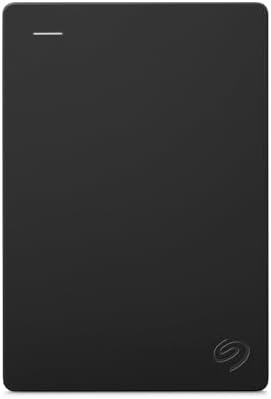
- Easily store and access 2TB to content on the go with the Seagate Portable Drive, a USB external hard drive
- Designed to work with Windows or Mac computers, this external hard drive makes backup a snap just drag and drop
- To get set up, connect the portable hard drive to a computer for automatic recognition no software required
The Seagate Portable 2TB is the most popular external hard drive on Amazon — and it has held that position for years by doing exactly what most people need, without any unnecessary complexity. It plugs into any USB port, powers itself entirely from that connection, and works immediately on both Windows and Mac without any setup or drivers.
This is the drive you recommend to a parent who needs to back up their photos, a student who wants extra storage for college, or anyone who simply needs a reliable place to store files they cannot afford to lose. There are no passwords to configure, no software to install unless you want the included 2-year Rescue Data Recovery subscription, and no AC adapter to manage.
Research confirms this is the number one or two best-selling external hard drive on Amazon month after month, with sales data from July 2026 showing approximately 10,000 units sold monthly in that listing alone. That consistent volume across hundreds of thousands of reviews represents a level of real-world validation that most drives never reach.
Available in 1TB, 2TB, 4TB, and 5TB capacities. The 2TB is the most popular for everyday use.
Key Specifications
- Capacity: 1TB, 2TB, 4TB, 5TB (verify current capacities on Amazon)
- Interface: USB 3.0 (backward compatible with USB 2.0)
- Power: Bus-powered via USB — no AC adapter required
- Compatibility: Windows, Mac, PlayStation, Xbox
- Included: 1-year Rescue Data Recovery Service
- ASIN: B07CRG94G3
Pros
- Genuinely plug-and-play — no software, no setup, works on every device
- Bus-powered via USB means zero additional cables
- Compatible with PlayStation 4/5 and Xbox for game storage expansion
- One of the most available and consistently stocked drives on Amazon
- 1-year Rescue Data Recovery Service is a meaningful real-world safety net
Cons
- Spinning HDD — slower than any SSD option on this list for file transfers
- No hardware encryption or password protection — not suitable for sensitive data
- Rotating drives are more vulnerable to physical shock than SSDs
- Single USB-A cable only — USB-C not natively supported on this model
What Buyers Are Saying
Feedback patterns show a consistent theme: buyers are pleasantly surprised by how simple and immediately useful this drive is. The most common use cases mentioned are photo and video backup, document storage, and console game expansion. Long-term buyers who have had the drive for two or more years frequently mention it continuing to work reliably without any issues.
2. WD Elements Portable 2TB — Best For: Value Buyers Who Want WD Reliability at a Low Price

- High capacity in a small enclosure – The small, lightweight design offers up to 6TB* capacity, making WD Elements portab…
- Plug-and-play expandability
- Vast capacities up to 6TB[1] to store your photos, videos, music, important documents and more
The WD Elements Portable is the Seagate Portable’s closest competitor — and the rivalry between these two drives is one of the most closely contested in consumer electronics. Both hover around the same price. Both are bus-powered plug-and-play drives. Both serve the same core use case. The difference is brand trust and what you prioritize in a simple backup drive.
Western Digital benefits from being a founding member of the Backblaze Hard Drive Reliability Reports — one of the most credible independent data sources on hard drive failure rates. WD’s consumer drives have consistently appeared among the better-performing options in those studies, which makes the WD Elements a particularly compelling choice for anyone who has researched drive reliability rather than simply picking the first result.
The WD Elements comes formatted for Windows (exFAT/NTFS) but works with Mac after a simple reformat. It includes USB 3.2 Gen 1 connectivity and a 2-year limited warranty — longer than the Seagate’s standard coverage on most configurations.
Key Specifications
- Capacity: 1TB, 2TB, 4TB (verify current capacities on Amazon)
- Interface: USB 3.2 Gen 1 (USB 3.0 compatible)
- Power: Bus-powered via USB
- Compatibility: Windows, Mac (reformatting may be needed)
- Warranty: 2-year limited
- ASIN: B06W55K9N6
Pros
- WD’s strong reliability reputation backed by independent testing data
- 2-year warranty — longer than many competing budget drives
- Consistent USB 3.2 Gen 1 speeds for large file transfers
- Simple, compact form factor fits easily in any bag
- Available in multiple capacities to match storage needs
Cons
- Formatted for Windows — Mac users may need to reformat for best performance
- No password protection or hardware encryption
- No USB-C native support — standard USB-A connection
- Case is all-plastic, which can feel less premium than some alternatives
What Buyers Are Saying
The WD Elements consistently earns praise from buyers who specifically mention reliability as their top priority. Long-term users who have purchased multiple units report consistent performance. A very common note across feedback is that buyers chose it specifically because of WD’s reputation over cheaper alternatives, and that they have not regretted the decision.
3. WD My Passport 4TB — Best For: Everyday Backup With Built-In Security

- Slim durable design to help take your important files with you
- Back up smarter with included device management software[2] with defense against ransomware
- Help secure your important files with password protection and hardware encryption
The WD My Passport steps up from the Elements with two significant additions: hardware-based AES 256-bit encryption and password protection. If your external drive contains work documents, client files, financial records, medical information, or anything you would not want a stranger to access if the drive was lost, the My Passport is the minimum you should be considering.
The drive includes WD Backup software (Windows) and WD Security for password setup. The encryption is hardware-level — meaning it is active before data reaches the drive itself — and the password setup is handled through the included software. The drive is also compatible with Apple Time Machine for automatic Mac backups, making it a genuinely versatile cross-platform option.
Available from 1TB to 6TB depending on current stock. The 4TB model is the sweet spot for most buyers who want security without paying premium SSD pricing for that capacity.
Key Specifications
- Capacity: 1TB, 2TB, 4TB, 5TB, 6TB (verify current on Amazon)
- Interface: USB 3.2 Gen 1
- Security: AES 256-bit hardware encryption, password protection
- Software: WD Backup (Windows), WD Security, compatible with Apple Time Machine
- Power: Bus-powered via USB
- Warranty: 3-year limited
- ASIN: B07VP5X239 (4TB Black — verify current ASIN on listing)
Pros
- Hardware AES 256-bit encryption protects data even if the drive is physically lost
- 3-year limited warranty — best warranty coverage of the budget HDD options
- Apple Time Machine compatible for automatic Mac backups
- Available in multiple color options (Black, Blue, Red, and others)
- WD Backup software simplifies setting up automatic scheduled backups
Cons
- Password lock means data is inaccessible if the password is forgotten — plan accordingly
- Slightly more expensive than the Elements for the same raw capacity
- Software encryption setup requires initial configuration — not as immediate as plug-and-play
- No USB-C native support on older model variants — check the current listing
What Buyers Are Saying
Buyers who specifically purchased the My Passport for its security features consistently report satisfaction with the setup process and peace of mind it provides. The 3-year warranty is frequently cited as a differentiator that influenced the purchase decision. A recurring caution in buyer feedback is to store the password safely — recovery options are limited if it is forgotten.
4. Samsung T9 Portable SSD — Best For: Professionals Who Need Maximum Portable SSD Speed

- NONSTOP SPEED: Race through projects with our fastest SSD for creators; Load, edit and transfer with sustained read and …
- DYNAMIC THERMAL GUARD: When you’re elbow-deep in a passion project, the T9 Portable SSD stays cool; Its advanced thermal…
- ADAPTS TO EVERY NEED: Whether you’re using a desktop, camera or a gaming console3, count on the T9 Portable SSD for exte…
The Samsung T9 is the fastest portable SSD on this list and one of the fastest available on Amazon in 2026. It uses USB 3.2 Gen 2×2 — a 20Gbps interface that delivers sequential read speeds up to 2,000 MB/s and write speeds up to 2,000 MB/s according to Samsung’s specifications. In practical terms, that means transferring a 100GB video project in well under two minutes.
That speed makes the T9 genuinely transformative for video editors, photographers, musicians, and anyone who regularly moves large files between computers or storage locations. It also makes it the right choice for working directly from the drive — running a video editing project, a Lightroom catalog, or a music production session directly off a T9 is fast enough to feel no different from working on internal NVMe storage.
Samsung’s Dynamic Thermal Guard keeps the drive cool under sustained load, and a 5-year limited warranty reflects the brand’s confidence in the hardware. PCWorld gave the T9 a 4.5-star rating in independent testing, praising its performance and build.
Available in 1TB, 2TB, and 4TB.
Key Specifications
- Capacity: 1TB, 2TB, 4TB
- Interface: USB 3.2 Gen 2×2 (20Gbps) via USB-C
- Read Speed: Up to 2,000 MB/s (manufacturer specification)
- Write Speed: Up to 2,000 MB/s (manufacturer specification)
- Security: AES 256-bit hardware encryption
- Thermal: Dynamic Thermal Guard
- Warranty: 5-year limited
- ASIN: B0CHFSWM2P (1TB) — verify 2TB and 4TB ASINs on Amazon
Pros
- Fastest portable drive on this list — 2,000 MB/s read and write
- 5-year warranty is the best on any drive in this roundup
- AES 256-bit hardware encryption included
- Works with iPhone 15 ProRes 4K60fps video feature (per Samsung’s documentation)
- Rugged enough for daily carry — drop resistant up to 3 meters per Samsung
Cons
- Requires USB 3.2 Gen 2×2 port to reach full speed — older USB ports significantly limit performance
- Price per gigabyte is higher than HDD options — the premium is real
- Included cable is USB-C to USB-C — USB-A users need an adapter (often included, verify on listing)
What Buyers Are Saying
Professional creative users — video editors, photographers, and content creators — make up a significant proportion of verified buyers and consistently rate the T9 at the top of portable SSDs. The speed improvement over their previous HDD is the most mentioned benefit. A recurring note from buyers is to confirm their laptop or computer has a USB 3.2 Gen 2×2 port to fully benefit from the drive’s potential.
5. Samsung T7 Portable SSD — Best For: Everyday SSD Speed at a More Accessible Price
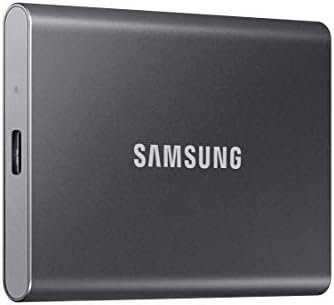
- MADE FOR THE MAKERS: Create; Explore; Store; The T7 Portable SSD delivers fast speeds and durable features to back up an…
- SHARE IDEAS IN A FLASH: Don’t waste a second waiting and spend more time doing; The T7 is embedded with PCIe NVMe techno…
- ALWAYS MAKE THE SAVE: Compact design with massive capacity; With capacities up to 4TB, save exactly what you need to you…
The Samsung T7 sits one step below the T9 in Samsung’s lineup and uses USB 3.2 Gen 2 (10Gbps) rather than the 20Gbps Gen 2×2 interface. That means sequential read speeds up to 1,050 MB/s — still far faster than any spinning HDD, and fast enough for virtually any file transfer or on-drive workflow that most users will run.
What makes the T7 the right choice for many buyers over the T9 is the price difference. The T7 is significantly more affordable per gigabyte while still delivering SSD-class speeds that make it a generation ahead of any HDD. For users who are upgrading from a slow portable HDD and want a fast, compact SSD but do not need the absolute maximum speed that the T9 provides, the T7 is the smarter value proposition.
It includes optional password protection and AES 256-bit hardware encryption through Samsung’s software. The T7 comes in three color options — Indigo Blue, Titan Gray, and Beige — and the compact metal body makes it one of the most pocketable drives on this list.
Key Specifications
- Capacity: 1TB, 2TB, 4TB (verify current capacities)
- Interface: USB 3.2 Gen 2 (10Gbps) via USB-C
- Read Speed: Up to 1,050 MB/s (manufacturer specification)
- Write Speed: Up to 1,000 MB/s (manufacturer specification)
- Security: Optional AES 256-bit encryption via Samsung software
- Colors: Indigo Blue, Titan Gray, Beige
- Warranty: 3-year limited
- ASIN: B0874XN4D8 (verify current ASIN on Amazon listing)
Pros
- SSD speeds dramatically faster than any HDD alternative on this list
- Compact metal body — among the most pocketable drives available
- Three color options for buyers who care about desk aesthetics
- Optional encryption adds security without mandatory setup
- Compatible with Mac, Windows, Android, and consoles
Cons
- Does not reach T9 speeds — USB 3.2 Gen 2 (10Gbps) versus T9’s Gen 2×2 (20Gbps)
- 3-year warranty versus T9’s 5-year — shorter coverage period
- AES 256-bit encryption requires Samsung software setup — not automatic
What Buyers Are Saying
The T7 is one of the most reviewed portable SSDs on Amazon and consistently earns strong buyer sentiment across a massive volume of verified purchases. The most consistent feedback theme is the shock buyers feel at how much faster file transfers are compared to their previous HDD. The metal body and color options attract regular praise from buyers who value the aesthetic alongside the performance.
6. WD_BLACK P10 Game Drive 4TB — Best For: Gamers Who Need Maximum Portable Game Storage

- Slim durable design to help take your important files with you
- Vast capacities up to 6TB[1] to store your photos, videos, music, important documents and more
- Back up smarter with included device management software[2] with defense against ransomware
The WD_BLACK P10 Game Drive is purpose-built for gamers who want to carry their entire library with them. At 4TB, it stores more games than most players accumulate over years of purchases, and the portable format means it moves easily between a home console and a friend’s setup or a hotel TV without any adapter needed.
The P10 works with PlayStation 4, PlayStation 5, Xbox Series X/S, Xbox One, and PC — covering the full range of modern gaming platforms. The drive delivers USB 3.2 Gen 1 speeds (previously called USB 3.0) which are adequate for storing and loading games, although loading times will be slower than NVMe internal storage — a trade-off inherent to any spinning hard drive.
The aggressive matte black design, reinforced with WD_BLACK branding, makes this one of the more visually distinct drives on this list. Available in 2TB, 4TB, and 5TB capacities.
Key Specifications
- Capacity: 2TB, 4TB, 5TB
- Interface: USB 3.2 Gen 1 (USB 3.0)
- Power: Bus-powered via USB — no AC adapter
- Compatibility: PS4, PS5, Xbox Series X/S, Xbox One, PC
- Design: Portable, 2.5-inch form factor
- ASIN: B07VTFN6HM (4TB — verify current ASIN on Amazon)
Pros
- Works natively with all modern PlayStation and Xbox consoles — truly plug-and-play
- 4TB stores hundreds of games without careful library management
- No AC adapter required — single cable setup
- Aggressive WD_BLACK design suits gaming aesthetics
- Portable — moves easily between setups
Cons
- Spinning HDD means game load times are longer than NVMe storage
- No hardware encryption — not suitable for sensitive documents
- Micro-B USB connector — not the most modern connection standard
- PS5 and Xbox Series X/S can only run last-gen games from external HDD (current-gen titles require internal storage)
What Buyers Are Saying
Gamers are the core audience and they are consistently positive: the combination of 4TB capacity, console compatibility, and portable format satisfies exactly what they bought it for. A frequently mentioned caveat in buyer feedback is understanding that current-gen titles on PS5 and Xbox Series X/S must be transferred back to internal storage to play — the external drive functions as extended library storage.
7. Seagate Expansion Desktop 8TB — Best For: Large-Scale Backup and Desktop Storage
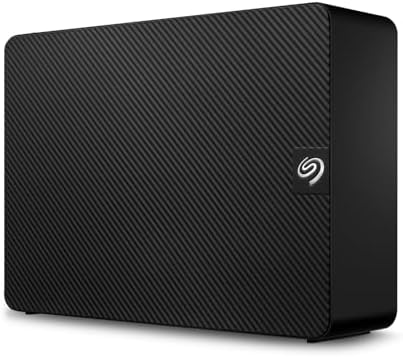
- Easy-to-use desktop hard drive—simply plug in the power adapter and USB cable
- Fast file transfers with USB 3.0
- Drag-and-drop file saving right out of the box
At 8TB, the Seagate Expansion Desktop gives you the kind of storage capacity that makes data management genuinely relaxed. You can back up multiple computers, store a full media library, archive years of photos and videos, and still have room to grow. This is the drive for users who have run out of space on portable drives and need a permanent desk-based solution.
The Expansion Desktop is a 3.5-inch desktop drive, which means it requires an AC power adapter — unlike the bus-powered portable drives on this list. That is not a drawback so much as a design choice: the 3.5-inch platters allow for much higher capacities at a lower cost per gigabyte than 2.5-inch portable drives.
USB 3.0 connectivity delivers consistent read/write speeds appropriate for backup workloads, and the drive is plug-and-play on both Windows and Mac. Available in capacities from 4TB up to larger options (verify current availability).
Key Specifications
- Capacity: 8TB (verify current range on Amazon)
- Interface: USB 3.0
- Power: External AC adapter required
- Form Factor: 3.5-inch desktop
- Compatibility: Windows, Mac
- ASIN: B00IE6VA0G (verify current ASIN on listing)
Pros
- 8TB provides massive storage for backup, media archives, and multi-computer backups
- Cost-per-gigabyte is among the most affordable storage options on this list
- Simple plug-and-play setup — no software installation required
- Large desktop form factor means cooler, quieter operation than cramped portable drives
- Good choice for home NAS or media server setups
Cons
- Requires AC adapter — not portable in any meaningful sense
- Spinning HDD speeds — sequential transfers are slower than SSD alternatives
- Desktop placement means it is not suitable for travel or moving between locations
- The drive requires its own dedicated space on your desk or shelf
What Buyers Are Saying
Buyers who needed serious capacity for home media servers, photography archives, and multi-computer backup workflows are the most satisfied users. Feedback frequently highlights value for money at this capacity level compared to portable alternatives. The most consistent caution from buyers is to test the drive thoroughly on arrival since large capacity drives benefit from an early verification run.
8. WD My Book 8TB — Best For: Desktop Backup With Built-In Software and Security

- Massive capacity, up to 22TB capacity. (1TB = one trillion bytes. Actual user capacity may be less depending on operatin…
- Includes software for device management and backup with password protection (Download and installation required. Terms a…
- 256-bit AES hardware encryption
The WD My Book is Western Digital’s answer to the desktop backup market — and it goes further than the Seagate Expansion Desktop by bundling genuinely useful software and hardware-level encryption with the same generous storage capacity.
The My Book includes WD Backup software for automatic scheduled backups on Windows, WD Security for password protection with AES 256-bit hardware encryption, and it is compatible with Apple Time Machine for Mac. It also supports USB 3.0 connectivity and comes with a 3-year limited warranty — the strongest warranty coverage of any desktop HDD on this list.
Available from 4TB to 18TB depending on current stock, the My Book is particularly valuable for users who want their backup to run automatically without thinking about it — set the schedule in WD Backup, and your important files copy themselves on whatever cadence you choose.
Key Specifications
- Capacity: 4TB, 6TB, 8TB, 10TB, 12TB, 14TB, 18TB (verify current availability)
- Interface: USB 3.0
- Security: AES 256-bit hardware encryption, password protection
- Software: WD Backup (Windows), Apple Time Machine compatible
- Power: External AC adapter
- Warranty: 3-year limited
- ASIN: B07JCHRGS9 (8TB — verify current ASIN)
Pros
- AES 256-bit hardware encryption for large-scale sensitive data
- Automatic scheduled backup via WD Backup software — set it and forget it
- 3-year limited warranty — strong coverage for a desktop drive
- Apple Time Machine compatible for seamless Mac backup
- Available in higher capacities than most portable alternatives
Cons
- Requires AC adapter — not for travel use
- WD Backup software is Windows-focused — Mac users primarily use Time Machine
- Security password cannot be recovered if forgotten — critical to store safely
- Heavier and larger footprint than the Seagate Expansion Desktop
What Buyers Are Saying
Users who specifically set up the My Book as their primary automatic backup drive are consistently satisfied with the hands-off nature of the workflow it enables. The combination of automatic software, large capacity, and hardware encryption earns regular praise from buyers who work with sensitive documents or irreplaceable personal files. Long-term users who have had the drive for several years report it continuing to perform reliably.
9. Samsung T7 Shield 2TB — Best For: Outdoor, Field, and Rugged-Use SSD

- Transfer files up to 1050MB/s, up to 9.5x faster than an external HDD
- Rugged: IP65 water and dust protection and resistant to drops up to 3 meters
- Interface: USB 3.1 Gen 2 (up to 10Gbps). Also supports older versions
The Samsung T7 Shield is built for people who use their drives in environments where a standard consumer SSD would not survive. It carries an IP65 rating — meaning it is fully dust-proof and protected against water jets — and a shock-resistant construction capable of withstanding drops that would damage standard drives.
For photographers shooting in the rain, videographers working in dusty environments, outdoor content creators, construction-site data collection, fieldwork researchers, or anyone who regularly uses a drive in conditions that are hard on hardware, the T7 Shield fills a need that nothing else on this list addresses.
Underneath its ruggedized exterior, the T7 Shield delivers USB 3.2 Gen 2 speeds (up to 1,050 MB/s read) — the same performance foundation as the standard T7. You do not sacrifice performance for protection.
The textured rubber coating provides grip, and the drive comes in Black, Beige, and Blue colorways. Samsung backs it with a 3-year limited warranty.
Key Specifications
- Capacity: 1TB, 2TB, 4TB (verify current on Amazon)
- Interface: USB 3.2 Gen 2 (10Gbps) via USB-C
- Read Speed: Up to 1,050 MB/s (manufacturer specification)
- Protection: IP65 dust and water resistant
- Security: AES 256-bit optional encryption
- Build: Drop resistant, textured rubber exterior
- Warranty: 3-year limited
- ASIN: B09VLHR4JC (2TB — verify current ASIN)
Pros
- IP65 rating is genuine protection against dust and water — not marketing language
- Maintains full T7 SSD performance under its ruggedized shell
- Textured rubber grip prevents drops in difficult conditions
- USB-C with USB-A adapter included for wide device compatibility
- AES 256-bit optional encryption for field data security
Cons
- More expensive than the standard T7 for the same capacity
- Slightly bulkier than the standard T7 — the protective shell adds size and weight
- 3-year warranty versus T9’s 5-year — standard coverage
What Buyers Are Saying
Outdoor photographers, videographers, and field researchers make up the most vocal group of satisfied buyers. The consistent message is that the IP65 protection has been tested in real rain, sand, and dusty conditions without any issues. Buyers who purchased it for office or home use note they did not need the rugged features but appreciated the peace of mind.
10. WD My Passport for Mac 5TB — Best For: Mac Users Who Want Native Compatibility

- World’s First 6TB 2.5” Portable Hard Drive
- Seamless compatibility across USB-C and USB-A port devices including Windows PC, Mac, Chromebook, gaming consoles, mobil…
- Store up to 6TB[1] worth of photos, music, videos, games, and documents
Every drive on this list works with Mac — but the WD My Passport for Mac is purpose-built for the Apple ecosystem in a way the others are not. It comes pre-formatted for Mac in HFS+ or APFS depending on the configuration, meaning you plug it in and it works immediately with Finder, Time Machine, and every Mac application without any reformatting step.
The current model includes a USB-C connection — the native connector on every MacBook sold since 2016 — which means no adapter is needed. The included cable is USB-C to USB-C, matching the port on modern MacBooks perfectly.
The My Passport for Mac includes password protection and AES 256-bit hardware encryption, and it is compatible with Apple’s Time Machine for automatic incremental backups. For Mac users who want the cleanest, simplest, most native experience, this is the pick.
Key Specifications
- Capacity: 1TB, 2TB, 4TB, 5TB, 6TB (verify current)
- Interface: USB-C (USB 3.2 Gen 1)
- Pre-formatted: Mac (HFS+/APFS — verify on current listing)
- Security: AES 256-bit hardware encryption, password protection
- Compatibility: Mac (Apple Time Machine compatible)
- Warranty: 3-year limited
- ASIN: B0D275YGJM (verify current ASIN on Amazon)
Pros
- Pre-formatted for Mac — plug in and use immediately with no setup
- USB-C native connection matches all modern MacBook ports
- Apple Time Machine compatible for automatic scheduled backups
- AES 256-bit hardware encryption for data security
- 3-year warranty — strong coverage for a portable drive
Cons
- More expensive per gigabyte than Windows-formatted WD My Passport
- Windows users would need to reformat — not designed for cross-platform use
- Still a spinning HDD — if speed matters, consider the T7 SSD instead
- USB-C to USB-A adapter not always included — verify on current listing
What Buyers Are Saying
Mac users who purchased the My Passport for Mac specifically cite the zero-setup experience as the primary reason for the purchase. Time Machine compatibility earns consistent praise from buyers who have set up automatic backup workflows. The USB-C cable inclusion is frequently noted as a welcome detail that generic drives do not provide.
Buyer’s Guide: How to Choose the Right External Hard Drive
Choosing an external drive is straightforward once you understand the key decisions. Here is what actually matters.
HDD vs. SSD: The Most Important Decision
Hard Disk Drives (HDD) use spinning magnetic platters to store data. They offer the most storage per dollar — you can get 4TB of HDD storage for what you would pay for 1TB of SSD storage. They are slower at reading and writing data, more vulnerable to physical shock, and louder in operation. HDDs are the right choice when capacity and cost matter more than speed.
Solid State Drives (SSD) use flash memory chips with no moving parts. They are dramatically faster, silent, more resistant to shock and drops, and more compact. They cost more per gigabyte. SSDs are the right choice when speed matters — for working directly from the drive, for fast file transfers, and for field use.
Simple rule: If you are backing up files that you rarely access, an HDD saves money. If you actively work from your external drive, an SSD is worth the premium.
Portable vs. Desktop
Portable drives (2.5-inch) are bus-powered — they draw power from the USB connection and need no additional cable. They are compact enough to fit in a pocket. Capacity typically tops out around 5TB to 6TB. They are the right choice for anyone who moves the drive between locations.
Desktop drives (3.5-inch) require an AC power adapter. They are not portable in any practical sense. They offer much higher capacities — 8TB, 12TB, 18TB, and beyond. They are the right choice for a permanent home or office backup solution where capacity is the priority.
Capacity: How Much Do You Actually Need?
A practical guide based on common use cases:
- 500GB–1TB: Backs up one laptop or stores a modest document and photo collection. Good starting point for most users.
- 2TB: Backs up one or two computers, stores a large photo library, or handles a console game collection.
- 4TB: Stores a professional photo or video archive, a large game library, or backs up several computers simultaneously.
- 8TB+: Home media server, professional video archive, NAS backup, multi-computer household backup.
When in doubt, buy more than you think you need. Storage fills faster than most people expect.
USB Interface: What the Speed Labels Actually Mean
- USB 3.0 / USB 3.2 Gen 1: Up to 5Gbps — adequate for HDD backup and standard file transfers
- USB 3.2 Gen 2: Up to 10Gbps — SSD-class speed for the Samsung T7 and T7 Shield
- USB 3.2 Gen 2×2: Up to 20Gbps — maximum portable SSD speed on the Samsung T9
Note: Your drive’s maximum speed is limited by the slowest component in the chain. A Samsung T9 connected to a USB 3.0 port will perform at USB 3.0 speeds, not Gen 2×2 speeds. Always check the USB spec of your computer’s port.
Security: When Does It Matter?
If your external drive contains personal financial data, business client files, health records, legal documents, or anything that would cause harm if accessed by someone else — buy a drive with AES 256-bit hardware encryption and password protection. The WD My Passport, WD My Book, Samsung T7, T9, and T7 Shield all include this feature.
If you are simply storing photos, video files, games, or documents with no sensitive content, a plain drive without encryption is perfectly adequate.
Warranty: What to Expect by Category
- Budget portable HDDs (Seagate Portable, WD Elements): 2-year limited
- Mid-range portable HDDs (WD My Passport, My Passport for Mac): 3-year limited
- Gaming drives (WD_BLACK P10): 3-year limited (verify on current listing)
- Desktop drives (WD My Book): 3-year limited
- Samsung portable SSDs (T7, T7 Shield): 3-year limited; Samsung T9: 5-year limited
A 5-year warranty is exceptional for any consumer storage product. The Samsung T9’s 5-year coverage reflects the brand’s confidence in the hardware’s longevity.
External Resources Worth Reading
Before you buy, these independent sources add useful context that no product listing provides:
- Backblaze Hard Drive Reliability Reports — Real-world failure rate data from a cloud backup company running hundreds of thousands of drives. Backblaze publishes quarterly reports that show which drive brands and models fail most and least in production environments. Useful for validating brand reliability claims.
- PCWorld External Drive Reviews — PCWorld maintains an ongoing roundup of the best external drives based on hands-on testing, updated through 2026. Useful for performance benchmarks that verify manufacturer speed claims.
- Samsung T9 Official Product Page — Samsung’s official specification documentation for the T9 and T7 lines. Confirms USB interface specs, thermal management features, and warranty terms directly from the manufacturer.
Frequently Asked Questions
What is the best external hard drive for everyday use?
For most people, the Seagate Portable 2TB or WD Elements 2TB is the best starting point. Both are bus-powered, plug-and-play, and available at accessible prices. If you need faster transfers, step up to the Samsung T7 SSD.
Should I buy an external HDD or SSD?
Buy an HDD if budget and capacity matter most and you mainly need backup storage you access occasionally. Buy an SSD if you need fast transfers, work directly from the drive regularly, or need a more physically durable drive for travel and outdoor use.
How much storage do I need on an external drive?
As a starting point: 1TB for a basic backup of one laptop, 2TB for comfortable everyday backup with room to grow, 4TB for a photographer or gamer, 8TB or more for a home media server or household backup. When in doubt, buy more — storage fills faster than expected.
Is it safe to use an external hard drive with both Mac and Windows?
Yes, with a note. Most drives ship formatted for Windows (NTFS). Mac can read NTFS without formatting but typically cannot write to it by default. For full read/write access on both platforms, reformat the drive to exFAT — a format both systems handle natively. Drives like the WD My Passport for Mac ship pre-formatted for Mac, but these need reformatting to work well on Windows.
How long do external hard drives last?
HDDs typically have a lifespan of three to five years under regular use, though many last longer. SSDs generally last longer and degrade more predictably. No drive lasts forever — the 3-2-1 backup rule (three copies of data, on two different storage types, with one offsite) remains the most reliable data protection strategy regardless of drive type.
Can I use an external hard drive with my PS5 or Xbox Series X/S?
Yes — as extended storage for library management. Both consoles support USB external drives for storing last-generation (PS4, Xbox One) games. Current-generation (PS5, Xbox Series X/S) titles must be stored on the internal NVMe SSD or an official expansion card to run. The WD_BLACK P10 and Seagate Portable are both compatible with modern consoles.
What is AES 256-bit encryption on an external drive?
AES 256-bit encryption is the hardware-level encryption standard used by the US government and most enterprise security systems. On an external drive, it scrambles all stored data using a 256-bit key so that even if the drive is physically lost or stolen, its contents cannot be read without the correct password. The WD My Passport, WD My Book, and Samsung T7/T9/T7 Shield all include this feature.
Does transfer speed matter for backups?
For occasional backups of documents and photos, no — even a slow HDD completes in a reasonable time. For backing up or restoring large amounts of data (video footage, large software installations, gaming libraries measured in hundreds of gigabytes), speed matters significantly. An SSD like the T7 or T9 can complete transfers in minutes that would take an hour on a budget HDD.
Final Verdict
The best external hard drive for you depends entirely on what you need it to do.
🏆 Best Budget Choice: The Seagate Portable 2TB is the simplest, most available, and most widely validated portable drive available on Amazon. It does everything most users need without any setup. If you want the same thing from a brand with strong independent reliability data, the WD Elements 2TB is an equally strong alternative.
⚡ Best SSD: The Samsung T9 is the fastest portable drive on this list and the right pick for video editors, photographers, and professionals who move large files daily. For buyers who want SSD speed at a lower price, the Samsung T7 is the practical alternative.
🔐 Best With Security: The WD My Passport adds hardware AES 256-bit encryption and a 3-year warranty — worth the modest premium over the Elements for anyone storing sensitive data.
🖥️ Best Desktop Drive: The WD My Book 8TB combines large capacity with automatic backup software and hardware encryption. It is the most complete desktop backup solution on this list.
🍎 Best for Mac: The WD My Passport for Mac removes every friction point from the Mac backup experience — pre-formatted, USB-C native, Time Machine compatible.
Check current pricing on Amazon before deciding — these drives frequently go on sale, and the price difference between tiers can shift the value proposition significantly.
As an Amazon Associate I earn from qualifying purchases. Product configurations, pricing, ASIN assignments, and availability on Amazon change frequently — always verify the live listing before purchasing. Speed specifications quoted are manufacturer-stated maximums and may vary in real-world use.

MD.HASAN is an experienced SEO expert and amazon products review writer passionate about helping people find right products on amzon for buy without confusion. With 4 years of hands-on experience in content strategy and search engine optimization, he specializes in writing SEO-friendly blog posts that rank, engage, and convert.


