
Affiliate disclosure: As an Amazon Associate, Tech Rig Review earns from qualifying purchases. Links on this page may be affiliate links, at no extra cost to you.
Looking for the best Apple MacBook laptops on Amazon? We compared the current MacBook Air and MacBook Pro lineup to help you pick the right one.
Shopping for a MacBook on Amazon is a different experience than shopping on Apple’s own site. Instead of configuring a build-to-order machine, you’re choosing from whatever specific configurations third-party and Amazon-direct listings actually have in stock — which means some older but still excellent models sit right next to the newest releases, often at a real discount.
This guide covers five MacBook laptops currently sold on Amazon, spanning Apple’s current MacBook Air and MacBook Pro lineups. We picked them to cover genuinely different needs — the lightest everyday option, the biggest screen for multitasking, the best value for a tighter budget, and two tiers of MacBook Pro for people who need more sustained power. Every product below was verified as a real, currently listed Amazon page with a confirmed ASIN before being included; nothing here is a guess at what Amazon “probably” sells.
We built this comparison through research — comparing Apple’s own published specifications, each listing’s confirmed configuration details, and the patterns that show up in buyer feedback across these listings — rather than claiming to have personally tested five different MacBooks ourselves. That’s a more honest starting point, and it’s exactly the kind of research-backed comparison that’s actually useful when you’re trying to decide between two very similar-looking laptops.
One thing worth understanding upfront: Apple’s MacBook lineup can look confusing because multiple chip generations are often sold side by side as current products, not as “new” versus “discontinued.” That’s genuinely useful for buyers, since it means a slightly older generation isn’t automatically a worse deal — it’s often simply a cheaper, still fully supported option. We’ve tried to make that distinction clear throughout this guide rather than assuming “newest” automatically means “best for you.”
Table of Contents
Quick Comparison Table
| Product Name | Best For | Key Feature | Buyer Sentiment | Affiliate Link |
|---|---|---|---|---|
| Apple MacBook Air 13-inch (M5 chip) | Best Overall | Latest Apple silicon with Wi-Fi 7 | Consistently well-rated on Amazon | Check Price on Amazon |
| Apple MacBook Air 15-inch (M5 chip) | Best for a Bigger Screen | 15.3-inch display in an Air-class body | Rated highly among buyers in this category | Check Price on Amazon |
| Apple MacBook Air 13-inch (M4 chip) | Best Value | Previous-gen M4 chip at a lower price point | Consistently well-rated on Amazon | Check Price on Amazon |
| Apple MacBook Pro 14-inch (M4 chip) | Best Entry-Level Pro | Liquid Retina XDR display on a Pro chassis | Rated highly among buyers in this category | Check Price on Amazon |
| Apple MacBook Pro 16-inch (M4 Max chip) | Best for Power Users | M4 Max chip with up to 40-core GPU | Rated highly among buyers in this category | Check Price on Amazon |
A note on pricing: in line with Amazon’s affiliate content policies, we haven’t listed exact prices here since they change frequently and vary by configuration and color. Always check the “Check Price on Amazon” link for the current price before buying.
Individual Product Reviews
1. Apple MacBook Air 13-inch (M5 chip) — Best For: Best Overall

- BUILT FOR COLLEGE. AND BEYOND — MacBook Air with the M5 chip packs blazing speed and powerful AI capabilities into an in…
- TEAR THROUGH TOUGH ASSIGNMENTS — With its faster CPU and unified memory, the M5 chip delivers even more performance and …
- MAKE QUICK WORK OF YOUR TO-DO LIST — Apple Intelligence helps you write, express yourself, and get things done effortles…
The 13-inch MacBook Air with the M5 chip is Apple’s current entry point into the MacBook Air lineup, and for most people shopping for a MacBook on Amazon, it’s the sensible default. It’s built around Apple’s M5 chip — part of the same custom ARM-based Apple silicon family that’s powered every current Mac since Apple moved away from Intel processors — which brings a 10-core CPU, up to 10-core GPU, and Apple’s newer Neural Accelerator architecture built into each GPU core for faster on-device AI tasks. The listing we verified includes 16GB of unified memory and 512GB of SSD storage in a Midnight finish, with Wi-Fi 7 and Bluetooth 6 support built in through Apple’s own N1 wireless chip.
This is the model Apple designs for the broadest range of buyers — students, everyday browsing and office work, light photo editing, and general productivity — rather than sustained professional workloads. Its fanless design means it runs completely silent under normal use, which is a genuine quality-of-life difference compared to most Windows ultrabooks in the same weight class.
It’s also worth noting what this machine replaced: Apple’s M-series Airs have steadily closed the gap with entry-level MacBook Pro models on raw everyday speed, to the point where the primary reasons left to choose a Pro over an Air are the display and ports, not CPU performance for typical tasks. That shift is a big part of why this configuration earns the “best overall” label here rather than a Pro model.
Key Specs:
- Chip: Apple M5, 10-core CPU, up to 10-core GPU
- Memory: 16GB unified memory (as listed)
- Storage: 512GB SSD (as listed)
- Display: 13.6-inch Liquid Retina
- Connectivity: Wi-Fi 7, Bluetooth 6, two Thunderbolt 4 ports, MagSafe 3
- Weight: Approximately 2.7 pounds
Full configuration details, including Apple’s official port diagrams and battery testing methodology, are published on Apple’s MacBook Air technical specifications page, which is worth a look if you want to verify an exact spec before ordering rather than relying solely on a third-party listing’s description.
Pros:
- Latest-generation Apple silicon with meaningfully faster on-device AI performance than the previous M4 generation
- Fanless, completely silent operation under typical workloads
- Wi-Fi 7 support, ahead of most competing ultrabooks at this size
- Supports up to two external displays, up from one on older M1/M2 Air models
Cons:
- 512GB storage can fill up quickly if you work with large video or design files
- Still limited to two Thunderbolt ports, which may require a hub for multi-accessory setups
- As a newer release, pricing hasn’t dropped as much as the previous-generation M4 model yet
Buyer Sentiment: Consistently well-rated on Amazon.
What Buyers Are Saying: Feedback patterns across the listing tend to highlight how quiet and responsive the machine feels for everyday use, along with praise for battery life lasting a full workday without needing a midday charge. Some buyers note that the step up from M4 to M5 is a smaller jump than the M1-to-M2 transition was, which is worth factoring in if you already own a recent MacBook Air.
2. Apple MacBook Air 15-inch (M5 chip) — Best For: A Bigger Screen Without a Pro Price
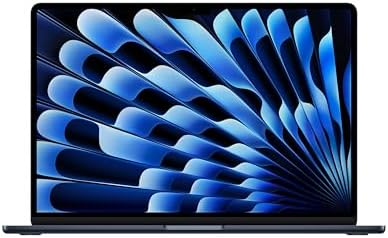
- BUILT FOR COLLEGE. AND BEYOND — MacBook Air with the M5 chip packs blazing speed and powerful AI capabilities into an in…
- TEAR THROUGH TOUGH ASSIGNMENTS — With its faster CPU and unified memory, the M5 chip delivers even more performance and …
- MAKE QUICK WORK OF YOUR TO-DO LIST — Apple Intelligence helps you write, express yourself, and get things done effortles…
If the 13-inch screen feels cramped but a MacBook Pro’s price doesn’t make sense for your workload, the 15-inch MacBook Air with the M5 chip fills that gap directly. It carries the same M5 chip and fanless design as its 13-inch sibling, just stretched across a larger 15.3-inch Liquid Retina display, which makes a real difference for side-by-side document work, spreadsheets, or simply having more comfortable screen real estate for long sessions. The configuration we verified includes 24GB of unified memory and 1TB of SSD storage in Midnight.
This is the model to consider if your actual complaint about the 13-inch Air isn’t performance, it’s screen space — a common situation for people doing a lot of writing, research, or multitasking between windows rather than demanding rendering or compilation work.
Key Specs:
- Chip: Apple M5, 10-core CPU, up to 10-core GPU
- Memory: 24GB unified memory (as listed)
- Storage: 1TB SSD (as listed)
- Display: 15.3-inch Liquid Retina
- Connectivity: Wi-Fi 7, Bluetooth 6, two Thunderbolt 4 ports, MagSafe 3
- Weight: Approximately 3.3 pounds
Pros:
- Significantly more screen space than the 13-inch model without moving up to Pro pricing
- Higher starting memory and storage in this specific configuration than the base 13-inch listing
- Same fanless, silent design as the smaller Air
- Six-speaker sound system, a notable step up from the 13-inch model’s four speakers
Cons:
- Noticeably heavier and larger than the 13-inch Air, which matters if portability is your priority
- Same core performance ceiling as the 13-inch model, since it’s the identical M5 chip
- Premium configuration pricing can approach entry-level MacBook Pro territory depending on the listing
Buyer Sentiment: Rated highly among buyers in this category.
What Buyers Are Saying: Buyers researching this size tend to specifically compare it against the 13-inch Air and the entry MacBook Pro, with feedback patterns suggesting the larger screen is the deciding factor for people who do a lot of multi-window work, while the fan-free design remains a consistent point of praise even at this larger size.
3. Apple MacBook Air 13-inch (M4 chip) — Best For: Value

- SPEED OF LIGHTNESS — MacBook Air with the M4 chip lets you blaze through work and play. With Apple Intelligence,* up to …
- SUPERCHARGED BY M4 — The Apple M4 chip brings even more speed and fluidity to everything you do, like working between mu…
- BUILT FOR APPLE INTELLIGENCE — Apple Intelligence is the personal intelligence system that helps you write, express your…
The previous-generation MacBook Air, built around Apple’s M4 chip, remains on sale directly through Amazon and is worth serious consideration if you don’t need the absolute newest chip. Apple itself still sells this generation as a current product, not a discontinued clearance item, which means it still receives full software support and Apple Intelligence features. The listing we verified covers the 13.6-inch model with a 10-core CPU, up to 10-core GPU, Thunderbolt 4 connectivity, and MagSafe 3 charging.
For anyone comparing the M4 and M5 generations on paper, the practical performance gap in everyday tasks — web browsing, office work, video calls, light editing — is smaller than the generational jump suggests. That makes this configuration a genuinely smart pick if the savings matter more to you than owning the newest chip generation.
Key Specs:
- Chip: Apple M4, 10-core CPU, up to 10-core GPU
- Display: 13.6-inch Liquid Retina
- Connectivity: Wi-Fi 6E, Bluetooth 5.3, two Thunderbolt 4 ports, MagSafe 3
- Battery: Up to 18 hours of video playback, per Apple’s published specs
- Weight: Approximately 2.7 pounds
Pros:
- Meaningfully lower price point than the current M5 generation while still being an actively sold, supported model
- Same fanless design and all-day battery life as the newer Air
- Still supports the current generation of Apple Intelligence features
- Widely available across multiple color and configuration options on Amazon
Cons:
- Lacks the M5’s Neural Accelerator GPU architecture, which matters for AI-heavy and some creative workloads
- Wi-Fi 6E instead of the newer Wi-Fi 7 standard
- As the outgoing generation, resale value will likely depreciate faster than the current M5 model
Buyer Sentiment: Consistently well-rated on Amazon.
What Buyers Are Saying: Feedback patterns on this listing frequently mention buyers specifically shopping for the best price-to-performance MacBook available, with several noting they went with the M4 generation deliberately once it dropped in price rather than paying full price for the newest chip. The core “silent, all-day laptop” praise that’s consistent across the whole Air lineup shows up here too.
4. Apple MacBook Pro 14-inch (M4 chip) — Best For: An Entry-Level Pro Machine

- SUPERCHARGED BY M4 — The 14-inch MacBook Pro with M4 chip gives you spectacular performance in a powerhouse laptop built…
- CHAMPION CHIP — The M4 chip brings spectacular speed and capability to blaze through everyday activities and multitask a…
- BUILT FOR APPLE INTELLIGENCE—Apple Intelligence is the personal intelligence system that helps you write, express yourse…
The 14-inch MacBook Pro with the base M4 chip is the entry point into Apple’s Pro lineup, and it’s a meaningfully different machine from the Air despite sharing a chip family naming convention. The headline difference is the 14.2-inch Liquid Retina XDR display, which supports extreme dynamic range and up to 1600 nits of peak brightness for HDR content — something no MacBook Air offers. The listing we verified includes 16GB of unified memory and 512GB of SSD storage in Space Black.
This configuration makes sense for people who want the Pro’s display quality, additional port selection (including an HDMI port and SD card slot not found on the Air), and active cooling for sustained workloads, without stepping up to the significantly more expensive M4 Pro or M4 Max chip tiers.
Key Specs:
- Chip: Apple M4, 10-core CPU, 10-core GPU
- Display: 14.2-inch Liquid Retina XDR, up to 1600 nits peak brightness
- Connectivity: Three Thunderbolt 4/USB-C ports, HDMI, SDXC card slot, MagSafe 3
- Operating System: macOS Sequoia (as shipped)
- Active cooling fan for sustained performance
Pros:
- Liquid Retina XDR display is a genuine upgrade over any Air model for color-critical or HDR work
- Added ports (HDMI, SD card slot) that the Air lineup doesn’t include
- Active cooling allows sustained performance under longer render or export tasks
- Lower entry price than the M4 Pro and M4 Max configurations of the same chassis
Cons:
- The base M4 chip here isn’t dramatically faster than the M4 in the MacBook Air for everyday tasks — the Pro’s real advantages are the display and ports, not raw CPU speed
- Heavier than any Air configuration
- If you specifically want the performance jump the “Pro” name implies, you’ll want the M4 Pro or M4 Max tier instead
Buyer Sentiment: Rated highly among buyers in this category.
What Buyers Are Saying: Buyer feedback patterns on this configuration commonly mention the display quality as the primary reason for choosing it over an Air, particularly among people doing photo work or watching a lot of HDR video content. A number of reviews also note that this specific tier is a popular “best of both worlds” pick for buyers who want Pro build quality without paying for a Pro-tier chip they won’t fully use.
5. Apple MacBook Pro 16-inch (M4 Max chip) — Best For: Power Users

- SUPERCHARGED BY M4 PRO OR M4 MAX — The 16-inch MacBook Pro with the M4 Pro or M4 Max chip gives you outrageous performan…
- CHAMPION CHIPS — The M4 Pro chip blazes through demanding tasks like compiling millions of lines of code. M4 Max can han…
- BUILT FOR APPLE INTELLIGENCE—Apple Intelligence is the personal intelligence system that helps you write, express yourse…
At the top of this list sits the 16-inch MacBook Pro configured with Apple’s M4 Max chip, the most powerful laptop chip Apple currently makes. The listing we verified specifies the 16-core CPU and 40-core GPU variant of the M4 Max, paired with 48GB of unified memory and 1TB of SSD storage in Silver. This is a machine built for sustained, demanding workloads — video editing in large project files, 3D rendering, large-scale software compilation, and similar tasks where both raw performance and sustained thermal headroom matter.
This isn’t the right pick for someone who just wants “the nicest MacBook” — it’s specifically the right pick for someone whose work would actually bottleneck on a less powerful chip. If you’re not sure whether you fall into that category, the 14-inch M4 Pro configuration (also available on Amazon) is worth comparing against this one before committing to the larger, more expensive 16-inch M4 Max tier.
A simple gut check: if you’ve ever sat watching a progress bar on an export, render, or large build process on your current laptop and found yourself annoyed by how long it took, that’s the exact scenario this chip tier is built to shorten. If your “slow” moments are more about app load times or a sluggish browser with too many tabs open, you don’t need this much chip, and your money is better spent on a base M4 or M5 configuration instead.
Key Specs:
- Chip: Apple M4 Max, 16-core CPU, 40-core GPU
- Memory: 48GB unified memory (as listed)
- Storage: 1TB SSD (as listed)
- Display: 16.2-inch Liquid Retina XDR
- Memory bandwidth: 546GB/s, per Apple’s published specifications
Pros:
- Most powerful chip configuration in Apple’s current laptop lineup, built for genuinely demanding, sustained workloads
- Largest, highest-brightness Liquid Retina XDR display in the MacBook lineup
- Significantly higher memory bandwidth than any M4 or M4 Pro configuration, which matters for large creative files
- Full Pro port selection, including HDMI, SD card slot, and three Thunderbolt 4 ports
Cons:
- Meaningfully heavier and larger than every other machine on this list — not a travel-first laptop
- Substantial price premium over the base M4 Pro tier for workloads that don’t need the Max chip’s extra GPU cores
- Overkill, and arguably poor value, for anyone doing primarily web browsing, office work, or light editing
Buyer Sentiment: Rated highly among buyers in this category.
What Buyers Are Saying: Feedback on this configuration tends to come from buyers who specifically describe professional use cases — video editors, developers, and creative professionals working with large files — rather than general consumers. A recurring theme is that buyers in this category specifically researched the difference between M4 Pro and M4 Max before purchasing, suggesting this isn’t typically an impulse upgrade.
Understanding Apple’s Chip Names: M4 vs. M5 vs. Pro vs. Max
One of the most common points of confusion when shopping for a MacBook is the naming scheme itself. Apple’s current lineup spans several chip tiers, and the names don’t always make the practical difference obvious. Here’s a plain-language breakdown.
The base chip (M4, M5, and so on) is the number that changes every generation. Each new number represents a new architecture and manufacturing process, generally bringing improved CPU and GPU performance, better efficiency, and new features like the Neural Accelerators introduced with the M5 generation. These base chips power the entire MacBook Air lineup and the entry-level MacBook Pro.
“Pro” and “Max” are tiers within the same chip generation, not separate generations. An M4 Pro chip and a base M4 chip were announced at the same time and share the same generation name, but the Pro and Max variants add significantly more CPU cores, GPU cores, and memory bandwidth, aimed at sustained professional workloads rather than everyday use. The M4 Max configuration we feature above, for example, shares its generation name with the base M4 in the entry-level Pro, but the two chips perform very differently under heavy, sustained workloads.
A newer base chip doesn’t automatically beat an older Pro or Max chip. This trips up a lot of buyers: an M5 base chip is newer than an M4 Max, but the M4 Max is still the significantly more powerful chip for demanding, sustained tasks like video rendering or large compilation jobs, because it has dramatically more CPU and GPU cores and far higher memory bandwidth. Chip generation and chip tier are two separate axes, and both matter.
Unified memory works differently than RAM on most Windows laptops. Apple’s chips use what’s called unified memory, where the CPU, GPU, and Neural Engine all share the same single pool of high-bandwidth memory rather than each having separate dedicated memory. This is part of why Apple Silicon Macs can feel faster than their RAM figures alone might suggest compared to a Windows laptop with the same amount of RAM.
If you want the deeper technical details behind any of this — die architecture, manufacturing process, generation-by-generation specifications — Wikipedia’s overview of Apple silicon is a thorough, continuously updated reference that goes well beyond what’s useful to cover in a buying guide like this one.
How to Choose the Right MacBook on Amazon
Choosing between these five machines comes down to matching the chip tier, screen size, and port selection to what you actually do with a laptop — not to which model sounds the most impressive.
Start with how much performance headroom you actually need. The base M4 or M5 chip in any Air or entry Pro model comfortably handles web browsing, office work, video calls, light photo editing, and most everyday software. You only need to look at the Pro or Max tier chips if your work involves sustained rendering, large video exports, 3D work, or compiling large codebases — tasks where the base chip’s thermal limits under a fanless design (in the Air’s case) would actually become a bottleneck. Be honest with yourself about how often that actually happens in a typical week, rather than sizing your purchase around an occasional task you do a few times a year — a rented or cloud-based machine might make more sense for a rare heavy job than a laptop you overpay for every single day.
Match screen size to how you actually work, not how portable you imagine wanting to be. The 13-inch Air is genuinely excellent for travel and tight spaces, but if you regularly have two documents or windows open side by side, the 15-inch Air or a 14-inch Pro will measurably reduce how much you’re scrolling and resizing throughout the day. Don’t assume you want the smallest option by default — test how your current laptop’s screen size actually feels before downsizing.
Decide whether you actually need Pro-specific features. The MacBook Pro’s Liquid Retina XDR display, additional ports (HDMI, SD card slot), and active cooling are real, tangible upgrades over the Air — but only valuable if you use them. If you’re not editing HDR video, don’t need an SD card reader, and don’t push sustained workloads long enough to need active cooling, you’re paying for capability you won’t use.
It helps to think about this in terms of how you’d actually notice the upgrade, not whether it sounds nice on a spec sheet. An HDMI port only matters the moment you need to plug into a projector or TV without a dongle. An SD card slot only matters if you shoot photos or video on a camera that uses one. Active cooling only matters once you’ve pushed a fanless Air hard enough, for long enough, that it audibly throttles. If none of those moments show up in your actual week, the Pro’s extra cost is buying you peace of mind rather than solving a problem you have.
Think about memory and storage up front, not as an afterthought. Unlike many Windows laptops, Apple’s unified memory and SSD storage generally cannot be upgraded after purchase. If you’re between two storage tiers on the same model, it’s almost always worth buying the larger one upfront rather than assuming you’ll “make do” with less — running out of storage later means replacing the whole machine, not just adding a drive.
Check the chip generation against the price gap, not just the newest label. As this comparison shows, the M4 and M5 generations are both currently sold new, and the real-world performance difference for most everyday tasks is smaller than the marketing suggests. If the previous generation is meaningfully cheaper for the configuration you want, it’s often the smarter buy rather than a compromise.
Energy efficiency is already handled for you. Every MacBook currently sold by Apple, including the M4 Air we recommend above, is ENERGY STAR certified, so you don’t need to weigh power efficiency the way you might when comparing Windows laptops across different manufacturers — it’s a smaller factor in this specific decision than it would be shopping outside Apple’s lineup.
Consider what you’ll connect to it. Every machine on this list relies on Thunderbolt/USB-C for most external connections, and the Air lineup in particular has only two ports total. If you’re running an external monitor, a few accessories, and charging all through the same two ports, a laptop stand that also helps organize your desk setup, paired with a proper docking solution, makes a real difference day to day — our guide to using a laptop stand covers how to set that up without cramping your other ports, and our Dell UltraSharp U2723QE review looks specifically at a monitor that can charge and connect to a MacBook over a single USB-C cable.
If this is your first MacBook, don’t assume your buying instincts from Windows shopping carry over directly. On a Windows laptop, chasing the highest clock speed or largest number on the spec sheet is often a reasonable shortcut. Apple’s unified chip architecture doesn’t compare the same way — a base M5 chip can comfortably outperform a much older Intel-based MacBook Pro despite having a “lower” sounding core count, because the architecture itself is fundamentally different. If you’re coming from a Windows background, our broader Amazon laptop buying guide covers general laptop-shopping fundamentals — ports, display types, battery claims — that still apply even though the chip comparison logic above is Mac-specific.
Don’t ignore keyboard and trackpad feel if you’ve never used a current MacBook. Apple’s current Magic Keyboard and large glass trackpad are consistently rated among the best in the laptop industry, but if you’ve spent years on a different keyboard layout or a smaller trackpad, budget a short adjustment period rather than assuming day-one familiarity. This is a minor point compared to chip and display decisions, but it’s a real part of the experience that doesn’t show up anywhere in a spec sheet.
Frequently Asked Questions
Is it safe to buy a MacBook from Amazon instead of Apple directly?
Yes, as long as you’re buying a listing that’s sold and shipped by Amazon itself or fulfilled through Amazon’s standard channels, rather than a third-party seller offering a suspiciously large discount on a “new” unit. Apple-brand electronics sold and shipped by Amazon carry the same manufacturer warranty as buying directly from Apple.
What’s the real difference between MacBook Air and MacBook Pro?
The Air prioritizes thinness, silence, and battery life with a fanless design, while the Pro adds a brighter, HDR-capable display, active cooling for sustained performance, and additional ports like HDMI and an SD card slot. For most non-professional tasks, the performance difference matters less than these physical differences.
Should I buy the M4 or M5 generation MacBook Air?
If budget is the deciding factor and you don’t need the newest AI-specific hardware improvements, the M4 generation remains a fully supported, capable choice at a lower price. If you want the longest runway before your machine feels dated, or you specifically use AI-accelerated features, the M5 is the safer long-term pick.
How much storage do I actually need on a MacBook?
For web browsing, office work, and streaming, 256GB is often enough, though 512GB gives more comfortable breathing room. If you work with large video files, extensive photo libraries, or multiple large applications like development environments, 1TB or more avoids having to constantly manage storage.
Can I upgrade the RAM or storage on a MacBook after buying it?
No. Apple’s unified memory and SSD storage are built into the logic board on every current MacBook and cannot be upgraded after purchase. This makes it especially important to choose your configuration carefully at the time of purchase rather than assuming you can add more later.
Is the MacBook Pro with the base M4 chip worth it over the MacBook Air?
It depends on whether you specifically need the Liquid Retina XDR display, the extra ports, or sustained performance under active cooling. If none of those apply to you, the MacBook Air with the same general chip tier is the better value, since you’re mostly paying extra for the display and chassis rather than a dramatically faster processor.
How long do MacBooks typically receive software updates?
Apple has historically supported Mac models with major macOS updates for roughly 7 years or more from release, though this varies by model and isn’t guaranteed on a fixed schedule. Checking Apple’s current software support documentation before buying is worthwhile if longevity is a priority.
Do these MacBooks work the same with Windows software and files?
MacBooks run macOS, not Windows, so native Windows applications don’t run directly. Many common file formats (documents, spreadsheets, images, most video formats) are fully cross-compatible, and tools like Microsoft 365 have native Mac versions, but any software built exclusively for Windows would need a workaround like virtualization, which isn’t covered in this guide.
What’s the difference between buying an “Apple” listing and a third-party seller on Amazon?
Listings explicitly sold and shipped by Amazon or by Apple’s official storefront on Amazon carry the full standard Apple warranty, just like buying from Apple directly. Third-party sellers can include legitimate retailers, but it’s worth checking the seller name and reading the listing carefully, especially on open-box, renewed, or heavily discounted listings, since those typically carry different warranty terms than a new unit.
Does a higher core count GPU actually matter if I don’t do video editing or 3D work?
Generally, no. Extra GPU cores mainly benefit workloads that can actually use parallel graphics processing — video rendering, 3D modeling, some AI/ML tasks, and high-end gaming. For web browsing, office work, and typical photo editing, the base chip’s GPU is already well beyond what you’d notice a difference from in daily use.
Why do some MacBook listings show different colors at different prices?
Color availability and individual listing price can vary slightly even for the exact same internal configuration, largely based on what inventory Amazon or third-party sellers currently have in stock. If you’re flexible on color, it’s worth comparing listings for the same configuration across available colors before buying.
Conclusion
If you only take one recommendation from this guide, make it the Apple MacBook Air 13-inch with the M5 chip — it’s the current-generation default for a reason, covering the vast majority of everyday computing needs in a silent, all-day laptop. If your budget is tighter, the MacBook Air 13-inch with the M4 chip gives you nearly the same experience at a meaningfully lower price, and remains a fully supported, current Apple product rather than a compromise pick.
For anyone whose work genuinely demands more — HDR color work, sustained video exports, or large creative and development projects — the MacBook Pro 14-inch (M4) and MacBook Pro 16-inch (M4 Max) represent two different points on that spectrum, and which one makes sense depends entirely on how heavy your actual workload is, not on wanting “the best” MacBook available.
Whichever you choose, every pick in this guide is a real, currently available listing on Amazon — check the live product page for current pricing, configuration options, and color availability before you buy, since those details shift more frequently than the core specs we’ve covered here.
If you’re still torn between two options after reading this far, go back to the single question that matters most: what specifically frustrates you about the laptop you’re using right now? If it’s battery life or noise, any machine on this list solves that. If it’s screen space, lean toward the 15-inch Air or either Pro. If it’s genuinely waiting on your computer to finish processing something, that’s the one case where paying for the Pro or Max tier chip is worth it rather than a nice-to-have. Buying based on that specific frustration, rather than the newest chip number, is the fastest way to end up with a MacBook you’re actually happy with a year from now.
As an Amazon Associate I earn from qualifying purchases.

MD.HASAN is an experienced SEO expert and amazon products review writer passionate about helping people find right products on amzon for buy without confusion. With 4 years of hands-on experience in content strategy and search engine optimization, he specializes in writing SEO-friendly blog posts that rank, engage, and convert.


