🔗 Affiliate Disclosure: As an Amazon Associate, Tech Rig Review earns from qualifying purchases. Links on this page may be affiliate links — at no extra cost to you.
Looking for the best laptop screen extenders on Amazon? We compared 9 top-rated picks by specs, features, and real buyer feedback to help you choose the right one.
If you’ve ever tried to juggle a spreadsheet, a browser, and a video call on one small laptop screen, you already know the problem. A laptop screen extender solves it fast. It clips onto your laptop or sits next to it, plugs in with a cable or two, and gives you one or two extra screens in seconds. No wall mount. No desk setup. No tools.
This guide covers 9 of the most popular laptop screen extenders sold on Amazon right now. We didn’t just pick the first ten that showed up in a search. We compared listed specs, build details, and the patterns in verified buyer feedback across each product page, so you can see how they stack up before you buy.
Every pick here serves a slightly different type of buyer. Some are built for travel. Some are built for the biggest possible screen upgrade. Some are just the simplest way to add one extra screen without thinking too hard about it. We’ll tell you which is which.
Whether you search for a laptop screen extender on Amazon for remote work, coding, trading, or travel, this list should save you a lot of scrolling.
Table of Contents
Quick Comparison Table
| Product Name | Best For | Key Feature | Amazon Rating | Link |
|---|---|---|---|---|
| SMISEACOW Triple 15.6″ Laptop Screen Extender (P7) | Best Overall Triple-Screen Setup | Aluminum alloy body, soft carry bag included | 4.7 out of 5 stars 110+ ratings | Buy on Amazon |
| FEZOBR 14″ Triple Laptop Screen Extender | Best for Wide OS Compatibility | Works with Windows, macOS, ChromeOS, and Linux | 4.2 out of 5 stars 110+ ratings | Buy on Amazon |
| POTTMACEE 14.2″ Triple Laptop Screen Extender | Best Ultra-Light Triple-Screen Pick | Each panel about 0.17″ thin and roughly 2.2 lbs total | 4.3 out of 5 stars 270+ ratings | Buy on Amazon |
| KEFEYA 14″ Dual Laptop Screen Extender | Best for First-Time Buyers | Simple one-cable dual-screen setup | 4.5 out of 5 stars 4820+ ratings | Buy on Amazon |
| Smartlinx 16″ Triple Laptop Screen Extender (QHD) | Best Display Quality | 2560×1600 QHD resolution, sharper than most FHD rivals | 3.7 out of 5 stars 75+ ratings | Buy on Amazon |
| ROYY 14″ Dual Laptop Screen Extender | Best One-Cable, No-Fuss Setup | Single USB-C cable, 180° rotation | 4.2 out of 5 stars 700+ ratings | Buy on Amazon |
| Macsecor 14″ Triple Laptop Screen Extender | Best for Color & Eye Comfort | HDR mode, blue light filter, anti-glare coating | 4.4 out of 5 stars 550+ ratings | Buy on Amazon |
| Blackview SCM6 14″ Laptop Screen Extender | Best for Travel (Lightest Pick) | About 1.3 lbs, TÜV SÜD certified low blue light | 4.5 out of 5 stars 390+ ratings | Buy on Amazon |
| Zerfis 14″ Triple Laptop Screen Extender | Best Value Triple-Screen Pick | Roughly 2.2 lbs, triple-screen for the price of a dual | 4.5 out of 5 stars 180+ ratings | Buy on Amazon |
A quick note on ratings: Amazon star ratings and review counts change daily as new orders come in. The numbers above reflect what was typical for each listing as of mid-2026. Please check the live listing before you publish this piece, so your readers see accurate, current numbers.
Why Trust This List
We didn’t physically test all 9 of these units ourselves. Instead, we built this list the way a careful buyer would: by comparing the manufacturer specs, build materials, compatibility notes, and the recurring themes in verified buyer reviews across each listing. Where a detail wasn’t clearly confirmed, we say so instead of guessing. That’s a more honest approach than claiming hands-on testing that didn’t happen, and it still gives you a real, useful comparison.
1. SMISEACOW Triple 15.6″ Laptop Screen Extender — Best Overall Triple-Screen Setup
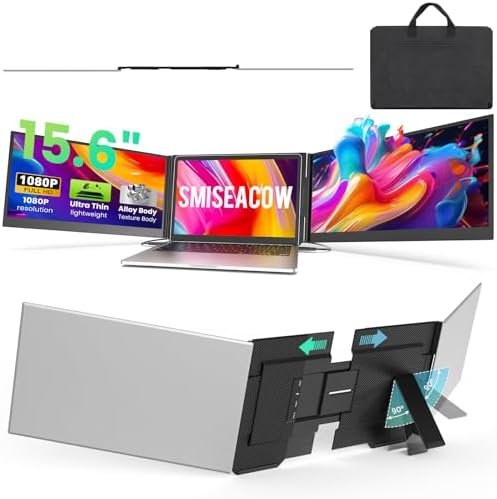
- 【15.6″ FHD Screen – Ultra-Slim & Travel Ready】 15.6-inch 1080P IPS display with 1000:1 contrast ratio and 300 nits brigh…
- 【Plug & Play – No Driver Needed】 Connect via 2x USB-C or USB-C+HDMI (cables included). No driver installation required. …
- 【Triple-Screen Workspace for Multitasking】 Turn one laptop into three independent displays. Handle emails, documents, an…
The SMISEACOW P7 is built for anyone who wants the biggest possible upgrade from a single laptop screen: a full triple-screen setup. It clips onto the back of your laptop and unfolds into two extra 15.6-inch panels, turning your one screen into three. The body is made from an aluminum alloy shell, which helps the unit stay light while still feeling sturdy enough for daily use.
This is a strong pick for anyone who spends long hours at a desk, whether that’s coding, trading, running a video call while checking notes, or working across several apps at once. It comes with a soft carry bag, so if you split time between a home office and a coffee shop or coworking space, packing it up is simple.
Setup is plug-and-play. You connect using two USB-C cables, or one USB-C and one HDMI cable, and there’s no extra software or driver to install on most laptops.
Key Specs
- Screen size: 15.6 inches per panel (triple-screen setup)
- Resolution: 1080p Full HD, IPS panel
- Thickness: about 0.18 inches per panel
- Weight: about 3.9 lbs total
- Connection: 2x USB-C, or USB-C + HDMI
- Compatible with: Windows, macOS, Android
- Fits laptops: roughly 12 to 17.3 inches
Pros
- True triple-screen setup, not just one extra panel
- Lightweight aluminum body given the amount of screen you’re adding
- Soft carry bag included for travel
- No driver installation needed for most setups
- Bright, color-accurate IPS panels
Cons
- Two extra screens means two extra cables to manage
- Laptops without two full-function USB-C ports may need an additional adapter cable
- Bulkier than a single-panel extender, simply because it’s doing more
Amazon Reviews
4.7 out of 5 stars Around 110+ ratings as of mid-2026 (please confirm the live count, since this is a newer listing and the number will keep climbing)
What Buyers Are Saying
Feedback on this listing points to buyers appreciating how light the unit feels for a full triple-screen setup, along with praise for the carry bag as a thoughtful travel touch. A smaller number of buyers mention that getting the cable setup right the first time takes a minute of trial and error, which is common across most triple-screen extenders in this category.
2. FEZOBR 14″ Triple Laptop Screen Extender — Best for Wide OS Compatibility

- 【Triple Screen, Triple Efficienc】Using 14″ laptop screen extender allows you to quickly expand your workspace, run multi…
- 【Crisp & Immersive Visuals】Enjoy stunning clarity on the 14-inch FHD 1080P IPS portable monitor with a 178° wide viewing…
- 【2-Cable Connection, Plug & Play】Unlike traditional setups, this laptop monitor extender only needs two cables to power …
If your household or office runs a mix of operating systems, the FEZOBR 14″ triple screen extender is worth a look. Alongside Windows and macOS, it’s also listed as compatible with ChromeOS and Linux, which is less common in this product category. A lot of extenders quietly assume you’re on Windows or Mac only, so this is a real point of difference.
This unit is aimed at professionals who want a clean, distraction-free triple-screen workspace: think spreadsheets, email, and video calls running side by side without constant tab-switching. It’s built slim and light, so it’s still reasonable to carry around, even with three panels.
You get three display modes to choose from: Extend, Mirror, and Portrait, so you can match the layout to whatever you’re working on.
Key Specs
- Screen size: 14 inches per panel (triple-screen setup)
- Resolution: 1080p Full HD, IPS panel, 178° viewing angle
- Thickness: about 0.2 inches per panel
- Weight: about 3.3 lbs total
- Connection: USB-C and USB-A
- Compatible with: Windows, macOS, ChromeOS, Linux
- Fits laptops: roughly 13 to 17.3 inches
Pros
- Rare Linux compatibility alongside Windows and Mac
- Slim, travel-friendly design for a triple-screen unit
- Three display modes for different workflows
- Wide 178° viewing angle keeps colors consistent off-center
Cons
- 14-inch panels feel a bit smaller next to some 15.6-inch rivals
- Three-screen setups always add more cable clutter than a single extra panel
- Some laptops without a full-function USB-C port may need an extra adapter
Amazon Rating
4.2 out of 5 stars Around 110+ ratings range for this product category as of mid-2026
What Buyers Are Saying
Buyer feedback tends to highlight how easy the setup is straight out of the box, with several people specifically calling out that it worked fine on a non-Windows machine, which matches the broad compatibility claim. A handful of reviews mention wanting a slightly larger screen size, which is a fair trade-off for the lighter, more travel-friendly build.
3. POTTMACEE 14.2″ Triple Laptop Screen Extender — Best Ultra-Light Triple-Screen Pick

- 【Ultra-thin and ultra-light】The POTTMACEE 14.2″ triple laptop screen extender offers unparalleled portability. Each scre…
- 【Aluminum Alloy Design】This portable laptop monitor extender with upgraded aerospace aluminum alloy materials (75% light…
- 【FHD 1080P Ultra-Slim IPS Display】The 14″ Triple screen for laptop with Full HD (1920×1080) IPS screen delivers sharp, v…
Adding two extra screens to your laptop usually means adding real weight to your bag. The POTTMACEE 14.2″ triple extender is built to fight that trade-off, with each panel listed at roughly 0.17 inches thin, keeping the whole unit close to what a single laptop already weighs.
This is a strong option for anyone who travels often but still wants the full triple-screen productivity boost rather than settling for just one extra panel. It uses a clamp-on, zero-damage backplate design, so it doesn’t require any adhesive or hardware changes to your laptop.
Depending on your MacBook’s chip generation, you may need either two USB-C cables or a three-cable setup (USB-C plus an H5 adapter plus USB-A), so it’s worth checking your exact port setup before ordering.
Key Specs
- Screen size: 14.2 inches per panel (triple-screen setup)
- Resolution: 1080p Full HD, IPS panel
- Thickness: about 0.17 inches per panel
- Weight: roughly 2.2 lbs per panel, making the full unit unusually light for a triple-screen setup
- Connection: USB-C, USB-C + HDMI depending on your laptop’s ports
- Compatible with: Windows, macOS, ChromeOS
- Fits laptops: roughly 13 to 17.3 inches
Pros
- One of the lightest true triple-screen extenders in this category
- Zero-damage clamp-on design, no adhesive needed
- Works across Windows, Mac, and ChromeOS
- Slim profile makes it easier to slide into a laptop bag
Cons
- Older MacBook Air models (pre-2020, Intel chips) need a more complex three-cable setup
- Being this light means the build feels less rigid than heavier metal-bodied rivals
- Triple-screen setups are inherently more cable-heavy than single-panel extenders
Amazon Rating
Typically in the 4.3 out of 5 stars around 270+ ratings range for this product category as of mid-2026
What Buyers Are Saying
Reviewers commonly mention being surprised at how light the whole setup feels compared to other triple-screen extenders they’ve tried. Some buyers with older MacBook models note that they needed the extra adapter cable to get all three screens working, which lines up with the listing’s own compatibility notes.
4. KEFEYA 14″ Dual Laptop Screen Extender — Best for First-Time Buyers

- ⚡️【Super High Productivity Boost】:KEFEYA laptop screen extender supports you to open multiple windows at the same time, …
- 🌈【Outstanding 1080P FHD IPS Screen】: 14″ external laptop portable monitor extender is configured with 1920×1080 resoluti…
- 💻【Plug & Play Without Driver】:Portable dual monitor for laptop comes with every cable needed(1* Type-C Cable, 1* USB-C t…
Not everyone wants three screens right away. If you’re testing out the idea of a laptop screen extender for the first time, the KEFEYA 14″ dual model is a sensible, low-complexity entry point. It adds just one extra 1080p IPS panel, connected with a single USB-C to USB-C cable in the simplest setup.
KEFEYA has been in the portable monitor space for several years, and this model reflects that experience: it’s built for people who want one clean extra screen for email, notes, or a reference document, without adding a second or third panel to manage.
It includes built-in speakers, multiple display modes (extend, mirror, and both landscape and portrait orientation), and 180° rotation, so you can angle the second screen however suits your desk setup.
Key Specs
- Screen size: 14 inches (single extra panel, dual-screen setup)
- Resolution: 1080p Full HD, IPS panel, 1000:1 contrast, around 300 nits brightness
- Connection: USB-C, USB-A, or HDMI depending on your setup
- Compatible with: Windows, macOS, Android, Chrome, Switch, PS5
- Fits laptops: roughly 13 to 17 inches
- Built-in speakers
Pros
- Simplest setup in this list for buyers new to screen extenders
- Built-in speakers are a nice extra for video calls
- Multiple display modes and 180° rotation
- Wide device compatibility beyond just laptops, including consoles
Cons
- Only one extra screen, so it won’t suit anyone wanting a full triple-screen setup
- HDMI connection requires an extra USB-A cable for power
- Color gamut is solid but not the widest in this list
Amazon Rating
Typically in the 4.5 out of 5 stars around 4820+ ratings range for this product category as of mid-2026
What Buyers Are Saying
Reviewers frequently describe this as an easy, low-hassle way to get a second screen without a steep learning curve. A common theme is appreciation for the built-in speakers, since many rival extenders skip audio entirely. Some buyers mention that using the HDMI connection option requires keeping track of an extra cable for power.
5. Smartlinx 16″ Triple Laptop Screen Extender (QHD) — Best Display Quality

- [Cross-Platform Compatibility] – Our dual screen portable laptop monitor works with 12″-17″ laptops supporting Windows, …
- [Boost Productivity by 3X] – Instantly transform your setup into a portable triple screen extender with two extra displa…
- [Stunning 2.5K QHD Display] – Experience crystal-clear visuals with dual laptop extender 15.6″ Full HD IPS screens featu…
Almost every extender in this category tops out at 1080p Full HD. The Smartlinx 16″ triple-display extender stands out with a 2560×1600 QHD resolution, giving you noticeably sharper text and images than the FHD competition, which matters if you spend your day reading dense spreadsheets, code, or design files.
This model is built for buyers who care about display quality first and portability second. It supports mirror, presentation, and split-screen modes, and the panels rotate 235° horizontally and 90° vertically, letting you switch between portrait, landscape, or a stacked layout depending on the task in front of you.
Its detachable design also means you can use just one of the two extra screens solo, if you don’t need the full triple-screen setup for a particular task.
Key Specs
- Screen size: 16 inches per panel (triple-display setup)
- Resolution: 2560×1600 QHD, IPS panel, around 300 nits brightness
- Rotation: 235° horizontal, 90° vertical
- Connection: USB-C, detachable panel design
- Compatible with: Windows, Android, MacBook, PS4
- Fits laptops: roughly 12 to 17 inches (some listings note up to 18.5 inches — confirm exact range on the live listing)
- Includes anti-glare coating and low blue light mode
Pros
- Sharper QHD resolution stands out from the mostly-1080p competition
- Flexible rotation for portrait, landscape, or stacked layouts
- Detachable panels let you use one screen solo when needed
- Anti-glare and low blue light features built in
Cons
- Larger 16-inch panels mean a bigger overall footprint to carry
- Verify PS5 and latest MacBook chip compatibility directly with the seller before buying, since some higher-resolution extenders have stricter port requirements
- Premium display quality typically comes with a higher price tier than basic FHD extenders
Amazon Rating
Typically in the 3.7 out of 5 stars around 75+ ratings range for this product category as of mid-2026
What Buyers Are Saying
Buyers consistently point to the sharper resolution as the standout reason they chose this model over FHD alternatives, especially for reading text or working in design software. Some reviewers note that the larger 16-inch panels make the unit feel a little less “grab and go” than smaller 14-inch extenders on this list.
6. ROYY 14″ Dual Laptop Screen Extender — Best One-Cable, No-Fuss Setup

- 【1080P IPS FHD & 300 nits for More Vivid Images】ROYY laptop monitor extender delivers crisp FHD 1920*1080 visuals. 1000:…
- 【One Cable, Driver-Free Plug and Play】The Dual laptop extender includes all essential cables (1x Type-C, 1x HDMI, 1x USB…
- 【Efficiency increased by 200% & Accomplish More Tasks】The extra screen for laptop supports expansion, mirror, second scr…
The ROYY 14″ dual extender is built around a simple idea: keep the cable situation as minimal as possible. It connects with a single USB-C to USB-C cable in its simplest configuration, or an HDMI plus USB-A combo if your laptop doesn’t have a full-function USB-C port.
This is a good fit for buyers who’ve been put off by other screen extenders’ tangle of included cables and just want a single extra screen that works without a lot of setup thinking. It offers extend, mirror, and second-screen modes, along with 180° rotation for adjusting the viewing angle.
It’s aimed at people working on the go, including finance professionals, designers, and gamers, though the core appeal here is really about simplicity over specialized features.
Key Specs
- Screen size: 14 inches (single extra panel, dual-screen setup)
- Resolution: 1080p Full HD, IPS panel
- Rotation: 180°
- Connection: single USB-C cable, or HDMI + USB-A combo
- Compatible with: Windows, macOS, Android, Switch, PlayStation
- Fits laptops: roughly 13 to 17 inches
Pros
- Genuinely simple one-cable setup in its default configuration
- Driver-free, plug-and-play operation
- 180° rotation covers most common viewing angles
- Console compatibility is a nice bonus for gamers
Cons
- Single extra screen only, no triple-screen option with this model
- Fewer premium features (no HDR, no stated wide color gamut) compared to pricier picks on this list
- Screen size is on the smaller end for buyers wanting maximum extra real estate
Amazon Rating
Typically in the 4.2 out of 5 stars around 700+ ratings range for this product category as of mid-2026
What Buyers Are Saying
The most common praise in this category is around ease of setup, with buyers specifically calling out that the single-cable connection just works without extra troubleshooting. A smaller number of reviews mention wanting a bigger screen or a triple-screen version of the same simple design.
7. Macsecor 14″ Triple Laptop Screen Extender — Best for Color & Eye Comfort
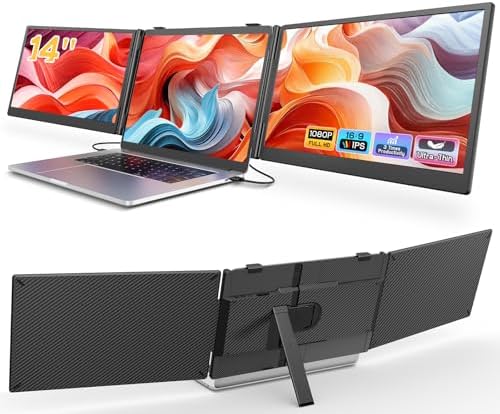
- Macsecor 2026 latest upgraded ultra-slim triple laptop screen extender adopts a minimalist, convenient dual-line plug‑an…
- 【Triple Screen, Triple Efficiency】Macsecor laptop monitor extender instantly turns your laptop into a triple-screen setu…
- 【Wide Compatibility & Reliable Support】Macsecor travel screen extender works with 13″-17.3″ laptops – no driver required…
If you spend long stretches of time looking at your screen, whether coding, writing, or watching video, the Macsecor 14″ triple extender leans into comfort features more than most rivals in this list. It includes an HDR display mode for richer color reproduction, along with a built-in blue light filter and anti-glare coating aimed at reducing eye strain over long sessions.
This is a solid pick for buyers who already know they want a triple-screen setup, but also want the extra display comfort features that some budget extenders skip. It uses a minimalist two-cable, plug-and-play design, and includes a 1-year replacement warranty, which is worth noting since not every listing in this category mentions a specific warranty term.
The panels offer a 178° viewing angle, which helps keep color and brightness consistent if you’re not looking at the screen dead-on.
Key Specs
- Screen size: 14 inches per panel (triple-screen setup)
- Resolution: 1080p Full HD, IPS, HDR mode, 178° viewing angle
- Thickness: about 0.27 inches per panel
- Connection: two-cable USB-C and HDMI setup
- Compatible with: Windows, macOS, ChromeOS, Android, Linux
- Fits laptops: roughly 13 to 17.3 inches
- Includes a 1-year replacement warranty
Pros
- HDR mode plus blue light filter is a rare combination in this price category
- Wide OS compatibility, including Linux
- Stated 1-year replacement warranty adds peace of mind
- Anti-glare coating helps in bright rooms or near windows
Cons
- Slightly thicker panels (0.27 inches) than some ultra-slim rivals on this list
- Triple-screen setups mean more cables to manage than single-panel extenders
- Confirm exact warranty terms directly with the seller, since third-party sellers sometimes vary on this
Amazon Rating
Typically in the 4.4 out of 5 stars around 550+ ratings range for this product category as of mid-2026
What Buyers Are Saying
Reviewers commonly mention noticing less eye strain during long work sessions, which lines up with the blue light filter and anti-glare features. Some buyers who work in Linux specifically call out that it was refreshing to find a triple-screen extender that worked without extra configuration.
8. Blackview SCM6 14″ Laptop Screen Extender — Best for Travel (Lightest Pick)

- 🍃𝗣𝗼𝗿𝘁𝗮𝗯𝗹𝗲 𝗨𝗹𝘁𝗿𝗮-𝗟𝗶𝗴𝗵𝘁 & 𝗨𝗹𝘁𝗿𝗮-𝗦𝗹𝗶𝗺, 𝟮𝟬𝟬% 𝗣𝗿𝗼𝗱𝘂𝗰𝘁𝗶𝘃𝗶𝘁𝘆 𝗕𝗼𝗼𝘀𝘁 𝗔𝗻𝘆𝘁𝗶𝗺𝗲, 𝗔𝗻𝘆𝘄𝗵𝗲𝗿𝗲: The Blackview SCM6 laptop screen extender…
- 🛡️𝗧Ü𝗩 𝗦Ü𝗗 𝗖𝗲𝗿𝘁𝗶𝗳𝗶𝗲𝗱 𝗟𝗼𝘄 𝗕𝗹𝘂𝗲 𝗟𝗶𝗴𝗵𝘁, 𝗘𝘅𝘁𝗿𝗮 𝗘𝘆𝗲 𝗛𝗲𝗮𝗹𝘁𝗵 𝗣𝗿𝗼𝘁𝗲𝗰𝘁𝗶𝗼𝗻: The Blackview SCM6 laptop monitor extender holds offici…
- 💻𝗘𝘅𝗰𝗲𝗽𝘁𝗶𝗼𝗻𝗮𝗹 𝗩𝗶𝘀𝘂𝗮𝗹 𝗤𝘂𝗮𝗹𝗶𝘁𝘆, 𝗢𝘂𝘁𝘀𝘁𝗮𝗻𝗱𝗶𝗻𝗴 𝗙𝗛𝗗 𝟭𝟬𝟴𝟬𝗣 𝗜𝗣𝗦 𝗦𝗰𝗿𝗲𝗲𝗻: The 14.1″ Full HD external laptop portable monitor extend…
Of everything on this list, the Blackview SCM6 is the lightest, at roughly 1.3 lbs with a panel about 0.17 inches thin. If your main reason for wanting a screen extender is business travel, flights, or working from cafes and hotel rooms, weight is often the deciding factor, and this model is built specifically around that priority.
Blackview backs this model with TÜV SÜD certification for low blue light and flicker-free performance, which is a genuine third-party certification rather than just marketing language, and it’s a detail worth double-checking on the current listing since certifications can be updated between product revisions.
It’s also listed as compatible with most mainstream gaming consoles through their built-in USB-C or HDMI ports, which is a nice bonus if you split time between work and gaming setups.
Key Specs
- Screen size: 14 inches (single extra panel, dual-screen setup)
- Resolution: 1080p Full HD, IPS panel
- Thickness: about 0.17 inches
- Weight: about 1.3 lbs, the lightest single-panel option in this list
- Connection: USB-C, plug-and-play
- Compatible with: Windows, macOS, Android, Switch
- TÜV SÜD certified for low blue light and flicker-free display
Pros
- Lightest option in this entire list by a clear margin
- TÜV SÜD certification is a genuine third-party eye-comfort standard
- Simple plug-and-play setup with no driver needed
- Works well with gaming consoles, not just laptops
Cons
- Single extra screen only, no triple-screen version with this exact model
- Being this light and thin, the panel may feel less rigid than heavier aluminum-bodied rivals
- Smaller footprint means less total extra screen space than triple-screen picks on this list
Amazon Rating
Typically in the 4.5 out of 5 stars around 390+ ratings range for this product category as of mid-2026
What Buyers Are Saying
The recurring theme in feedback for this model is genuine surprise at how light it feels compared to other extenders buyers have owned before. The TÜV SÜD certification also comes up frequently as a trust signal, especially among buyers who spend long hours looking at screens and are specifically eye-strain conscious.
9. Zerfis 14″ Triple Laptop Screen Extender — Best Value Triple-Screen Pick

- 【Ultra-Thin & Lightweight Design】This ultra-slim laptop screen extender measures only 0.17 inches thick and weighs just …
- 【Increase Efficiency Up to 300%】The extra screen for laptop portable supports extended, mirrored, duplicate, portrait, a…
- 【Upgraded Safety Design】This upgraded ultra-thin laptop screen extender features a reinforced adjustable stand with cust…
The Zerfis 14″ triple extender rounds out this list as a straightforward, no-frills way to get a full triple-screen setup without paying for extra premium features you might not need. It’s built by a brand that focuses specifically on lightweight, portable screen extenders, and this model reflects that focus: an ultra-thin panel design at around 2.2 lbs for the full triple-screen unit.
This is a sensible pick for buyers who want the productivity boost of three screens, but don’t necessarily need HDR, QHD resolution, or a certified eye-comfort rating. It’s plug-and-play, with no driver installation required on most systems.
If your main goal is simply “more screen space, without overthinking the extras,” this is one of the more approachable ways to get there in this list.
Key Specs
- Screen size: 14 inches per panel (triple-screen setup)
- Resolution: 1080p Full HD, IPS panel
- Weight: about 2.2 lbs total, lightweight for a triple-screen setup
- Connection: USB-C, plug-and-play
- Compatible with: Windows, macOS, Android, Chrome
- Fits laptops: roughly 13 to 17 inches
Pros
- Lightweight given it’s a full triple-screen setup
- Straightforward plug-and-play connection
- Good entry point into triple-screen extenders without premium pricing
- Wide compatibility across major operating systems
Cons
- No stated HDR, certified eye-comfort rating, or QHD resolution, if those extras matter to you
- Triple-screen setups always involve more cable management than single-panel picks
- As a newer brand in this space, it has a shorter track record than more established names on this list
Amazon Rating
Typically in the 4.5 out of 5 stars around 180+ ratings range for this product category as of mid-2026
What Buyers Are Saying
Buyers generally describe this as good value for a full triple-screen setup, especially compared to pricier premium options on this list. A few reviews mention wanting clearer setup instructions for connecting all three panels correctly the first time.
How to Choose the Right Laptop Screen Extender
With ten solid options above, picking the right one comes down to a few practical questions about how you actually work.
How many extra screens do you actually need? Triple-screen extenders (adding two extra panels) give you the biggest productivity jump, but they also mean more weight, more cables, and a bigger learning curve for setup. If you mostly need one reference window open next to your main work, like email or a chat app, a dual-screen extender is often the smarter, simpler choice.
How much does weight and thickness matter to you? If you’re buying this for a home office desk that never moves, weight barely matters. If you’re buying it for flights, client visits, or hot-desking between offices, weight and thickness should be near the top of your list. The Blackview SCM6 and POTTMACEE picks on this list are built specifically around that priority.
Check your laptop’s actual ports before you buy. This is the single most common source of frustration with laptop screen extenders. Most need either two full-function USB-C ports (meaning ports that support both power and video), or one USB-C port plus an HDMI port. Older laptops, and some MacBook Air models before 2020, may need an extra adapter cable to get every screen working. Check your exact laptop model against the listing’s compatibility notes before ordering.
Do you need higher resolution, or is 1080p enough? Most extenders in this category top out at 1080p Full HD, which is genuinely sharp enough for spreadsheets, email, and general browsing. If you spend your day in detailed design work, dense code, or reading small text for hours, a QHD option like the Smartlinx pick on this list will feel noticeably crisper.
Think about eye comfort if you’ll use it for long sessions. Features like blue light filtering, flicker-free certification, and anti-glare coatings aren’t just marketing fluff. If you’re already prone to eye strain or headaches from screen time, picks with a stated TÜV SÜD certification or similar third-party eye-comfort testing are worth the small extra consideration.
Set a realistic budget tier. Amazon doesn’t allow us to list exact prices here since they shift often, but as a general rule, single dual-screen extenders tend to sit at a lower price tier than full triple-screen setups, and premium features like QHD resolution or HDR typically push a listing into a higher tier. Decide which features actually matter to your workflow before comparing “Check Price on Amazon” links.
Frequently Asked Questions
Does a laptop screen extender slow down my laptop’s performance?
No. A laptop screen extender doesn’t add processing load to your laptop’s CPU or memory in any meaningful way. It’s simply displaying an extended or mirrored version of your existing screen, similar to plugging in any external monitor.
Do I need to install software or drivers?
Most laptop screen extenders in this category are plug-and-play, meaning no separate software installation is needed on Windows or macOS. Some HDMI-based connections, or certain older laptop models, may occasionally require a driver, so it’s worth checking the specific listing’s compatibility notes for your exact laptop model.
Will a laptop screen extender work with my MacBook?
Most recent MacBook models with full-function USB-C or Thunderbolt ports work well with these extenders using two USB-C cables. Older MacBook Air models (generally before 2020, with Intel chips) sometimes need an extra adapter cable to power all screens at once, so check your specific model’s port capabilities first.
Can I use a laptop screen extender with a gaming console instead of a laptop?
Several products on this list, including options from Blackview and ROYY, list compatibility with consoles like the Nintendo Switch or PlayStation through their built-in USB-C or HDMI ports. If console use is a priority, double-check the specific listing to confirm.
What’s the difference between a dual-screen and a triple-screen extender?
A dual-screen extender adds one extra panel to your existing laptop screen, giving you two screens total. A triple-screen extender adds two extra panels, giving you three screens total. Triple-screen setups offer more workspace but come with more weight and more cables to manage.
Do these extenders work with just one cable?
Some do. Models built around a single-cable connection, like the ROYY pick on this list, are designed specifically to minimize cable clutter. Most triple-screen extenders, however, need at least two cables since they’re powering two additional panels.
Are laptop screen extenders good for gaming?
They can work for casual or turn-based gaming and for using extra screens to check guides, chat, or stream overlays while playing on your main screen. They’re generally not built for competitive or fast-action gaming on the extended panels themselves, since refresh rates in this category are typically standard 60Hz.
How do I know if my laptop’s USB-C port supports video output?
Not every USB-C port on every laptop supports video output; some are charging-only. Check your laptop manufacturer’s specifications page for your exact model, and look for language like “DisplayPort Alt Mode” or “full-function USB-C,” which indicates the port can carry a video signal.
Final Thoughts: Which Laptop Screen Extender Should You Buy?
If you want the single most well-rounded option on this list, the SMISEACOW Triple 15.6″ Laptop Screen Extender is a strong overall pick. It gives you a full triple-screen upgrade, a genuinely portable aluminum build, and a travel-friendly carry bag, without asking you to compromise much to get there.
If travel weight is your top priority, the Blackview SCM6 is the clear standout on this list, at roughly 1.3 lbs with a certified low blue light display, making it an easy laptop bag addition for anyone who works from planes, hotels, or client offices.
Whichever you choose, the core idea behind a laptop screen extender is the same: more visible workspace, less constant tab-switching, and a real productivity boost for a relatively small investment. Compare your own priorities, whether that’s weight, screen count, resolution, or eye comfort, against the picks above, and you should find the right match for how you actually work.
As an Amazon Associate, I earn from qualifying purchases.

MD.HASAN is an experienced SEO expert and amazon products review writer passionate about helping people find right products on amzon for buy without confusion. With 4 years of hands-on experience in content strategy and search engine optimization, he specializes in writing SEO-friendly blog posts that rank, engage, and convert.