
Affiliate disclosure: As an Amazon Associate, Tech Rig Review earns from qualifying purchases. Links on this page may be affiliate links, at no extra cost to you.
Looking to buy the Razer Pro Click V2 Vertical wireless mouse on Amazon? This research-backed guide covers ergonomics, multi-device features, battery life, real buyer patterns, and current availability.
If long hours at a desk leave your wrist aching, a standard flat mouse may be part of the problem. The handshake-style grip of a vertical mouse keeps your forearm in a more natural position and can reduce strain for many people. The Razer Pro Click V2 Vertical Wireless Mouse brings that ergonomic angle together with gaming-grade precision, multi-device switching, and useful productivity tools.

- VERTICAL 6 BUTTON ERGONOMIC DESIGN WITH BASE SUPPORT — Shaped for a natural handshake grip, its angled design promotes t…
- AI PROMPT MASTER — Summarize text, draft emails and more with just one click; unlock powerful shortcuts via Razer Synaps…
- LONG BATTERY LIFE — Powered by an efficient, long lasting battery, game and create for up to 6 months* without interrupt…
This article is a research-backed look at the Razer Pro Click V2 Vertical currently available on Amazon. We compared official specifications, examined patterns across verified buyer reviews, and confirmed real stock so you can decide with confidence. You will find clear details on design, performance, battery life, software features, who it suits best, and how it compares with a couple of strong alternatives. The goal is simple: help you decide whether this vertical mouse is the right fit for your work and play setup.
For a wider view of wireless options across budgets, see our full roundup of the 10 best Amazon wireless mice. Vertical models also pair well with supportive desk setups, which is why many readers also check our Amazon mouse pads guide and office chairs for back pain when building a more comfortable workstation.
What Is the Razer Pro Click V2 Vertical Wireless Mouse?

The Razer Pro Click V2 Vertical is Razer’s first true vertical ergonomic mouse. It is designed for right-handed users who want both all-day comfort and high-precision tracking. The shape holds the hand in a natural handshake position at roughly 71.7 degrees. A base support under the wrist helps reduce friction while you move the mouse.
Key official specifications include:
- Form factor: Right-handed vertical ergonomic design
- Connectivity: Razer HyperSpeed Wireless (2.4 GHz), Bluetooth (up to 3 hosts), and USB-C wired
- Sensor: Razer Focus Pro Optical Sensor, up to 30,000 DPI
- Max speed: 550 IPS
- Max acceleration: 40 G
- Polling rate: Up to 1,000 Hz on HyperSpeed
- Buttons: Up to 8 programmable
- Battery life: Up to 6 months (standard test conditions)
- Charging: USB-C with quick-charge support
- RGB: 18-zone underglow with Razer Chroma
- Weight: Approximately 150 g
- Dimensions: 111 × 88 × 79 mm
- Software: Razer Synapse 4 (includes AI Prompt Master)
The mouse ships with a HyperSpeed wireless dongle, a USB-A to USB-C cable, and product documentation. The dongle stores in a compartment on the underside.
It is currently sold new on Amazon.com. Listings show recent sales volume in the hundreds per month, ratings around 4.1 stars from several hundred reviews, and typical pricing in the high-$80 to low-$90 range during promotions (list price near $120).
Recommended purchase link: Razer Pro Click V2 Vertical Wireless Mouse
Always confirm the exact listing, seller, and current price on Amazon before buying, as offers can change.
Why a Vertical Mouse Can Help
Traditional mice force the forearm into a pronated (palm-down) position. Over long sessions this can increase pressure on the wrist and tendons. A vertical design rotates the hand into a more neutral handshake posture. Many users who experience mild wrist fatigue or early signs of repetitive strain report less discomfort after switching.
The Razer Pro Click V2 Vertical adds a supportive base that elevates the wrist slightly. This reduces the amount of skin and muscle contact that slides across the desk. Independent reviews and buyer feedback patterns note that the adjustment period usually lasts a few days to a couple of weeks. After that, most people adapt and find the grip more sustainable for all-day use.
It is not a medical device and results vary by individual anatomy, desk height, and existing conditions. Anyone with diagnosed issues should consult a professional. For general comfort-focused buyers, the vertical shape is one of the clearest advantages this mouse offers.
Comfort, Build Quality, and Daily Feel
The shell uses premium-feeling materials with a textured side for the thumb. The vertical angle and extended base create a stable platform. At 150 g it is heavier than many lightweight gaming mice, yet the weight distribution feels balanced once the hand settles into the grip.
Buttons are mechanical with a rated 60-million-click lifecycle. Placement is logical for a vertical design: main left and right clicks sit under the index and middle fingers, while side buttons fall naturally under the thumb. A dedicated DPI / AI Prompt button sits on top. The scroll wheel is standard (no free-spin or tilt on this vertical model).
Build quality receives consistent praise in verified reviews and expert write-ups. The PTFE feet glide smoothly, and the overall construction feels solid rather than hollow or cheap. RGB underglow is optional and can be turned off for a cleaner office look.
Some buyers with very large or very small hands note that the shape takes extra adjustment. Medium to large hands tend to report the best fit. Left-handed users will need a different model, as no left version exists.
Sensor Performance and Tracking
The Focus Pro 30K optical sensor is one of the strongest points. It delivers high resolution accuracy (Razer claims 99.8 %), tracks on glass surfaces of sufficient thickness, and supports on-the-fly DPI switching. Default stages cover common productivity and gaming ranges. Full customization happens inside Razer Synapse.
Polling rate reaches 1,000 Hz on the HyperSpeed 2.4 GHz connection. This keeps cursor response snappy for both precise office work and casual or competitive gaming. Bluetooth is available for multi-device convenience but runs at a lower polling rate, which is still fine for productivity.
Buyer patterns and lab-style reviews confirm reliable tracking across typical desk surfaces. The combination of high DPI ceiling and low latency makes this one of the more versatile vertical mice for users who both work and play on the same machine.
Battery Life and Charging
Razer rates the battery at up to six months under standard test conditions. Real-world results depend on RGB usage, polling rate, and daily hours. Many owners report several months between charges when RGB is dimmed or off.
USB-C charging is convenient. A five-minute top-up can provide a couple of working days of use according to official claims. The included cable also supports fully wired operation, so the mouse never has to sit idle while charging.
This rechargeable approach differs from AA-powered vertical mice. You gain the convenience of a built-in battery and quick charge, but you do need to remember to plug in occasionally.
Multi-Device Connectivity
The mouse supports three connection methods:
- HyperSpeed 2.4 GHz (included dongle) for lowest latency
- Bluetooth (up to three hosts)
- USB-C wired
A dedicated button lets you cycle between paired devices. Combined with the dual wireless options, this gives flexible multi-computer control. You can keep a desktop on HyperSpeed, a laptop on Bluetooth, and still have wired as a backup.
Setup is straightforward. Pair each device once, then switch with a single press. Razer Synapse can store profiles per device or per application for further convenience.
Software: Razer Synapse 4 and AI Prompt Master
Basic functions work without software. Full value comes from Razer Synapse 4. The free app unlocks:
- Button remapping and macros
- DPI stages and profiles
- RGB customization
- Per-app settings
- AI Prompt Master
AI Prompt Master is a distinctive feature. Press and hold the top button to launch a shortcut that can summarize text, draft emails, or trigger other AI tools (compatible with existing ChatGPT or Copilot accounts). You can also assign AI macros to other buttons. This is useful for writers, researchers, and anyone who frequently interacts with large language models.
Synapse runs on Windows and offers solid profile management. On-board memory stores one profile so settings travel with the mouse.
Who Should Buy the Razer Pro Click V2 Vertical?
This mouse fits several clear profiles:
- Right-handed users who want a true vertical grip to reduce wrist and forearm strain
- People who switch between work and light-to-moderate gaming on the same machine
- Multi-device users who need HyperSpeed performance plus Bluetooth flexibility
- Buyers who value high-DPI precision and glass tracking
- Anyone interested in AI-assisted productivity shortcuts
It is less ideal if you need silent clicks, a left-handed design, free-spin scrolling, or the lightest possible weight. Users who prefer a milder vertical angle (around 57 degrees) may prefer other models.
Current Amazon Availability and Buying Tips
- VERTICAL 6 BUTTON ERGONOMIC DESIGN WITH BASE SUPPORT — Shaped for a natural handshake grip, its angled design promotes t…
- AI PROMPT MASTER — Summarize text, draft emails and more with just one click; unlock powerful shortcuts via Razer Synaps…
- LONG BATTERY LIFE — Powered by an efficient, long lasting battery, game and create for up to 6 months* without interrupt…
As of the latest checks, new Razer Pro Click V2 Vertical units are in stock on Amazon.com. Listings frequently show promotional pricing, Prime shipping, and solid monthly sales numbers. Ratings hover around 4.1 stars from hundreds of verified purchases.
When purchasing:
- Confirm the title specifies “Vertical” and matches the ergonomic description.
- Prefer “Ships from and sold by Amazon” or highly rated sellers for reliable fulfillment.
- Review recent customer questions for any current packaging or firmware notes.
- Use the tracked link for proper affiliate attribution.
Primary link: Razer Pro Click V2 Vertical Wireless Mouse on Amazon
How It Compares to Nearby Vertical Options
Two frequently considered alternatives also remain available on Amazon:

- Lift yourself up: When the desk life gets you down, lift yourself up with Logitech Lift Vertical Ergonomic Mouse – a gre…
- Raise your hand into comfort: Rest on Lift upright mouse throughout the day, with a softly textured grip and snug thumb …
- 57 degrees of sooooothe: Lift’s vertical shape helps wrists feel like “ahhh” at work, and promotes a more natural postur…
- Logitech Lift Vertical — milder 57-degree angle, quieter clicks, lighter weight, AA battery rated up to two years, available in multiple colors and left-handed versions. Strong everyday comfort choice at a lower typical price. Logitech Lift Vertical Ergonomic Wireless Mouse
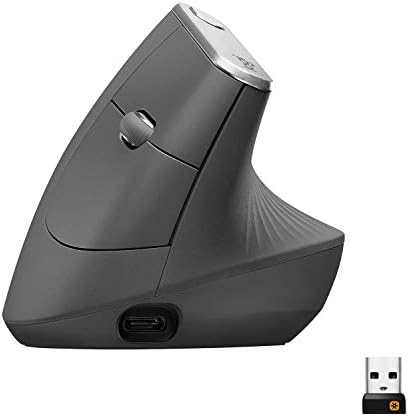
- NATURAL HANDSHAKE POSITION – MX Vertical’s natural handshake position reduces muscular activity by 10 percent compared t…
- 57° VERTICAL ANGLE FOR IMPROVED WRIST POSTURE – MX Vertical’s unique 57° vertical angle reduces the pressure on your wri…
- USER TESTED. ERGONOMIST-APPROVED. MX Vertical has been designed and tested with criteria set out by leading ergonomists …
- Logitech MX Vertical — premium 57-degree design, rechargeable, MagSpeed-style scrolling, multi-device Easy-Switch, excellent build. Higher price but refined office focus. Logitech MX Vertical Wireless Mouse
The Razer stands out with its steeper vertical angle, higher sensor performance, 1,000 Hz polling, RGB underglow, and AI Prompt Master. The Logitech options generally feel quieter and slightly more office-oriented. Choice depends on whether you prioritize maximum vertical posture and gaming-grade specs (Razer) or quieter operation and long AA battery life (Lift) or polished premium feel (MX Vertical).
For more context on the broader wireless mouse market, return to our Amazon wireless mouse comparison.
Setup Guide: Getting Started Quickly
- Charge the mouse fully with the included USB-C cable before first use.
- Insert the HyperSpeed dongle or enable Bluetooth pairing.
- Power on the mouse and select the desired connection mode with the underside switch.
- Pair additional devices via Bluetooth or the dongle as needed.
- Download and install Razer Synapse 4 from the official Razer site.
- Customize buttons, DPI stages, RGB, and AI Prompt Master settings.
- Test the vertical grip for a few days and adjust desk height or chair position if needed.
Most users report the hardware pairing process takes only a few minutes. Software setup adds more time if you create detailed profiles.
Common Buyer Feedback Patterns
Across Amazon listings with several hundred ratings, consistent themes appear:
Positives
- Noticeable reduction in wrist strain for many users after adaptation
- Excellent sensor precision and tracking
- Solid multi-device switching
- Premium build quality
- Useful battery life and quick-charge feature
- AI Prompt Master appreciated by productivity users
Mixed or neutral notes
- Learning curve for the vertical grip (usually short)
- Weight feels substantial compared with lighter mice
- Scroll wheel lacks free-spin or tilt
- RGB is optional but some prefer it off for office use
Occasional issues
- Adaptation difficulty for users with atypical hand sizes
- Software required for full feature set
These patterns come from aggregated verified reviews rather than individual claims. They describe a capable vertical mouse that rewards a short adjustment period with lasting comfort and performance.
External Resources
For the latest official specifications and software downloads, visit the manufacturer page:
Razer Pro Click V2 Vertical Edition
Independent testing and measurements are available from sites such as RTINGS, which publishes detailed sensor, latency, and ergonomics data for the model.
Razer Synapse documentation and support articles on the official Razer support site provide setup and troubleshooting guidance.
FAQ Section
Is the Razer Pro Click V2 Vertical currently available new on Amazon?
Yes. Multiple listings confirm new stock under ASIN B0DVD5RTZ5 with current pricing and shipping options. Always verify the live product page.
How long does the battery last in real use?
Razer rates it at up to six months under standard conditions. Many owners report several months with moderate RGB use. Quick charge provides usable runtime after only a few minutes.
Does it work with Mac and Windows?
Yes. It supports Windows and Mac via HyperSpeed, Bluetooth, or wired USB-C. Full Synapse features are strongest on Windows; basic functions work across platforms.
How many devices can it connect to?
It supports multi-device connectivity via HyperSpeed and Bluetooth (up to three Bluetooth hosts) plus wired mode. A dedicated button switches between them.
Is the vertical grip hard to get used to?
Most people adapt within a few days to a couple of weeks. The 71.7-degree angle is steeper than some milder vertical mice, so initial sessions may feel different.
Does the sensor track on glass?
Yes. The Focus Pro 30K optical sensor is designed to track on glass surfaces of adequate thickness.
Do I need Razer Synapse?
No for basic use. Yes for button remapping, advanced DPI control, RGB, profiles, and AI Prompt Master.
Is there a left-handed version?
No. The Pro Click V2 Vertical is right-handed only. Left-handed buyers should look at other vertical options that offer left models.
Conclusion
The Razer Pro Click V2 Vertical Wireless Mouse delivers a genuine vertical ergonomic shape, high-precision tracking, multi-device flexibility, and thoughtful productivity features in one package. Its handshake grip and supportive base address the comfort needs of people who spend long hours at a desk, while the Focus Pro sensor and 1,000 Hz polling keep performance competitive for both work and play. Current Amazon listings confirm it remains available new with solid sales activity.
If you want a steeper vertical posture, gaming-grade accuracy, and AI-assisted shortcuts, this mouse is worth serious consideration. Give the grip a fair adaptation period and pair it with a supportive chair and mouse pad for best results. Check the live Amazon page for the latest price and stock, then use the tracked link:
Buy the Razer Pro Click V2 Vertical Wireless Mouse on Amazon
For more wireless mouse options and complementary desk gear, explore our Amazon wireless mouse guide, mouse pads roundup, and office chairs for back pain.
As an Amazon Associate I earn from qualifying purchases.

MD.HASAN is an experienced SEO expert and amazon products review writer passionate about helping people find right products on amzon for buy without confusion. With 4 years of hands-on experience in content strategy and search engine optimization, he specializes in writing SEO-friendly blog posts that rank, engage, and convert.


