
Affiliate disclosure: As an Amazon Associate, Tech Rig Review earns from qualifying purchases. Links on this page may be affiliate links, at no extra cost to you.
Looking to buy the Keychron M5 wireless ergonomic mouse on Amazon? This research-backed guide covers its vertical design, high-performance specs, real availability, and how it helps reduce wrist strain.
If long hours at a computer leave your wrist aching or your forearm tired, a standard flat mouse may be part of the problem. The Keychron M5 Wireless Ergonomic Mouse takes a different approach. It tilts your hand into a natural handshake position at about 47 degrees. This vertical shape aims to reduce muscle strain while still delivering strong performance specs usually found on gaming mice.
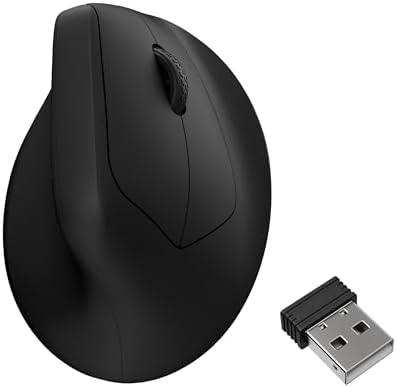
- Keychron M5 Wireless Ergonomic Mouse has the best PixArt 3950 sensor. It supports wireless 2.4 GHz and Bluetooth 5.1 con…
- One of The Strongest Mouse Sensor – M5 has the strongest, most competitive grade mouse sensor chip PixArt 3950, with up …
- More Customization on The Keychron Launcher – Just click, save, and turn it off, the online Launcher web app allows for …
This article focuses on the Keychron M5 currently available to buy on Amazon. We researched official specifications, checked live product listings for stock and seller details, and reviewed patterns in verified buyer feedback. You will find a clear breakdown of features, who it suits, how it compares to other vertical options, and practical buying advice. The goal is to help you decide whether this mouse fits your desk setup and comfort needs before you purchase.
For a wider look at wireless mice that include ergonomic choices, see our guide to the 10 best Amazon wireless mice. The Keychron M5 stands out in the vertical category because it pairs comfort-focused design with high DPI, high polling rates, and tri-mode connectivity at a mid-range price.
What Is the Keychron M5 Wireless Ergonomic Mouse?

The Keychron M5 is a right-handed vertical wireless mouse. Keychron designed it around a 47-degree tilt that promotes a more natural forearm and wrist position. Unlike traditional horizontal mice that force the palm flat, this shape keeps the hand closer to a handshake stance. Many users who experience wrist fatigue or early signs of repetitive strain find this posture more comfortable for long sessions.
Key official specs from Keychron and current Amazon listings include:
- Sensor options: PixArt PAW3950 (up to 30,000 DPI, 750 IPS) on the higher-end version or PixArt 3311 on the more basic version
- Polling rate: Up to 8,000 Hz on 2.4 GHz and wired modes with the PAW3950 version; lower rates on Bluetooth
- Connectivity: Tri-mode — 2.4 GHz wireless (dongle included), Bluetooth 5.1 or 5.3, and USB-C wired
- Battery: 600 mAh rechargeable, rated up to 140 hours in Bluetooth mode and around 120 hours at lower polling rates
- Weight: Approximately 95 g
- Buttons: Typically 5–7 programmable controls plus a main scroll wheel and often a side thumb wheel for horizontal scrolling
- Design: 47-degree vertical ergonomic shape with thumb rest
- Software: Free web-based Keychron Launcher for remapping, macros, DPI stages, polling rate, and onboard profiles
- Compatibility: Windows and macOS (basic functions work on other systems)
The mouse comes in black and white color options. Amazon listings confirm new units are in stock, often sold by Keychron or fulfilled by Amazon, with prices commonly around the $70 range depending on the exact sensor version and any promotions. One verified current ASIN for the black 8000 Hz model is B0F3X9G276.
Recommended purchase link: Keychron M5 Wireless Ergonomic Mouse on Amazon
Always double-check the live product page for the exact sensor (3950 vs 3311), color, stock status, and seller before buying.
Why a Vertical Ergonomic Design Helps
Standard mice keep the forearm pronated (palm down). Over many hours this position can increase strain on the wrist and forearm muscles. Vertical mice rotate the hand outward so the forearm stays closer to a neutral handshake angle. Research and ergonomic guidelines often note that this posture can lower muscle activity in the forearm compared with a conventional mouse.
The Keychron M5 uses a 47-degree angle. Review patterns and independent tests describe it as comfortable for medium to larger hands once the initial adjustment period ends. Some users with smaller hands report the shape feels large at first. Most people need a few days to adapt to the new grip. After that, many report less wrist fatigue during long workdays.
The lightweight 95 g body helps. Heavier vertical mice can feel tiring to move because the hand must lift and steer a bulkier object. The M5 stays easy to control for precise work and casual movement.
Performance Specs That Stand Out
Most vertical mice prioritize comfort over speed. The Keychron M5 takes a different route. The higher-end version uses the PixArt PAW3950 sensor — the same high-end optical sensor found in many competitive gaming mice. It supports up to 30,000 DPI, 750 IPS tracking speed, and 50 G acceleration. Lift-off distance is adjustable (commonly 0.7 mm, 1.0 mm, or 2.0 mm).
Polling rate reaches 8,000 Hz when using the 2.4 GHz dongle or the USB-C cable. That means the mouse reports its position to the computer 8,000 times per second, which translates to very smooth cursor movement and low latency. Bluetooth runs at a more typical 125 Hz, which is still fine for office work. Independent lab measurements of similar units show sub-millisecond latency on the high-performance modes.
These numbers matter less for pure spreadsheet work and more for users who also do design, photo editing, light gaming, or any task that rewards precise tracking. The sensor tracks well on most surfaces, including glass of sufficient thickness on the higher-end model.
Connectivity and Multi-Device Use
Tri-mode connectivity gives flexibility:
- Plug in the 2.4 GHz USB dongle for the lowest latency and highest polling rate.
- Use Bluetooth to connect without occupying a USB port and to pair with up to three devices.
- Connect via the included USB-C cable for wired use or charging.
A physical switch or button on the mouse lets you change modes or cycle Bluetooth channels. This setup works well for people who move between a desktop, laptop, and tablet. Onboard memory stores up to five profiles, so your preferred DPI stages, button mappings, and polling rates travel with the mouse.
Battery Life and Charging
The 600 mAh battery is rated for up to 140 hours in Bluetooth mode. At 1,000 Hz polling the figure stays high (around 120 hours in manufacturer data). Higher polling rates reduce runtime, as expected. Real-world reports align with these ranges for typical mixed use.
Charging happens through the USB-C port. A short flexible cable and a USB-A adapter usually ship in the box. You can continue using the mouse while it charges in wired mode. There is no need to replace disposable batteries.
Software: Keychron Launcher
Keychron uses a free web-based tool called Keychron Launcher instead of a traditional desktop app. Open it in a supported browser (Chrome, Edge, or Opera recommended), connect the mouse in wired or 2.4 GHz mode, and you can:
- Remap buttons
- Create macros
- Set DPI stages and steps
- Adjust polling rate
- Change lift-off distance
- Enable or disable motion sync and angle snapping
- Save up to five onboard profiles
The web approach means no permanent software install and works across Windows, macOS, and Linux. Some users find the interface less polished than Logitech Options+ or Razer Synapse, and profile switching is not as seamless for rapid app-to-app changes. Still, the core customization tools are present and functional once you spend a few minutes learning the layout.
Official Keychron documentation and the Launcher site confirm ongoing support for the M5.
Who Should Buy the Keychron M5?
This mouse fits several clear groups:
- People who feel wrist or forearm fatigue with a traditional mouse and want a vertical design
- Users who want high tracking performance (high DPI and high polling) inside an ergonomic shape
- Anyone who needs tri-mode connectivity for multi-device work
- Buyers looking for a lighter vertical mouse (around 95 g) rather than heavier options
- Those who prefer a rechargeable battery and web-based configuration
It is less ideal if you have very small hands (try before committing if possible), need silent clicks as a top priority (some versions offer quieter switches), or want the most refined software experience available. Left-handed users will need a different model, as the M5 is right-handed only.
Current Amazon Availability and Buying Tips
- Keychron M5 Wireless Ergonomic Mouse has the best PixArt 3950 sensor. It supports wireless 2.4 GHz and Bluetooth 5.1 con…
- One of The Strongest Mouse Sensor – M5 has the strongest, most competitive grade mouse sensor chip PixArt 3950, with up …
- More Customization on The Keychron Launcher – Just click, save, and turn it off, the online Launcher web app allows for …
New Keychron M5 units are actively listed and in stock on Amazon.com at the time of research. Listings show both the higher-performance 8K/PAW3950 versions and lower-polling variants. Prices typically sit near $70 for the strong-spec models. Many are sold by Keychron or shipped by Amazon with Prime eligibility.
When purchasing:
- Confirm the sensor and polling rate in the title or bullet points (PAW3950 + 8K vs 3311 + 1K).
- Check the color (black or white) and current stock level.
- Prefer listings fulfilled by Amazon for faster shipping and easier returns.
- Read recent customer questions for any notes on packaging or included accessories.
Keychron M5 Wireless Ergonomic Mouse – Black
Search “Keychron M5” directly on Amazon if you want to compare all current variants side by side.
How the Keychron M5 Compares to Other Vertical Mice
The most common alternative buyers consider is the Logitech Lift Vertical Ergonomic Mouse. The Lift uses a steeper 57-degree angle, offers quiet clicks, multi-device Easy-Switch, and very long AA battery life. It is widely available and often recommended for smaller to medium hands. However, its sensor and polling performance sit at more typical office levels rather than the high-end numbers of the M5.
Other vertical options include the Logitech MX Vertical (premium build, MagSpeed wheel, higher price) and various budget vertical mice that lack the M5’s sensor strength or tri-mode flexibility.
The Keychron M5’s combination of low weight, high-performance sensor, 8K polling option, side thumb wheel on many versions, and competitive pricing makes it stand out for users who want both ergonomics and strong tracking. Buyer feedback patterns frequently praise the comfort after the adjustment period and the value relative to more expensive vertical mice.
For additional context on ergonomic and everyday wireless mice, revisit our Amazon wireless mouse roundup.
Setup and First-Week Tips
- Charge the mouse fully via USB-C before heavy use.
- Insert the 2.4 GHz dongle or pair via Bluetooth.
- Open Keychron Launcher in a supported browser while the mouse is in wired or 2.4 GHz mode.
- Set your preferred DPI stages and polling rate.
- Remap the side buttons and thumb controls to actions you use often (browser back/forward, copy/paste, desktop switch, etc.).
- Give yourself several days to adapt to the vertical grip. Start with shorter sessions if the new angle feels unfamiliar.
Most people report the learning curve is short. Once the hand settles into the handshake position, daily comfort often improves.
Common Patterns from Verified Buyer Feedback
Across Amazon listings the M5 generally receives solid ratings (typically in the 4.1–4.3 range on the samples reviewed). Recurring positive themes include:
- Noticeable reduction in wrist strain after the adjustment period
- Light weight that makes the vertical shape easier to use
- Strong tracking and smooth performance on the high-polling versions
- Good battery life for the size
- Useful side scroll or thumb controls for spreadsheets and timelines
Mixed or critical notes often mention:
- Initial adjustment period required for the vertical angle
- Software interface that feels less polished than major competitors
- Click feel that some describe as louder or less refined than silent office mice
- Size that may not suit the smallest hands
These patterns come from aggregated verified reviews and independent write-ups rather than isolated opinions. They paint a consistent picture of a capable, value-focused vertical mouse.
External Resources for Further Reading
For the latest official specifications and firmware notes, visit the manufacturer product page:
Keychron M5 Wireless Ergonomic Mouse
The free configuration tool is available at the Keychron Launcher web app. Use a supported browser and connect the mouse in wired or 2.4 GHz mode.
Independent technical measurements and latency data appear on testing sites such as LTT Labs, which has published results for the M5’s sensor and wireless performance.
FAQ Section
Is the Keychron M5 currently available to buy new on Amazon?
Yes. Multiple listings show new stock in black and white, with the higher-performance 8K versions and more basic variants both listed. Confirm the exact ASIN and seller on the product page.
What is the difference between the 8K and 1K versions?
The 8K version uses the PixArt PAW3950 sensor with up to 30,000 DPI and 8,000 Hz polling on 2.4 GHz/wired. The 1K version uses a lower-tier sensor (often PAW3311) with lower maximum DPI and 1,000 Hz polling. Battery life and basic ergonomics remain similar.
Does the Keychron M5 work with Mac and Windows?
Yes. It supports both operating systems. Full customization through the Launcher works on both. Basic pointing and clicking work without software.
How long does the battery last in real use?
Manufacturer ratings reach 140 hours on Bluetooth and around 120 hours at 1,000 Hz. Higher polling rates reduce runtime. Most mixed-use reports stay in the multi-day to multi-week range depending on daily hours.
Is software required?
No. The mouse works for basic functions out of the box. The free Keychron Launcher web app unlocks remapping, macros, DPI stages, polling rate, and onboard profiles.
Will it fit small hands?
It is generally better suited to medium and larger hands. Users with smaller hands sometimes find the vertical shape large. If possible, check return policies on Amazon so you can test the fit.
Does it have silent clicks?
Some variants emphasize quieter switches. The standard higher-end models use durable micro switches that are audible but not excessively loud. Check the specific listing if silence is a top priority.
Can I use it for light gaming?
Yes. The high DPI, high polling rate, and low latency on the PAW3950 version make it capable for many non-competitive games and precise work. Pure competitive esports players may still prefer lighter traditional gaming shapes.
Conclusion
The Keychron M5 Wireless Ergonomic Mouse offers a practical answer for people who want vertical comfort without giving up strong tracking performance. Its 47-degree handshake design, light 95 g weight, high-end sensor options, 8K polling capability, tri-mode connectivity, and solid battery life create a well-rounded package at a competitive price. Current Amazon listings confirm new units are available and ready to ship.
If wrist or forearm fatigue is part of your daily work, or if you simply prefer a more natural hand position, the M5 is worth serious consideration. Spend a few days adapting to the angle, set your preferred profiles in the free Launcher, and you may find long sessions feel easier on the body.
Check the live Amazon product page for the latest price, stock, and exact configuration, then use a tracked link to support independent research:
Buy the Keychron M5 Wireless Ergonomic Mouse on Amazon
For more options across wireless and ergonomic mice, explore our detailed Amazon wireless mouse guide.
As an Amazon Associate I earn from qualifying purchases.

MD.HASAN is an experienced SEO expert and amazon products review writer passionate about helping people find right products on amzon for buy without confusion. With 4 years of hands-on experience in content strategy and search engine optimization, he specializes in writing SEO-friendly blog posts that rank, engage, and convert.


