
Affiliate disclosure: As an Amazon Associate, Tech Rig Review earns from qualifying purchases. Links on this page may be affiliate links, at no extra cost to you.
Looking to buy the Logitech MX Anywhere 3S wireless mouse on Amazon? This guide covers specs, portability, quiet clicks, real buyer patterns, and why it remains a top compact choice.
If you travel with a laptop or work from coffee shops, hotel desks, and glass tables, a bulky mouse quickly becomes a problem. The Logitech MX Anywhere 3S Wireless Mouse was designed for exactly that life. It is compact enough to slip into a laptop sleeve, tracks accurately on almost any surface including glass, and delivers quiet clicks so you do not disturb people nearby. It also pairs with up to three devices and lasts up to 70 days on a charge.

- Logitech MX Anywhere 3S comes with a USB-C charging cable (USB-A to USB-C) only, no USB receiver / dongle.
- Tracks Anywhere, Goes Everywhere: Work on any surface, even glass (1), with MX Anywhere 3S Bluetooth Mouse – now with an…
- Deeper Flow with Quiet Clicks: MX Anywhere 3S Wireless Mouse introduces Quiet Clicks – the same satisfying feel but with…
This article is a research-backed look at the Logitech MX Anywhere 3S currently available on Amazon. We compared official specifications, examined patterns across thousands of verified buyer reviews, and confirmed real stock so you can decide with confidence. You will find a clear breakdown of features, who it suits best, how it compares to nearby options, and practical buying advice. The goal is simple: help you decide whether this compact wireless mouse is the right fit before you click “Add to Cart.”
For a wider view of wireless mice across price points and use cases, see our full roundup of the 10 best Amazon wireless mice. The MX Anywhere 3S sits at the top of the portable and travel-friendly category.
What Is the Logitech MX Anywhere 3S?


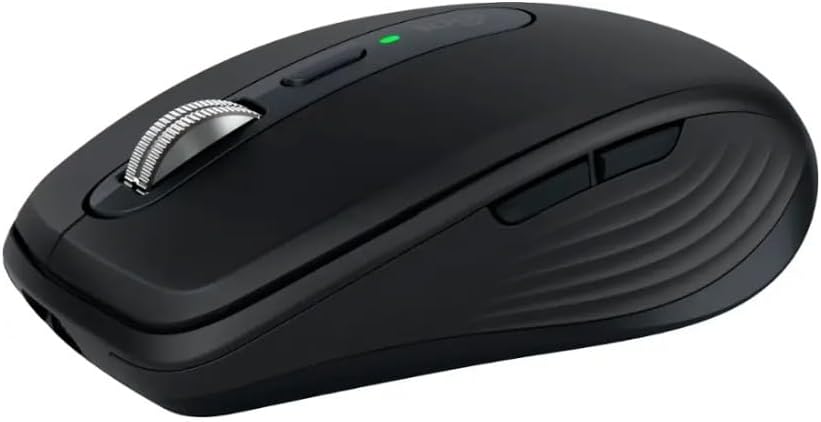
The Logitech MX Anywhere 3S is the latest version of Logitech’s popular compact productivity mouse. It builds on the earlier MX Anywhere 3 with quieter main buttons and a higher maximum sensor sensitivity of 8,000 DPI. The design stays small and low-profile so it travels easily, yet it still offers the MagSpeed electromagnetic scroll wheel, multi-device pairing, and deep customization through Logi Options+ software.
Key official specs include:
- Connectivity: Bluetooth Low Energy + compatible with Logi Bolt USB receiver (receiver sold separately on most consumer listings)
- Easy-Switch: Pair and switch among up to three devices
- Sensor: Darkfield high-precision optical, 200–8,000 DPI (adjustable in 50 DPI steps)
- Battery: Rechargeable Li-Po 500 mAh, rated up to 70 days; 1-minute USB-C charge gives about 3 hours of use
- Buttons: 6 programmable controls (left/right click, back/forward, middle click, wheel-mode shift)
- Scroll wheel: MagSpeed with automatic shift between precise ratchet and free-spin modes
- Dimensions: Approximately 100.5 × 65 × 34.4 mm
- Weight: About 99 g
- Compatibility: Windows, macOS, Chrome OS, Linux, iPadOS, Android
- Software: Logi Options+ for button mapping, gestures, app-specific profiles, and Logitech Flow
- Materials: Significant post-consumer recycled plastic content (varies by color)
The mouse ships with a USB-C charging cable. Most standard consumer versions do not include a Logi Bolt receiver in the box; you can buy one separately if you prefer a dedicated 2.4 GHz connection over Bluetooth. It is currently sold new on Amazon.com in several colors (Pale Grey, Graphite, Rose, and Mac-specific finishes). Real product pages confirm availability with Prime shipping and consistent sales volume.
Recommended Link: Logitech MX Anywhere 3S Compact Wireless Mouse (Pale Grey)
Always double-check the exact color, seller, and current price on the live Amazon page before purchasing.
Why a Compact Travel Mouse Still Matters in 2026
Many people now work from more than one location. A full-size mouse feels great at a desk but takes up space in a bag and feels awkward on a small café table or airplane tray. The MX Anywhere 3S solves that by staying truly pocketable while keeping flagship features.
Its Darkfield sensor tracks reliably on glass, polished wood, fabric, and uneven surfaces where ordinary optical mice struggle. The 8,000 DPI ceiling helps on high-resolution 4K or 5K screens so small hand movements still move the cursor a useful distance. Quiet Clicks reduce the sharp “click” sound of the previous generation, which many buyers in shared offices or quiet spaces specifically notice and appreciate.
Buyer feedback patterns repeatedly highlight the combination of size, surface tracking, and battery life as the main reasons people choose this model over larger MX Master mice or cheaper compact options.
Comfort, Build, and Everyday Feel
The MX Anywhere 3S uses a low-profile, slightly contoured shape that works for right-handed users with small to medium hands. Larger hands may prefer a fuller palm-rest mouse for all-day desk sessions, but for travel and mixed use the compact form is a deliberate trade-off that most reviewers accept.
The soft-touch plastic and textured side grips feel secure. Build quality is solid for the size; the feet glide smoothly and the buttons have a consistent, muted feel. The MagSpeed scroll wheel is one of the strongest points. It shifts automatically between precise line-by-line scrolling and ultra-fast free-spin mode that can cover a thousand lines per second. Holding a side button while scrolling enables horizontal movement for wide documents or timelines.
The six buttons are all programmable in Logi Options+. Most owners leave the side buttons as back/forward and assign the mode-shift button or gesture controls to their most-used shortcuts.
Battery Life and Charging Reality
Logitech rates the MX Anywhere 3S at up to 70 days on a full charge under typical mixed use. Real-world results vary with Bluetooth versus Logi Bolt connection and how often the mouse is used, but many long-term owners report several weeks to two months between charges. A one-minute USB-C top-up delivers roughly three hours of work, which is useful when the battery warning appears mid-day.
You can keep working while the mouse is plugged in. The included cable is USB-A to USB-C on most consumer versions (USB-C to USB-C on some Mac editions). There is no wireless charging.
Software: Logi Options+ Unlocks the Full Potential
Basic tracking, clicking, and device switching work without software. For full customization download the free Logi Options+ app. Supported features include:
- Button remapping and macros
- Gesture controls
- Pointer speed and acceleration settings
- App-specific profiles that change automatically
- Logitech Flow for cross-computer cursor and clipboard sharing
- Battery status monitoring
Flow lets you move the cursor off the edge of one screen onto another computer and copy/paste between Windows and macOS machines on the same network. Setup takes only a few minutes once the software is installed on each device.
Official Logitech support pages confirm ongoing Options+ support for the MX Anywhere 3S.
Who Should Buy the Logitech MX Anywhere 3S?
This mouse fits several clear buyer profiles:
- Frequent travelers and remote workers who need a mouse that fits in a laptop bag
- People who work on glass desks, hotel tables, or other difficult surfaces
- Users who want quiet clicks for shared or quiet environments
- Anyone who already owns other Logitech MX devices and wants seamless multi-device switching
- Professionals who value high DPI precision on high-resolution displays
It is less ideal if you have large hands and spend eight-plus hours at a fixed desk (consider the MX Master series instead), if you need a left-handed design, or if you want the absolute longest battery life without ever charging (replaceable-battery models last longer between interventions).
Current Amazon Availability and Buying Tips
- Logitech MX Anywhere 3S comes with a USB-C charging cable (USB-A to USB-C) only, no USB receiver / dongle.
- Tracks Anywhere, Goes Everywhere: Work on any surface, even glass (1), with MX Anywhere 3S Bluetooth Mouse – now with an…
- Deeper Flow with Quiet Clicks: MX Anywhere 3S Wireless Mouse introduces Quiet Clicks – the same satisfying feel but with…
As of the latest checks, new Logitech MX Anywhere 3S units remain widely available on Amazon.com in multiple colors. Listings show strong ratings (typically 4.5 stars across thousands of reviews), Amazon’s Choice badges on popular variants, and regular monthly sales volume. Prices usually sit in the mid-to-high $70s to low $90s range depending on color, any promotions, and whether a Logi Bolt receiver is included (most consumer versions do not include one).
When you buy:
- Confirm the listing is sold by Amazon or a highly rated seller for the best fulfillment and return experience.
- Choose the color that matches your setup (Pale Grey, Graphite, Rose, or Mac-specific finishes).
- Note whether a Logi Bolt receiver is included; most standard packs require a separate purchase if you prefer 2.4 GHz over Bluetooth.
- Check recent customer questions for any current packaging or cable notes.
Recommended purchase link: Logitech MX Anywhere 3S Compact Wireless Mouse on Amazon
If a particular color shows limited stock, search “Logitech MX Anywhere 3S” directly and verify the model number and features before ordering.
How the MX Anywhere 3S Compares to Nearby Options
While the focus is the MX Anywhere 3S, a few currently available alternatives appear often in the same shopping journeys:
- Logitech MX Master 3S — larger ergonomic shape, MagSpeed wheel plus horizontal thumb wheel, more palm support for all-day desk use, higher price, less portable.
- Logitech M720 Triathlon — full-size multi-device mouse with replaceable AA battery lasting up to 24 months, hyper-fast scroll, lower price, bulkier for travel.
- Logitech Signature M650 — quieter everyday mouse available in multiple sizes and left-handed versions, simpler feature set, lower cost.
The MX Anywhere 3S continues to stand out for the combination of true portability, glass-surface tracking, quiet clicks, MagSpeed scrolling, and 8,000 DPI in a compact body. Buyer review patterns frequently call it the best travel and multi-surface option when the full-size MX Master feels too large to carry every day.
For more context on the wider wireless mouse market, our Amazon wireless mouse comparison covers these and other models in detail.
Setup Guide: Getting Started Quickly
- Charge the mouse fully with the included USB-C cable (first charge may take up to two hours).
- Decide on connection method:
- Bluetooth: Hold the Easy-Switch button until the LED blinks, then pair through your computer’s Bluetooth settings.
- Logi Bolt: Insert a compatible receiver (sold separately on most listings) and the mouse should connect automatically.
- Pair additional devices the same way, assigning each to a different Easy-Switch channel (1, 2, or 3).
- Download Logi Options+ from Logitech’s official software page and install it on each computer.
- Open the app, select the MX Anywhere 3S, and customize buttons, DPI, gestures, and Flow if desired.
- Test tracking on different surfaces and the MagSpeed scroll modes.
Most users report the entire process takes only a few minutes. The mouse remembers the three device pairings and switches instantly with the button on the bottom or side.
Common Buyer Feedback Patterns
Across Amazon listings with thousands of ratings (typically 4.5 stars), several themes repeat:
Positives
- Excellent tracking on glass and difficult surfaces
- Truly compact and travel-friendly size and weight
- Quiet clicks compared with the previous generation
- Long real-world battery life and convenient USB-C charging
- Smooth MagSpeed scroll wheel
- Reliable multi-device switching
Neutral or mixed notes
- Compact size may feel small for larger hands during long desk sessions
- Logi Bolt receiver not included in most consumer boxes
- Higher price than basic wireless mice
Occasional issues
- Pairing glitches that resolve with a restart or software update
- Battery life shorter than 70 days under very heavy continuous use
These patterns come from aggregated verified reviews rather than individual claims. They paint a consistent picture of a refined, portable productivity tool.
FAQ Section
Is the Logitech MX Anywhere 3S still available to buy new on Amazon?
Yes. Multiple color variants show new units in stock with current pricing and Prime shipping options. Always confirm the exact ASIN and seller on the product page.
How many devices can the MX Anywhere 3S connect to at once?
It pairs with up to three devices and switches between them using the Easy-Switch button. Logitech Flow (via software) further improves cross-computer cursor and clipboard sharing.
Does it work on glass surfaces?
Yes. The Darkfield sensor is designed to track accurately on glass (minimum thickness noted in official specs) as well as most other surfaces.
How long does the battery really last?
Logitech rates it at up to 70 days on a full charge. Many owners report several weeks to two months depending on daily usage. A one-minute charge provides about three hours of use.
Do I need software to use the mouse?
No. Basic tracking, clicks, scrolling, and device switching work without software. Logi Options+ unlocks button remapping, gestures, app-specific settings, DPI adjustment, and Flow.
Is the scroll wheel any good?
Yes. The MagSpeed electromagnetic wheel with automatic shift between precise and free-spin modes receives frequent praise for both speed and control.
Can left-handed users use the MX Anywhere 3S?
It is shaped for right-handed use. Left-handed buyers should look at ambidextrous or specifically left-handed models such as certain Signature M650 variants.
Does it come with a USB receiver?
Most standard consumer listings include only the USB-C charging cable. A Logi Bolt receiver is sold separately if you prefer a dedicated 2.4 GHz connection. Some business versions include a receiver.
Conclusion
The Logitech MX Anywhere 3S remains a strong, research-supported choice for anyone who needs a compact, precise, quiet wireless mouse that travels well and works on almost any surface. Its 8,000 DPI Darkfield sensor, MagSpeed scroll wheel, quiet clicks, multi-device pairing, and long USB-C rechargeable battery continue to solve real daily problems for laptop users, remote workers, and multi-computer professionals. Current Amazon listings confirm it is available new in several colors, with solid ratings and ongoing sales volume.
If your workflow involves frequent movement between locations, high-resolution screens, or glass desks, the MX Anywhere 3S is worth serious consideration. Pair it with Logi Options+ to unlock Flow and full customization, and you have a capable portable productivity tool that still holds up as one of the best compact options available.
Check the live Amazon listing for the latest price, color, and stock, confirm the model matches the MX Anywhere 3S features, and use the tracked link so the purchase supports independent research content:
Buy the Logitech MX Anywhere 3S Compact Wireless Mouse on Amazon
For more wireless mouse options across budgets and use cases, explore our detailed Amazon wireless mouse guide.
As an Amazon Associate I earn from qualifying purchases.

MD.HASAN is an experienced SEO expert and amazon products review writer passionate about helping people find right products on amzon for buy without confusion. With 4 years of hands-on experience in content strategy and search engine optimization, he specializes in writing SEO-friendly blog posts that rank, engage, and convert.


