
Affiliate disclosure: As an Amazon Associate, Tech Rig Review earns from qualifying purchases. Links on this page may be affiliate links, at no extra cost to you.
Looking to buy the Logitech M330 Silent Plus mouse on Amazon? This guide covers silent clicks, battery life, real buyer patterns, and why it remains a top quiet wireless option.
Office noise adds up fast. The constant click-click of a standard mouse can distract you and everyone nearby during calls, focused work, or late-night sessions. The Logitech M330 Silent Plus Wireless Mouse solves that problem with SilentTouch technology that cuts click noise by over 90 percent while keeping the familiar click feel. It pairs long battery life, simple plug-and-play setup, and a comfortable right-handed shape at a budget-friendly price.

- Quieter Click: Logitech’s SilentTouch Technology reduces over 90 percent (1) of clicking sounds — ensuring top performan…
- Crafted for Comfort: Design with naturally shaped contoured plastic grips, the M330 SILENT wireless mouse is built for l…
- Long Battery Life: M330 SILENT has a 18-month battery life (2) and power saving auto-sleep mode; it allows you to focus …
This article is a research-backed guide to the Logitech M330 Silent Plus currently available on Amazon. We compared official specs from Logitech, examined patterns across tens of thousands of verified buyer reviews, and confirmed real stock and listings. You will find a clear breakdown of features, who it suits best, how it compares to nearby quiet options, setup tips, and practical buying advice. The goal is straightforward: help you decide whether this quiet wireless mouse is the right fit before you order.
For a wider view of wireless mice at different prices and features, see our full roundup of the 10 best Amazon wireless mice. The M330 sits firmly in the affordable silent category for everyday office and home use.
What Is the Logitech M330 Silent Plus Mouse?

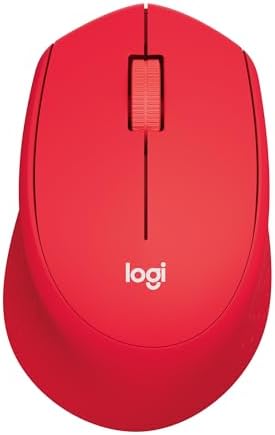
The Logitech M330 Silent Plus is a full-size, right-handed wireless mouse built for quiet everyday computing. Logitech designed it around SilentTouch technology so the main left and right clicks feel normal but produce far less sound. Independent lab measurements cited by Logitech show more than 90 percent reduction in click noise compared with a standard model like the M170.
Core official specs include:
- Connectivity: 2.4 GHz wireless via included USB Nano receiver
- Sensor: High-precision optical tracking at 1000 DPI
- Battery: 1 AA battery (included), rated up to 18–24 months depending on the listing and conditions
- Buttons: 3 (left click, right click, middle click/scroll wheel)
- Scroll wheel: Rubber mechanical wheel with line-by-line tactile feedback
- Wireless range: Up to 10 meters (33 feet)
- Dimensions: Approximately 105.4 × 67.9 × 38.4 mm
- Weight: About 91 g with battery (some listings note slightly lower)
- Compatibility: Windows, macOS, Chrome OS, Linux; Works with Chromebook certified
- Special feature: SilentTouch technology with Quiet Mark recognition from the UK Noise Abatement Society
The mouse arrives ready to use. Plug the tiny Nano receiver into a USB-A port, insert or confirm the AA battery, and start working. An on/off switch and auto-sleep mode help stretch battery life. No software is required for basic operation.
It remains widely available new on Amazon.com in black, grey, and occasional other colors. Listings show strong monthly sales volume, Amazon’s Choice badges on popular variants, and ratings around 4.5 stars from tens of thousands of reviews. Confirmed ASINs include B01JPOLKDW for the black model.
Recommended link: Logitech M330 Silent Plus Full Size 2.4 GHz Wireless Mouse
Always double-check the live Amazon page for the exact color, seller, and current stock before buying.
Why Silent Clicks Matter in Real Workspaces
Shared offices, open-plan desks, video calls, libraries, and home offices with sleeping family members all benefit from quieter peripherals. Standard mechanical mouse switches produce sharp, repetitive clicks that carry across a room. SilentTouch keeps the tactile feedback you expect while dramatically lowering the volume.
Buyer review patterns across Amazon listings repeatedly highlight this as the top reason for purchase. People who work near colleagues, take frequent calls, or simply dislike the noise of their own clicking praise the M330 for making the workspace calmer. The Quiet Mark certification adds an independent stamp of approval for noise reduction.
The reduction applies mainly to the primary left and right clicks. Scrolling and desk contact still produce some sound, but the overall experience is noticeably quieter than conventional mice.
Comfort, Shape, and Daily Feel
Logitech shaped the M330 with an asymmetric, contoured body for right-handed users. Soft rubber grips on the sides improve hold and reduce fatigue during longer sessions. The medium full-size form supports a natural palm or relaxed grip for average hands.
It is not ambidextrous and lacks a deep thumb rest or extra side buttons. Left-handed users and those who prefer vertical or highly sculpted ergonomics will want different models. Patterns in verified reviews show most medium-hand users find it comfortable for all-day office work, while some with very large or very small hands note the size as average rather than perfect.
The rubber scroll wheel offers clear line-by-line steps. It does not free-spin like higher-end hyper-fast wheels, which keeps control precise for documents and web pages. Tracking on standard desk surfaces and mouse pads is reliable at 1000 DPI. Glossy or glass surfaces can be less consistent, a common limitation for optical sensors in this price range.
Build quality matches the price point: durable plastic that holds up under normal desk use. The Nano receiver stores in a compartment on the underside for travel or storage.
Battery Life and Power Management
Logitech rates the M330 at up to 18 or 24 months on a single AA battery, depending on the specific listing language and real-world conditions. Auto-sleep and the physical on/off switch contribute to the long runtime. Many long-term owners report a year or more of daily use before needing a replacement cell.
This replaceable-battery design appeals to users who prefer not to manage charging cables. When the battery eventually runs low, simply swap in a fresh AA. No downtime for recharging is required.
Setup and Compatibility
Setup takes seconds. Plug the USB Nano receiver into any available USB-A port on a Windows PC, Mac, Chromebook, or Linux machine. The mouse connects automatically with no drivers needed. The 2.4 GHz connection stays stable within the rated 10-meter range under typical conditions.
It is certified Works with Chromebook, meeting Google’s compatibility standards. The receiver uses 128-bit encryption for a secure link. Because it relies on the Nano receiver rather than Bluetooth, it does not occupy a Bluetooth channel and avoids potential interference in crowded wireless environments. The trade-off is the need for one USB-A port (or a USB-C adapter if your laptop lacks USB-A).
No companion software is required or available for advanced customization. Buttons stay fixed in their standard roles. This simplicity suits users who want a plug-and-play experience without extra apps.
Who Should Buy the Logitech M330 Silent Plus?
This mouse fits clear use cases:
- Office workers and remote professionals who share space or take frequent video calls
- Anyone seeking a quiet mouse without spending on premium multi-device or high-DPI models
- Right-handed users who want a full-size, comfortable shape and long battery life
- Budget-conscious buyers who value proven reliability and high review volume
- Chromebook, Windows, or Mac users who prefer a simple USB-receiver connection
It is less suitable if you need multi-device Easy-Switch, Bluetooth, programmable buttons, silent scrolling, left-handed design, or high-DPI precision for design or gaming. Those needs point toward higher models such as the Signature M650 series or MX Master line.
Current Amazon Availability and Buying Tips
- Quieter Click: Logitech’s SilentTouch Technology reduces over 90 percent (1) of clicking sounds — ensuring top performan…
- Crafted for Comfort: Design with naturally shaped contoured plastic grips, the M330 SILENT wireless mouse is built for l…
- Long Battery Life: M330 SILENT has a 18-month battery life (2) and power saving auto-sleep mode; it allows you to focus …
New Logitech M330 Silent Plus units are readily available on Amazon.com. Popular black and grey listings show thousands of recent purchases, Amazon’s Choice status on key variants, and prices typically in the mid-teens range with frequent discounts. Prime shipping and free returns are standard for eligible orders.
When purchasing:
- Confirm the listing is the Silent Plus model with SilentTouch technology and Nano receiver.
- Prefer “Ships from and sold by Amazon” or highly rated sellers for reliable fulfillment.
- Check recent customer Q&A and photo reviews for packaging and battery notes.
- Verify the ASIN matches a current product page (B01JPOLKDW is one confirmed black option).
Primary recommended link:
Logitech M330 Silent Plus Wireless Mouse on Amazon
If one color is temporarily low on stock, search “Logitech M330 Silent Plus” and cross-check the model number and features.
How the M330 Compares to Nearby Quiet Options
Several currently available silent or quieter mice appear in the same shopping path:
- Logitech Signature M650 series — adds Bluetooth + Logi Bolt options, SmartWheel scrolling, multiple sizes including left-handed, and similar SilentTouch quiet clicks at a higher but still accessible price.
- Logitech M240 Compact Silent — smaller, ambidextrous, Bluetooth-focused, even more portable for travel.
- Higher-end choices such as the MX Master 3S — premium sensor, MagSpeed wheel, multi-device Flow, and quiet clicks, but at a significantly higher cost.
The M330 continues to stand out for pure value: proven silent clicks, full-size comfort, long AA battery life, and a simple 2.4 GHz receiver at one of the lowest price points among name-brand quiet mice. Review volume and consistent 4.5-star patterns reinforce its reliability for basic quiet office use.
For broader comparisons across silent and standard wireless mice, refer to our Amazon wireless mouse guide.
Setup Guide: From Box to Desk in Minutes
- Open the battery compartment and confirm or insert the included AA battery.
- Locate the USB Nano receiver (often stored inside the mouse or in the packaging).
- Plug the receiver into a free USB-A port on your computer.
- Slide the power switch on the underside to On.
- Move the mouse—the cursor should respond immediately.
- Adjust pointer speed in your operating system settings if desired.
- Store the receiver in the mouse compartment when traveling.
That is the entire process. No software downloads or pairing codes are needed.
Common Buyer Feedback Patterns
Across Amazon listings with 15,000–25,000+ ratings (typically 4.5 stars), consistent themes emerge from verified reviews:
Frequent positives
- Noticeably quieter clicks that reduce office and home noise
- Comfortable right-handed shape for everyday work
- Long battery life that requires little attention
- Reliable tracking and solid value for the price
- Simple plug-and-play setup
Mixed or neutral notes
- Size feels average—good for medium hands, less ideal for very large or very small hands
- Only three buttons and no customization
- Optical sensor can struggle on highly reflective surfaces
Occasional issues
- Durability reports vary; many units last years, while a smaller number fail earlier
- Receiver can be lost if not stored carefully
These patterns come from aggregated verified feedback rather than isolated claims. They show a dependable budget quiet mouse rather than a feature-packed premium tool.
External Resources
Official product details and the latest specifications are available on the manufacturer page:
Logitech M330 Silent Plus product page
The Quiet Mark certification provides independent recognition of the noise-reduction claims from the UK Noise Abatement Society.
Logitech’s support resources and compatibility notes confirm ongoing Windows, macOS, Chrome OS, and Linux support, including Chromebook certification.
FAQ Section
Is the Logitech M330 Silent Plus still available new on Amazon?
Yes. Multiple current listings show new units in stock with strong sales volume, Amazon’s Choice badges on popular colors, and Prime shipping options. Confirm the exact ASIN and seller on the product page.
How quiet are the clicks really?
Logitech states SilentTouch reduces click sound by over 90 percent compared with a standard mouse. The Quiet Mark certification supports the claim. Buyers consistently describe the clicks as much quieter while retaining a solid tactile feel.
Does it work with Mac and Chromebook?
Yes. It is compatible with macOS and is Works with Chromebook certified. Plug the Nano receiver into a USB-A port (or use an adapter) and it functions without extra drivers.
How long does the battery last?
Logitech rates it at up to 18–24 months on one AA battery under typical use. Auto-sleep and the on/off switch help achieve long runtimes. Real-world results depend on daily hours of use.
Is there Bluetooth or multi-device support?
No. It uses a dedicated 2.4 GHz Nano USB receiver only. There is no Bluetooth pairing or Easy-Switch for multiple computers. For multi-device needs, look at the Signature M650 or MX series.
Can left-handed users use it?
It is designed for right-handed use with an asymmetric shape. Left-handed buyers should consider ambidextrous models such as the M240 Silent or certain Signature M650 versions.
Do I need software?
No. The mouse works immediately after plugging in the receiver. There are no programmable buttons or advanced settings to configure.
What is the difference between the M330 and newer silent Logitech mice?
The M330 focuses on simple silent clicks, full-size comfort, and long AA battery life at a low price. Newer models such as the Signature M650 add Bluetooth options, improved scrolling, size choices, and sometimes higher DPI while keeping quiet operation.
Conclusion
The Logitech M330 Silent Plus remains a practical, research-supported choice for anyone who wants a quiet wireless mouse without extra cost or complexity. Its SilentTouch technology delivers a clear reduction in click noise, the contoured right-handed shape supports comfortable daily use, and the long AA battery life minimizes maintenance. Current Amazon listings confirm it is available new with high review volume and consistent ratings.
If your priority is a calmer desk, shared workspace, or call-friendly environment on a budget, the M330 is worth serious consideration. Plug in the Nano receiver, turn it on, and the quieter experience begins immediately.
Check the live Amazon listing for the latest price, color availability, and stock. Confirm the model includes SilentTouch and the USB Nano receiver, then use the tracked link:
Buy the Logitech M330 Silent Plus Wireless Mouse on Amazon
For more wireless mouse options across budgets, silent designs, and multi-device needs, explore our detailed Amazon wireless mouse guide.
As an Amazon Associate I earn from qualifying purchases.

MD.HASAN is an experienced SEO expert and amazon products review writer passionate about helping people find right products on amzon for buy without confusion. With 4 years of hands-on experience in content strategy and search engine optimization, he specializes in writing SEO-friendly blog posts that rank, engage, and convert.


