
Affiliate disclosure: As an Amazon Associate, Tech Rig Review earns from qualifying purchases. Links on this page may be affiliate links, at no extra cost to you.
A laptop is designed to handle everyday computing, but extended gaming sessions, video editing, multitasking, and other demanding activities can generate considerable heat. When a laptop gets too hot, its internal fans may become louder, performance can decrease, and working for long periods may become less comfortable. A laptop cooling pad can help improve airflow around the device and provide a more comfortable working position.

- COOLING PERFORMANCE: 6 built-in, ultra-quiet fans dissipate laptop heat from multiple angles for optimal cooling efficie…
- FAN CONTROL: Adjustable fan speed with easy turn knob control; blue LED indicator shows when the fans are running
- ERGONOMIC DESIGN: 6 adjustable-height settings offer various tilts for added heat release and ergonomic comfort while ty…
The 10 best laptop cooling pads on Amazon can offer different cooling designs, fan configurations, adjustable angles, and useful features for different types of users. Some are designed for everyday laptops, while others focus on providing stronger airflow for gaming laptops and high-performance computers.
However, choosing a suitable cooling pad involves more than counting the number of fans or looking at colorful lighting. Laptop size, bottom ventilation, airflow direction, noise levels, build quality, and adjustability all matter.
In this guide, we explain how laptop cooling pads work, their benefits, the important features to compare, and what to consider before purchasing one. Whether you use your laptop for work, studying, gaming, or content creation, understanding these factors can help you make a better buying decision.
10 Best Laptop Cooling Pads on Amazon


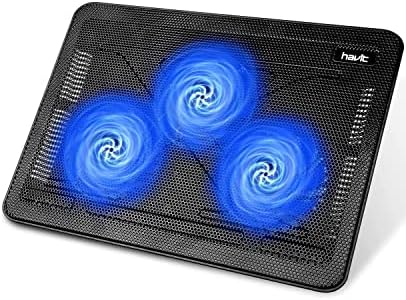

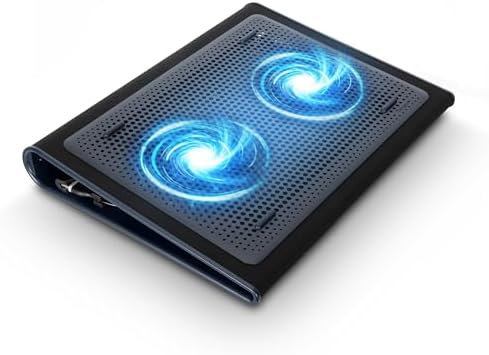


Why Should You Use a Laptop Cooling Pad?
Laptops have built-in cooling systems that use internal fans, heat pipes, ventilation openings, or other cooling components to manage heat. However, demanding workloads can make these systems work harder.
A cooling pad provides an additional surface underneath the laptop. Many models include built-in fans that circulate air toward the laptop’s bottom ventilation area. Others use an elevated design to create more space beneath the computer, allowing air to move more freely.
This additional airflow may help certain laptops maintain more comfortable operating temperatures, depending on their ventilation design and workload.
A cooling pad can be particularly useful for people who:
- Play PC games for extended periods.
- Edit videos, photos, and other demanding projects.
- Run multiple applications simultaneously.
- Use their laptops for programming and development.
- Work with large files or resource-intensive software.
- Frequently experience heat around the laptop’s bottom surface.
It is important to understand that a cooling pad is an additional cooling accessory, not a replacement for the laptop’s internal cooling system or proper maintenance.
Main Benefits of Laptop Cooling Pads
1. Improved Airflow
One of the main advantages of a laptop cooling pad is improved airflow beneath the device. Some laptops have ventilation openings on their bottom panels, and placing them directly on a flat surface may restrict available airflow.
A cooling pad can create additional clearance and, in powered models, circulate more air underneath the laptop.
2. Better Comfort During Long Sessions
Laptop bottoms can become warm during extended use. A cooling pad can help move heat away from the area beneath the computer, potentially making long working or gaming sessions more comfortable.
The actual improvement depends on the laptop’s design, workload, and surrounding environment.
3. Adjustable Working Position
Many cooling pads include adjustable stands that allow users to change the laptop’s angle or height.
This can improve screen positioning and make it easier to find a comfortable working position. However, users who type for several hours may prefer an external keyboard when using a significantly elevated stand.
4. Additional Features for Desk Setups
Some models include USB pass-through ports, fan-speed controls, phone holders, and adjustable lighting.
These features can make a laptop cooling pad more convenient for a home office, gaming desk, or study setup.
5. Support During Demanding Workloads
Gaming, video editing, and other intensive applications can increase heat production. A suitable cooling pad may help improve the airflow available to the laptop during these activities.
However, results vary between laptop models. A cooling pad cannot guarantee higher performance or eliminate thermal throttling.
Different Types of Laptop Cooling Pads
Before comparing available options, it helps to understand the main cooling pad designs.
Single-Fan Cooling Pads
These models typically use one larger fan positioned beneath the laptop.
A larger fan can provide broad airflow without requiring several smaller fans. This design may also be suitable for people who prefer a relatively simple cooling accessory.
When comparing single-fan models, check fan diameter, speed control, noise information, and airflow specifications.
Multiple-Fan Cooling Pads
Multi-fan cooling pads use several smaller fans distributed across the supporting surface.
Their fan arrangement can provide airflow across different areas of the laptop’s underside. Some models also allow users to control individual fans or adjust their combined speed.
However, having more fans does not automatically mean better cooling. Fan placement and compatibility with the laptop’s ventilation openings are equally important.
High-Airflow Gaming Cooling Pads
Gaming-focused cooling pads are designed for users who want stronger airflow during demanding activities.
Some use high-speed fans or specialized airflow chambers to direct air toward particular areas of the laptop.
These designs can be useful for compatible gaming laptops, but they may produce more noise and require additional desk space.
Passive Laptop Cooling Stands
Passive cooling stands do not use powered fans. Instead, they elevate the laptop and create more open space underneath it.
They are worth considering for people who prioritize portability, quiet operation, and improved positioning rather than additional powered airflow.
How to Choose the Best Laptop Cooling Pad
Selecting the right cooling pad requires checking several features. Here are the most important factors to compare before purchasing.
1. Laptop Size Compatibility
Start by checking your laptop’s actual dimensions.
Cooling pads are commonly advertised as supporting laptops within particular screen-size ranges. However, screen size alone does not guarantee compatibility.
Two laptops with the same screen size may have different widths, depths, weights, and ventilation layouts.
Before buying, check:
- Supported laptop screen sizes.
- Maximum platform dimensions.
- Weight capacity.
- Available space for the laptop’s bottom feet.
- Stability when the platform is tilted.
If you own a larger gaming laptop, make sure the cooling pad can support its weight without wobbling.
2. Fan Size and Configuration
Fan size is an important consideration when comparing powered cooling pads.
Some models use one large fan, while others feature multiple smaller fans. Both configurations can be useful, depending on airflow design and laptop ventilation.
Instead of selecting a model simply because it has the highest fan count, examine its fan diameter, placement, rotation speed, and available airflow information.
The fan arrangement should provide useful airflow to the areas where your laptop draws in air.
3. Adjustable Fan Speed
A cooling pad with adjustable fan speed offers greater control over cooling performance and noise.
For example, you may prefer a lower setting when browsing websites or writing documents. During gaming or video editing, you may want to increase airflow.
Look for accessible controls that allow you to adjust the fan without interrupting your work.
Some designs also include separate fan controls, allowing users to operate selected fans instead of running every fan continuously.
4. Noise Levels
Fan noise can become distracting when working in a quiet office, studying, attending online meetings, or recording audio.
Check whether the manufacturer provides noise information in decibels (dB or dBA).
Remember that noise measurements can vary depending on fan speed, testing distance, and surrounding conditions.
If quiet operation is important, consider a model with adjustable speeds and a design that does not need to operate continuously at maximum speed.
5. Cooling Surface and Build Quality
The platform material can influence durability, stability, and airflow.
Metal mesh surfaces are common because they allow air to pass through while supporting the laptop. Plastic designs can be lighter and easier to carry, but construction quality matters.
Look for:
- A sturdy supporting frame.
- A ventilated laptop surface.
- Secure hinges and adjustment mechanisms.
- Non-slip rubber pads.
- Durable front retaining supports.
- Stable feet that prevent unwanted movement.
A cooling pad should hold your laptop securely, especially when the platform is tilted.
6. Adjustable Height and Viewing Angles
An adjustable cooling pad can help position the laptop at a more comfortable angle.
Some models provide several height settings, while others offer a limited number of fixed positions.
Consider your desk height, chair position, and preferred screen angle before selecting one.
If you regularly type directly on the laptop keyboard, avoid choosing an excessively steep angle that makes typing uncomfortable.
7. USB Connectivity and Power
Most powered cooling pads use a USB connection to operate their fans.
Before buying, check which USB connection is required and whether the cooling pad includes a pass-through port.
A pass-through connection can help preserve access to a USB port, although its capabilities may differ between models.
Also consider the location of the cable and whether it can reach your laptop comfortably without creating clutter.
8. Portability and Desk Space
If you regularly travel with your laptop, portability should be part of your decision.
Large cooling pads may provide a more substantial platform, but they can be inconvenient to carry.
For home-office users, a larger and heavier design may be perfectly acceptable.
Check the product’s dimensions, weight, thickness, and whether it can fit inside your laptop bag if you intend to travel with it.
9. Additional Features
Some cooling pads include extra features that can improve convenience.
Depending on your needs, consider:
- RGB lighting for gaming setups.
- Built-in USB hubs.
- Phone holders.
- Adjustable fan controls.
- Cable management features.
- Removable dust filters.
- Dedicated power adapters.
These extras are not essential for everyone. Prioritize cooling compatibility and construction quality before paying more for decorative features.
What to Consider Before Buying a Laptop Cooling Pad
Before making your final decision, consider how and where you normally use your laptop.
Your laptop’s ventilation design: Check the underside of your laptop to identify its intake and exhaust openings. A cooling pad should not block the exhaust or direct air in a way that interferes with the laptop’s cooling system.
Your typical workload: Everyday browsing and document editing may not require the same cooling accessory as intensive gaming or video production.
Your working environment: A cooling pad used in a quiet bedroom should have different priorities from one used in a gaming room.
Your desk arrangement: Make sure the cooling pad fits your available workspace and provides a stable surface.
Your connectivity needs: Consider how many USB ports you regularly use and whether the cooling pad will take up a valuable connection.
Your budget: Compare essential features and construction quality instead of choosing solely based on the lowest price or the highest number of advertised features.
Common Mistakes to Avoid When Buying a Laptop Cooling Pad
A few purchasing mistakes can result in an accessory that does not suit your laptop.
- Choosing by fan count alone: More fans do not necessarily mean better cooling. Airflow direction and fan placement matter.
- Ignoring laptop dimensions: A cooling pad that is too small may provide poor support.
- Overlooking ventilation openings: The fan arrangement should work with your laptop’s actual intake locations.
- Ignoring noise levels: A powerful fan may become distracting during everyday use.
- Paying extra for unnecessary features: RGB lighting and additional accessories should not take priority over cooling performance.
- Forgetting maintenance: Dust can accumulate around cooling pad fans and laptop ventilation openings.
- Expecting a complete overheating solution: A cooling pad cannot repair blocked vents, damaged internal fans, or other hardware problems.
Frequently Asked Questions
1. Do laptop cooling pads actually work?
Yes, they can help certain laptops by improving airflow underneath the device. However, the results depend on the laptop’s ventilation design, workload, room temperature, and cooling pad configuration.
2. Are laptop cooling pads useful for gaming?
They can be useful for gaming laptops because demanding games can generate considerable heat. A compatible cooling pad may provide additional airflow during longer gaming sessions.
3. How many fans should a laptop cooling pad have?
There is no universal ideal number. One large fan or several smaller fans can both be effective. Consider fan size, placement, airflow, and noise rather than fan count alone.
4. Are laptop cooling pads compatible with all laptops?
No. Compatibility depends on laptop dimensions, weight, ventilation layout, and the cooling pad’s supporting surface. Always check the manufacturer’s compatibility information.
5. Can I use a laptop cooling pad for everyday work?
Yes. Cooling pads can also be useful for office work, online learning, browsing, and multitasking. Adjustable height and quiet operation may be particularly valuable for everyday users.
6. Can a cooling pad fix an overheating laptop?
Not necessarily. A cooling pad may improve external airflow, but serious overheating can result from internal dust buildup, blocked ventilation, failing fans, or other hardware issues. These problems may require proper cleaning or professional servicing.
7. Should I choose a cooling pad with adjustable speed?
An adjustable-speed model provides more flexibility. You can use a lower setting for quieter everyday operation and increase airflow when running demanding applications.
Final Thoughts
Choosing among the 10 best laptop cooling pads on Amazon becomes easier when you understand your laptop’s ventilation system and your everyday computing requirements.
For gaming and demanding workloads, prioritize compatible airflow designs and adjustable fan speeds. For office work and studying, consider quiet operation, stable construction, and comfortable viewing angles. If portability is important, look for a lightweight design that fits your laptop and workspace.
Most importantly, compare compatibility, fan configuration, noise, build quality, USB connectivity, and adjustability before making a purchase.
A suitable cooling pad can be a useful addition to your laptop setup, but the right choice depends on your device and how you use it. Take time to compare the available options and choose one that meets your practical needs rather than focusing only on extra features.

MD.HASAN is an experienced SEO expert and amazon products review writer passionate about helping people find right products on amzon for buy without confusion. With 4 years of hands-on experience in content strategy and search engine optimization, he specializes in writing SEO-friendly blog posts that rank, engage, and convert.


