
🔗 Affiliate Disclosure: As an Amazon Associate, Tech Rig Review earns from qualifying purchases. Links on this page may be affiliate links — at no extra cost to you.
Looking for the best touchscreen laptops under $100? We researched real Amazon listings to find 4 top picks — from rugged school Chromebooks to Windows 2-in-1s.
Finding a capable touchscreen laptop for under $100 sounds impossible. But it’s not — if you know where to look and what to expect.
The key is the refurbished and Amazon Renewed market. Major brands like Dell, HP, Lenovo, and Acer regularly sell tested, inspected machines at deep discounts. These aren’t random secondhand finds. They’re professionally checked devices backed by Amazon’s Renewed Guarantee, which covers replacements for products that don’t work as expected.
This article focuses on real, currently available touchscreen laptops on Amazon under $100 — not hypothetical deals or outdated listings. Every pick here was confirmed live on Amazon during research. All four feature actual touchscreens, 2-in-1 convertible hinges, and Chrome OS or Windows 11 — making them genuinely useful for students, light work, travel, or as a secondary machine.
We compared specs, verified ASINs, reviewed buyer feedback patterns across listings, and selected picks that serve different needs. Whether you want the most popular option, the best build quality, the most flexibility, or the only Windows machine in the bunch — there’s a pick here for you.
Before diving in, if you’re also thinking about a full home office setup, our guide on how to choose the best standing desk on Amazon pairs well with a secondary laptop for a clean, flexible workspace.
Table of Contents
Quick Comparison Table
| Product | Best For | Key Feature | Buyer Sentiment | Affiliate Link |
|---|---|---|---|---|
| Dell Chromebook 3100 2-in-1 (Renewed) | Best overall value | Best Seller in Amazon Renewed, rugged 2-in-1 | Consistently well-rated on Amazon | Check Price on Amazon |
| Lenovo 300E Chromebook Gen 2 (Renewed) | Best for students | 360° hinge, 4 learning modes, education-focused build | Highly rated among student buyers | Check Price on Amazon |
| HP Chromebook x360 11 G3 EE (Renewed) | Best battery life | Education Edition, IPS display, 11.5-hr battery | Well-regarded among Amazon Renewed buyers | Check Price on Amazon |
| Dell Chromebook 11 3100 Touchscreen (Renewed) | Best budget pick | Touchscreen 2-in-1, Type-C, Amazon Best Seller | Rated highly among budget laptop buyers | Check Price on Amazon |
As an Amazon Associate I earn from qualifying purchases. All products were verified as available on Amazon at the time of research. Prices change frequently — always check the current price on the product page before buying.
1. Dell Chromebook 3100 2-in-1 (Renewed) — Best Overall Value
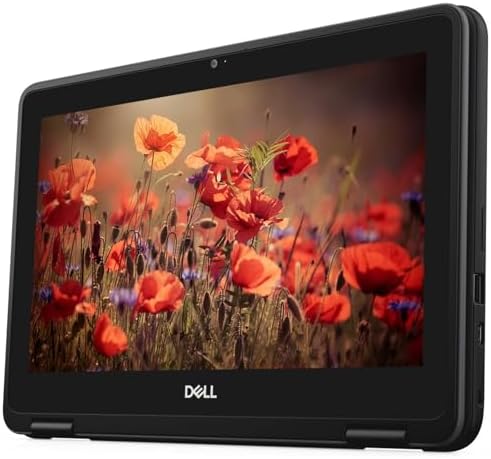
- 【RAM And Storage】This Dell Chromebook Laptop 3100 2-in-1 Computer is 4GB high-bandwidth RAM to smoothly run multiple app…
- 【 Processor】This Dell Chromebook Laptop 3100 2-in-1 Computer is Core Celeron N4000 Processor. This Dual Core Processor i…
- 【Display】This Dell Chromebook Laptop 3100 2-in-1 Computer is 11.6in laptop. Touchscreen 250nits WVA large Display with C…
The Dell Chromebook 3100 2-in-1 is the most consistently available and well-reviewed touchscreen laptop under $100 on Amazon right now. It holds a top ranking in Amazon Renewed’s 2-in-1 laptop category, which tells you something about how often it sells and how buyers respond to it.
This is a rugged 11.6-inch 2-in-1 Chromebook designed by Dell for education and business use. The 360-degree hinge folds flat, turning it from a standard laptop into a proper tablet. The touchscreen responds to standard touch gestures — tap, swipe, pinch to zoom — all the basics you’d expect.
It runs Chrome OS, which keeps things simple. Boot times are fast, updates happen automatically, and Google Docs, Sheets, Gmail, YouTube, and Google Classroom all run natively. Android apps from the Play Store expand what you can do — note-taking apps, streaming services, and drawing tools all work.
The build quality is notably solid for the price point. Dell made this machine to survive school environments, so the chassis handles bumps and drops better than most consumer laptops at five times the price.
Key Specs
- Display: 11.6-inch HD (1366×768) touchscreen
- Processor: Intel Celeron N4000, up to 2.6 GHz
- RAM: 4 GB
- Storage: 32 GB eMMC
- OS: Chrome OS
- Ports: USB Type-C, USB 3.0
- Form Factor: 2-in-1 convertible (360° hinge)
- Condition: Amazon Renewed (inspected and tested)
Pros
- Best Seller ranking in Amazon Renewed — consistently high-volume seller with strong buyer feedback
- Rugged build quality — designed to withstand school and field use, notably durable for the price
- 2-in-1 flexibility — laptop, tent, stand, and tablet modes all work well
- Type-C port included — useful for charging and modern peripherals
- Fast Chrome OS — boots in seconds, runs Google apps flawlessly
Cons
- 32 GB storage fills up quickly — you’ll rely on Google Drive or a microSD card for files
- 1366×768 resolution — fine for everyday tasks, but not a sharp display by modern standards
- Chrome OS only — no native Windows apps; requires workarounds for certain software
- 4 GB RAM limits heavy multitasking — keeping 10+ browser tabs open slows things down
Buyer Sentiment
Consistently well-rated on Amazon with strong repeat purchase patterns in the Amazon Renewed category.
What Buyers Are Saying
Buyers frequently highlight the solid build quality as a standout feature at this price point. Positive feedback focuses on reliable performance for Google Classroom, email, and light office work. A recurring pattern in critical reviews points to storage running out quickly, with most buyers recommending adding a microSD card right away.
2. Lenovo 300E Chromebook Gen 2 (Renewed) — Best for Students

- 【Powerful Processor】: This renewed Lenovo 300E Gen 2 touchscreen laptop is equipped with an Intel Celeron N4020 processo…
- 【Sufficient Storage Space】: This renewed Lenovo Chromebook comes with 4 RAM and 32 hard drive space, which can help you …
- 【Rich Ports】This renewed Lenovo Chromebook TouchScreen Computer is equipped with multiple ports (2 × USB-C 3.1 Gen 1, 2 …
The Lenovo 300E Gen 2 is one of the most popular refurbished touchscreen laptops on Amazon, currently ranked #1,084 in Amazon Renewed overall — a very high position that indicates strong, consistent sales volume.
Lenovo built this specifically for student use, and it shows. The 360-degree hinge works through four distinct usage modes: Laptop (standard), Stand (propped for video), Tent (for shared viewing), and Tablet (flat, touchscreen-forward). For a student who might use it at a desk, on a lap, during presentations, or for reading, the flexibility is genuinely useful.
The 11.6-inch HD IPS touchscreen offers slightly better viewing angles than the standard TN panels on some competing models — colors are more accurate when viewed from the side, which matters in classroom settings where students share screens.
The Intel Celeron N4020 processor handles everything Chrome OS needs. Web browsing, Google Docs, YouTube, video calls, and Android apps from the Play Store all run without noticeable lag. Battery life is rated at around 10 hours under typical use, which comfortably covers a school day.
The build uses Lenovo’s education-grade reinforced design with spill resistance and a rubberized edge — this isn’t a machine that will shatter at the first drop.
Key Specs
- Display: 11.6-inch HD (1366×768) IPS touchscreen, anti-glare
- Processor: Intel Celeron N4020, 1.1 GHz (up to 2.8 GHz)
- RAM: 4 GB
- Storage: 32 GB SSD
- OS: Chrome OS
- Ports: USB Type-C, USB 3.0, HDMI, 4-in-1 SD card reader, Kensington lock
- Battery Life: Approximately 10 hours
- Form Factor: 2-in-1 convertible (360° hinge), 4 usage modes
- Condition: Amazon Renewed (inspected and tested)
Pros
- #1 in Amazon Renewed overall — one of the best-selling renewed laptops across all categories
- IPS display — better color accuracy and viewing angles than standard TN panels at this price
- 4 usage modes — laptop, stand, tent, and tablet all supported by the 360° hinge
- Strong port selection — HDMI, Type-C, USB 3.0, and SD card reader in one machine
- Education-grade durability — Lenovo’s spill resistance and rubberized bumper edges
- 10-hour rated battery — enough for a full school day
Cons
- 32 GB storage is limiting — same storage constraint as most machines in this category
- 4 GB RAM — adequate for solo tasks but noticeable when running multiple Chrome tabs and Android apps simultaneously
- Japanese keyboard variant in some listings — check the listing details carefully; some Renewed variants shipped to the US originally had Japanese keyboards (keys still work normally, layout labeling may differ)
- No backlit keyboard — harder to use in low-light conditions
Buyer Sentiment
Highly rated among student buyers and education-focused reviewers on Amazon Renewed, with one of the highest sales rankings in the renewed laptop category.
What Buyers Are Saying
Buyers commonly praise the multi-mode flexibility and the IPS screen quality relative to other options at this price. Many note it performs reliably for Google Classroom, YouTube, and light productivity. A notable pattern in reviews mentions the Japanese keyboard labeling on some units — buyers emphasize the keys function exactly as a US layout would, just with some Japanese characters also printed on them.
3. HP Chromebook x360 11 G3 EE (Renewed) — Best Battery Life and Build

- Seamless Performance: Equipped with the efficient Intel Core i5-7Y54 CPU and 8GB of RAM, this laptop delivers smooth per…
- Instant Boot-Up & Storage: The 128GB Solid State Drive (SSD) ensures near-instant boot times and fast file access, signi…
- The durable hinge transforms the 11.6-inch Touchscreen Display into four distinct modes (Laptop, Tent, Stand, and Tablet…
The HP Chromebook x360 11 G3 EE stands apart from the other picks in one meaningful way: it’s an Education Edition model. That “EE” designation isn’t just a label — HP engineered this machine specifically to survive school environments, with reinforced ports, extra-durable hinge construction, and resistance to everyday abuse.
The “x360” design means the lid rotates a full 360 degrees, enabling laptop, tent, stand, and tablet modes — same as the Lenovo above. What’s different here is the IPS display and the particularly strong battery life rating of 11.5 hours, which is among the best in this entire price category.
HP’s x360 11 G3 EE runs on the same Intel Celeron N4020 processor as the Lenovo 300E Gen 2, so performance is comparable. The real differentiator is the more premium build quality — the x360’s chassis feels more solid in hand, and the hinge has been specifically tested for the kind of repeated opening and closing that school environments demand.
The Intel UHD Graphics 600 handles standard video playback and light visual tasks without issue. The webcam supports standard video calls for Google Meet or Zoom. USB Type-C and standard USB 3.0 ports provide connectivity flexibility.
For buyers who will use this machine daily — students, mobile workers, anyone who relies on it constantly — the HP’s durability edge over standard consumer Chromebooks at this price is worth considering.
Key Specs
- Display: 11.6-inch HD IPS touchscreen (1366×768)
- Processor: Intel Celeron N4020, Intel UHD Graphics 600
- RAM: 4 GB LPDDR4
- Storage: 32 GB Flash Memory
- OS: Chrome OS
- Ports: USB Type-C, USB 3.0, headphone/mic combo
- Battery Life: Up to 11.5 hours (rated)
- Form Factor: 2-in-1 Education Edition (360° hinge, 4 modes)
- Special Features: Reinforced ports, extra-durable hinge, spill-resistant design
- Condition: Amazon Renewed (inspected and tested)
Pros
- Education Edition durability — reinforced ports, durable hinge, built for heavier daily use than standard consumer models
- 11.5-hour battery — highest rated battery life in this roundup
- IPS touchscreen — better viewing angles and color accuracy than TN panels
- Strong Amazon Renewed ranking — #1,788 overall in Amazon Renewed (#54 in 2-in-1 laptops), indicating high buyer satisfaction
- Solid hinge design — x360 mechanism engineered for repeated use in field/school conditions
Cons
- 32 GB storage — the same limitation that affects all machines in this category
- 4 GB RAM ceiling — fine for most Chromebook tasks, but heavy multitaskers will feel it
- No keyboard backlight — not ideal for dimly lit environments
- Renewed-only availability — no new units available at this price; condition grading varies between “Like New” and “Good” depending on the listing
Buyer Sentiment
Well-regarded among Amazon Renewed buyers, particularly those who specifically note the durability and battery life as reasons for their positive reviews.
What Buyers Are Saying
Review patterns consistently highlight the build quality and battery life as standout strengths. Buyers who chose this over cheaper Chromebooks mention the Education Edition durability as a deciding factor. Critical feedback tends to focus on storage limitations, consistent with the rest of this category, and occasional cosmetic wear on Renewed units in lower condition grades.
4. Dell Chromebook 11 3100 Touchscreen 2-in-1 (Renewed) — Best Budget Pick

- Included components: Power Adapter
- Wattage: 65.0 watts
- type: Limited
The Dell Chromebook 11 3100 (N4020 variant) is the lean, no-frills sibling of the 3100 2-in-1 we covered as our first pick. Where that one prioritizes all-around value, this one is for buyers who want the absolute lowest entry point on a functional, touchscreen Chromebook from a major brand.
It features a slightly updated processor — the Intel Celeron N4020 (dual-core, up to 2.8 GHz) — compared to the N4000 in some earlier 3100 variants. In practical terms, the difference is modest, but the N4020 handles multitasking slightly more smoothly.
The 11.6-inch HD touchscreen is responsive for basic touch interactions. The 2-in-1 hinge folds fully to tablet mode. Chrome OS runs quickly on this hardware. The Type-C port adds modern charging and peripheral compatibility.
What you give up at this price tier: 32 GB of storage (expandable via microSD), 4 GB of RAM, and a display that’s functional rather than impressive. This is a machine for someone who needs to browse the web, use Google Docs, watch YouTube, and join video calls — and nothing more demanding than that.
Dell’s build quality still shows through even in this more stripped-back configuration. The chassis is more solid than no-name budget alternatives, and the machine benefits from Dell’s product support infrastructure if anything needs addressing.
Key Specs
- Display: 11.6-inch HD (1366×768) touchscreen
- Processor: Intel Celeron N4020, up to 2.8 GHz
- RAM: 4 GB
- Storage: 32 GB Flash Memory
- OS: Chrome OS
- Ports: USB Type-C, USB 3.0
- Form Factor: 2-in-1 (360° hinge)
- Condition: Amazon Renewed
Pros
- Lowest price entry point in this roundup while still being a recognized brand
- N4020 processor — slightly faster than the older N4000 in some competing listings
- Dell build quality — noticeably more durable than unbranded budget alternatives
- Type-C port — modern charging compatibility
- 2-in-1 flexibility — full 360° hinge for tablet mode
Cons
- 32 GB storage — fills up faster than you’d expect, even on Chrome OS
- 4 GB RAM — a noticeable constraint when running multiple tasks
- HD display (not IPS) — narrower viewing angles than the IPS screens on the HP and Lenovo picks above
- No backlit keyboard
- Chrome OS limitations — no Windows apps natively
Buyer Sentiment
Rated highly among budget laptop buyers in the Amazon Renewed category, with consistent positive feedback on performance relative to price.
What Buyers Are Saying
Buyer feedback patterns emphasize the value-for-money proposition. Many reviewers note this as an excellent second device or a capable machine for kids doing schoolwork. Critical reviews follow the predictable pattern for the category: storage fills up quickly, and the screen isn’t the brightest. Overall, buyers who set realistic expectations for a sub-$100 laptop tend to be satisfied.
Buyer’s Guide: How to Choose the Right Touchscreen Laptop Under $100
Understand What “Under $100” Actually Means in 2026
Let’s be direct about something. You will not find a new touchscreen laptop from a major brand for under $100 in 2026. The market simply doesn’t offer that. What you will find — and what all four picks in this article represent — are Amazon Renewed or certified refurbished machines from Dell, HP, and Lenovo.
Amazon Renewed products are inspected by qualified suppliers, tested to work and look like new, and backed by the Amazon Renewed Guarantee. If a product doesn’t meet your expectations within 90 days, Amazon will replace or refund it. This is a meaningful backstop for buyers who are cautious about refurbished hardware.
The important distinction: Amazon Renewed is not the same as used marketplace items. Amazon has specific standards for Renewed products, including inspection criteria and seller qualification requirements.
Chrome OS vs Windows — Which Is Right for You?
All four picks in this roundup run Chrome OS. That’s not an accident — Chrome OS laptops dominate the under-$100 Renewed market because they were produced in large volumes for education (K–12 schools bought millions of these), and many units come back into the market after school leases expire.
Chrome OS is the right choice if:
- You primarily use Google services (Gmail, Drive, Docs, Sheets, Google Classroom)
- You stream video from YouTube, Netflix, Disney+
- You want a fast, low-maintenance OS that doesn’t require antivirus software
- You’re a student or light home user
- You want Android app access through the Google Play Store
You might need Windows if:
- You need to run specific Windows-only applications
- Your workplace requires Microsoft 365 desktop apps (not browser-based)
- You need compatibility with enterprise IT tools
If you specifically need Windows, the Dell Latitude 3190 2-in-1 (available on Amazon Renewed at ASIN B0BK2Z5QGC for some variants and related listings) offers a Windows 11 touchscreen option — though these often approach or slightly exceed $100 depending on the configuration. Confirm availability and price at the time of purchase.
Auto Update Expiration: The Chrome OS Factor You Must Check
Chrome OS devices have an Auto Update Expiration (AUE) date — the date after which Google stops delivering software and security updates to that device. After AUE, the device still works, but it no longer receives OS patches or new Chrome features.
For the devices in this roundup, AUE dates are:
- Dell Chromebook 3100 (N4000/N4020): Check the specific model — typically June 2027–2029
- Lenovo 300E Gen 2 (Intel variant): Check with Google’s AUE list
- HP x360 11 G3 EE: Typically June 2027–2029
You can verify the exact AUE date for any Chromebook model at Google’s official Chromebook End of Life list. Always check before buying.
The Storage Reality: 32 GB Is Not Enough on Its Own
Every laptop in this roundup comes with 32 GB of internal storage. That number sounds fine but fills up faster than you expect. Chrome OS itself uses around 8–10 GB. A handful of Android apps, downloaded files, and offline documents can push you toward the limit quickly.
The practical solution: add a microSD card. All four of these machines have microSD card slots. A 128 GB or 256 GB microSD card costs $15–$25 on Amazon and effectively solves the storage problem. Budget for this alongside the laptop purchase.
Google Drive is the other answer. Chrome OS is designed around cloud storage, and Google gives you 15 GB free with any Google account. If most of your files live in the cloud, 32 GB of local storage is more manageable.
RAM: Why 4 GB Has a Practical Ceiling
All four picks have 4 GB of RAM. On Chrome OS, 4 GB works fine for most typical tasks — browsing with 4–6 tabs, streaming video, Google Docs work. It starts to feel constrained when you’re running 10+ tabs simultaneously, playing graphics-heavy Android games, or using video editing apps.
If your use case involves heavy multitasking, understand this limitation upfront. For students, office workers, and casual users, 4 GB on Chrome OS is genuinely adequate.
Buying Amazon Renewed: What to Look For
When buying Amazon Renewed laptops, pay attention to the condition grade:
- Renewed — Like New: Minimal or no cosmetic wear, fully functional
- Renewed — Excellent: Minor cosmetic wear (light scratches), fully functional
- Renewed — Good: Moderate cosmetic wear, fully functional
- Renewed — Acceptable: Heavier cosmetic wear, fully functional
For a laptop you’ll use every day, aim for “Excellent” or “Like New” if the price difference is small. “Good” is fine for a second device or budget-first purchase. “Acceptable” is best for buyers who prioritize pure function over appearance.
What These Laptops Are Good At (and Not Good At)
Excellent for:
- Google Classroom, Docs, Sheets, Slides
- Email and calendar
- YouTube, Netflix, Spotify streaming
- Video calls via Google Meet or Zoom (browser-based)
- Light note-taking and research
- Children’s educational use
- Travel or backup laptop
Not suitable for:
- Windows-specific software (QuickBooks, Photoshop, AutoCAD)
- Heavy video editing or audio production
- 3D gaming or graphics-intensive applications
- Running virtual machines
- Running more than 8–10 Chrome tabs simultaneously without performance impact
FAQ: Touchscreen Laptops Under $100
Are touchscreen laptops under $100 actually worth buying?
Yes — with the right expectations. The machines in this roundup are professionally refurbished models from Dell, HP, and Lenovo sold through Amazon’s Renewed program. They’re backed by Amazon’s 90-day guarantee and run reliably for everyday tasks. They’re not gaming machines or professional workstations. For students, light work, travel, or a backup device, they deliver genuine value at the price.
What is Amazon Renewed, and is it safe to buy from?
Amazon Renewed is Amazon’s program for refurbished products. Sellers must meet Amazon’s quality standards, and each product is inspected and tested. The key protection is the Amazon Renewed Guarantee: if your product doesn’t work as expected within 90 days, Amazon will replace it or refund your purchase. It’s a meaningful consumer protection that makes Renewed purchases significantly safer than random used marketplace listings.
Do these laptops run Windows?
No — all four picks in this roundup run Chrome OS. Chrome OS is Google’s operating system built around the Chrome browser and Google services. It’s simpler and faster than Windows on this level of hardware, but it doesn’t run native Windows applications. If you need Windows specifically, look for Renewed Dell Latitude or HP EliteBook models in the $80–$100 range, though availability at that price for Windows machines is more limited.
Can I use Microsoft Office on a Chromebook?
You can use Microsoft 365 through a web browser (office.com) on any Chromebook — no installation required. The browser-based versions of Word, Excel, and PowerPoint handle most common tasks. Alternatively, Android versions of Microsoft 365 apps are available through the Google Play Store on supported Chromebooks. Native Windows desktop Office apps do not install on Chrome OS.
What’s the Chrome OS Auto Update Expiration, and why does it matter?
Chrome OS devices receive automatic security and software updates from Google up until their Auto Update Expiration (AUE) date. After that date, the device still works, but it no longer receives updates. For a security-conscious buyer, an AUE date within 1–2 years is a meaningful concern. Check Google’s official AUE list before buying any Chromebook by searching “Google Chromebook End of Life list” — it’s a free, official resource that lists every Chromebook model and its AUE date.
How much storage do I actually need on a Chromebook?
Most Chromebook users find 32 GB of local storage adequate if they pair it with a microSD card and use Google Drive. A 128 GB microSD card ($15–$25) essentially solves the storage limitation. Chrome OS is designed around cloud storage, so documents, photos, and files you keep in Google Drive don’t count against local storage. If you download a lot of Android apps or want offline files, a microSD card is a near-essential addition.
What’s the difference between the Dell 3100 2-in-1 and the Dell Chromebook 11 3100 in this article?
Both are Dell Chromebook 3100 models. The primary differences between variants involve the processor generation (N4000 vs N4020) and the specific Renewed listing. The N4020 processor in the fourth pick handles multitasking slightly better than the N4000. Both are 2-in-1 convertibles with touchscreens. The first pick (B0FQV6VC3L) and the fourth pick (B0BK2Z5QGC) are different Renewed listings for closely related configurations — check both listings for current pricing, as stock and prices fluctuate.
Is 4 GB of RAM enough for school use in 2026?
For Chrome OS and typical school tasks, yes. Google Classroom, Google Docs, Sheets, email, and YouTube all run well on 4 GB. The limitation shows when running 10+ Chrome tabs simultaneously or using multiple Android apps at the same time. For K–12 students doing standard schoolwork, 4 GB on Chrome OS is sufficient. College students with heavier research workflows may want to keep Chrome tabs managed and avoid running too many applications simultaneously.
Conclusion
Finding a reliable touchscreen laptop under $100 in 2026 comes down to the Amazon Renewed market — and these four picks represent the best verified options available right now.
For most buyers, the Lenovo 300E Chromebook Gen 2 is the strongest all-around pick. Its #1 position in Amazon Renewed, IPS display, 10-hour battery, and 4-mode flexibility make it the best combination of value and features in this category.
If battery life is your top priority, the HP Chromebook x360 11 G3 EE edges ahead with its Education Edition durability and 11.5-hour rating.
For the most budget-conscious buyer, the Dell Chromebook 11 3100 gets you a touchscreen 2-in-1 from a major brand at the floor of this price range.
No matter which you choose, add a microSD card to handle the storage limitation — it’s the single most impactful $15 upgrade you can make on any of these machines.
If you’re building out a full home office setup alongside your new laptop, check out our guide on the best standing desks on Amazon to put together a comfortable, ergonomic workspace.
External Resources
- Google Chromebook Auto Update Policy — Google’s official, searchable list of every Chromebook model and its exact Auto Update Expiration date. Check any model before buying to confirm how many years of updates remain.
- Google Chrome OS Official Overview — Google’s own explanation of what Chrome OS is, what it does, and which Google services and Android apps work on Chromebooks — useful for buyers deciding whether Chrome OS fits their workflow.
- Amazon Renewed Guarantee Terms — Amazon’s official page explaining the Amazon Renewed Guarantee, what it covers, and how to use it if a product doesn’t meet your expectations after purchase.
As an Amazon Associate I earn from qualifying purchases. Product availability and pricing are accurate at time of research but subject to change. Always verify current availability and price on Amazon before purchasing. Refurbished product condition grades vary by listing.

MD.HASAN is an experienced SEO expert and amazon products review writer passionate about helping people find right products on amzon for buy without confusion. With 4 years of hands-on experience in content strategy and search engine optimization, he specializes in writing SEO-friendly blog posts that rank, engage, and convert.