
Affiliate disclosure: As an Amazon Associate, Tech Rig Review earns from qualifying purchases. Links on this page may be affiliate links, at no extra cost to you.
Looking for the best Evoluent vertical wireless mouse? We compared 6 Evoluent models plus 4 top alternatives that are on Amazon right now.
If you want the best Evoluent wireless vertical mouse on Amazon, the hard part isn’t finding one. The hard part is picking the right one. Evoluent sells several wireless models. They have names like VMDMW, VMDLW, VM4RW, and VMC. They also come in different sizes. Pick the wrong size and the mouse will feel awkward.
This guide makes that choice easy. We compared six Evoluent wireless vertical mice that are listed on Amazon right now. We also added four strong non-Evoluent options for people who want a left-handed mouse, a lower-cost mouse, or a mouse with extra features.
I did not buy or hold these mice. This is a research-based comparison. I compared official specs, product listings, sizing charts, and the common feedback themes buyers mention. I checked each product page to confirm it is listed on Amazon before adding it. Where I could not confirm a detail, I say so.
If you are building a more comfortable desk, you may also like our 10 Best Amazon Wireless Mouse roundup and our guide on how to use a laptop stand for better posture. Both pair well with a vertical mouse.
A quick note on prices: Amazon prices change often. So I do not list any prices here. Use the “Check Price on Amazon” links to see the current price, colors, and sizes.
Table of Contents
Quick Comparison: Best Evoluent Vertical Mouse Wireless Picks
| Product | Best For | Key Feature | Buyer Sentiment | Link |
|---|---|---|---|---|
| Evoluent VerticalMouse D Medium Wireless (VMDMW) | Best Overall for Most Hands | USB wireless, 6 buttons, Mouse Manager software | Well regarded among ergonomic mouse buyers | Check Price |
| Evoluent VerticalMouse C Classic Wireless (VMC) | Best for Switching Devices | Dual mode: Bluetooth or USB receiver | Positively received | Check Price |
| Evoluent VerticalMouse D Large Wireless (VMDLW) | Best for Large Hands | Taller shell for bigger hands | Well regarded by larger-handed users | Check Price |
| Evoluent VerticalMouse D Small Wireless (VMDSW) | Best for Smaller Hands | Compact shell, same layout | Positively received | Check Price |
| Evoluent VerticalMouse 4 Right Wireless (VM4RW) | Best Proven Classic | Pointer-speed LEDs, 6 buttons | Long-standing favorite | Check Price |
| Evoluent VerticalMouse 4 Right Mac Bluetooth (VM4RM) | Best for Mac (No Dongle) | Bluetooth, no receiver needed | Solidly rated among Mac users | Check Price |
| Logitech Lift Vertical Ergonomic Mouse (Right) | Best Alternative: Quiet Clicks | Bluetooth or Logi Bolt, quiet clicks | Consistently well-rated | Check Price |
| Logitech Lift Left-Handed | Best for Left-Handed Users | True left-hand shape | Well-rated among left-handed buyers | Check Price |
| Razer Pro Click V2 Vertical | Best Feature-Rich Alternative | 2.4GHz, Bluetooth, and wired USB-C modes | Popular with power users | Check Price |
| Anker 2.4G Wireless Vertical Mouse | Best Budget Alternative | Receiver stores inside the mouse | Popular budget pick | Check Price |
Why Choose an Evoluent Vertical Mouse?
Evoluent has made vertical mice for a long time. Its listings call it the inventor of the vertical mouse, and the brand focuses on one idea: a handshake grip.
With a normal mouse, your palm faces down. That twists your forearm. A vertical mouse turns your hand so it sits more like a handshake. Your forearm stays more neutral. For many people that feels more relaxed over a long workday.
Evoluent mice also have a few features that set them apart:
- A sculpted shape. The mouse supports your hand instead of making you grip it.
- A pinky lip. A wide ledge keeps your little finger off the desk.
- Multiple sizes. Evoluent offers small, medium, and large options in some lines. That matters, because a vertical mouse only helps if it fits your hand.
- Programmable buttons. On Windows, optional Evoluent Mouse Manager software lets you customize button and wheel actions.
One honest note. A vertical mouse is not a medical device. It may feel better for some people and not for others. If you have ongoing pain, numbness, or tingling, talk to a doctor or a qualified ergonomics specialist.
How We Researched and Picked These Mice
Trust matters when you spend money on a mouse you will touch all day. So here is exactly how this list was built.
Step 1: Start with the Evoluent wireless lineup. I searched Amazon for every Evoluent wireless vertical mouse I could find. That included the VerticalMouse D line, the VerticalMouse 4 line, and the VerticalMouse C line.
Step 2: Confirm each one is listed. I opened the product page for each model and checked that Amazon showed an active listing. I skipped any listing marked as unavailable. For example, a renewed VerticalMouse D Medium listing showed as unavailable during my research, so I left it out.
Step 3: Compare specs side by side. I looked at size, connection type, button count, battery type, and software. I also read the manufacturer’s sizing pages so the hand-size advice is not a guess.
Step 4: Look for patterns in buyer feedback. I looked at the general themes buyers raise. I did not copy any review text, and I did not use star ratings or review counts, because those change daily.
Step 5: Add alternatives for gaps. Evoluent does not cover every need. So I added a left-handed option, a quiet-click option, a feature-rich option, and a budget option.
What I did not do. I did not test these mice in person. Nothing here claims hands-on testing. If a detail could not be verified, I said so in plain words.
6 Best Evoluent Vertical Mouse Wireless Models on Amazon
1. Evoluent VerticalMouse D Medium Wireless (VMDMW) — Best Overall for Most Hands

- This ergonomic mouse features a sleek design that allows for a comfortable grip and reduces the strain on your wrist and…
- The Evoluent wireless mouse is the world’s first mouse with grooved buttons. The shallow groove on buttons where your fi…
- The Smart Scrolling feature of this “VMDMW” vertical mouse varies per notch in response to how you roll the wheel, rangi…
The VerticalMouse D is one of Evoluent’s newer designs, and the Medium wireless model is the one most people should look at first. It is a right-handed vertical mouse that uses a USB wireless receiver. The Amazon listing is a bundle that includes the mouse, a USB-A receiver, a AA battery, and a microfiber cleaning cloth.
According to Evoluent’s sizing information, the Medium size is similar in size to the “standard” VerticalMouse 4. So it suits the largest group of adults. It has a sculpted shell, a thumb rest, a pinky lip, and six buttons. It also has a smart scroll wheel that changes speed based on how you roll it.
Key Specs:
- Hand: Right-handed
- Size: Medium
- Connection: USB wireless receiver (USB-A)
- Buttons: 6
- Adjustable pointer speeds, with sensitivity listed up to 2600 DPI on the D line
- Software: Optional Evoluent Mouse Manager for Windows
- Power: AA battery (included in the bundle listing)
Pros:
- Right size for a wide range of adult hands
- Newer design with smart scrolling
- Buttons can be customized on Windows
- Pinky lip keeps your hand off the desk
- Wireless freedom without a cable
Cons:
- Right-handed only
- Needs a USB-A port for the receiver (a USB-C adapter may be needed on some laptops)
- Takes a few days to get used to the upright grip
Buyer Sentiment: Well regarded among people who want a dedicated ergonomic mouse.
What Buyers Are Saying: Buyers who pick Evoluent mice often say the handshake grip feels more relaxed during long work sessions. A common theme is that sizing matters a lot. People who measure their hand first tend to be happier. Some also mention a short adjustment period.
2. Evoluent VerticalMouse C Classic Wireless (VMC) — Best for Switching Devices

- Sculpted Ergonomic Mouse: Experience natural hand posture with this ergonomic wireless mouse engineered for comfort. Thi…
- Dual Mode Wireless USB/Bluetooth: Switch instantly between wireless vertical mouse and bluetooth ergonomic mouse using t…
- Precision Control With 4 Pointer Speeds: Adjust control easily on this vertical ergonomic mouse. This ergonomic mouse wi…
The VMC Classic is the most flexible wireless Evoluent on this list. It works in two modes. You can connect with a USB receiver, or you can connect with Bluetooth. A power selector lets you switch between the two.
That makes it a good fit if you use a desktop and a laptop, or a work computer and a personal tablet. It is a right-handed mouse for medium to large hands. It has four pointer speeds and a sculpted upright grip.
There is one trade-off to know. This model has two fixed copy and paste buttons. The listing describes them as non-programmable. If you want fully custom buttons, look at the D or VM4 models instead.
Key Specs:
- Hand: Right-handed, medium to large
- Connection: Bluetooth or USB wireless receiver (dual mode)
- Pointer speeds: 4
- Buttons: 6, including fixed Copy and Paste buttons
- Color: Gray
Pros:
- Switch between Bluetooth and USB receiver
- Handy copy and paste buttons for office work
- Good for people with more than one device
- Same handshake grip Evoluent is known for
Cons:
- Copy and paste buttons are not programmable
- Right-handed only
- Less customization than the D and VM4 lines
Buyer Sentiment: Positively received, especially for the dual-mode connection.
What Buyers Are Saying: The dual connection is the feature people mention most. It lets one mouse work with a USB-A desktop and a Bluetooth-only laptop. Some buyers like the simple copy and paste buttons. Others wish those buttons could be changed.
3. Evoluent VerticalMouse D Large Wireless (VMDLW) — Best for Large Hands

- This ergonomic mouse features a sleek design that allows for a comfortable grip and reduces the strain on your wrist and…
- The Evoluent wireless mouse is the world’s first mouse with grooved buttons. The shallow groove on buttons where your fi…
- The Smart Scrolling feature of this “VMDLW” vertical mouse varies per notch in response to how you roll the wheel, rangi…
Many vertical mice are made for small to medium hands. Large hands often overhang the edge. The VMDLW is the answer for that problem. It is a larger version of the VerticalMouse D with a taller shell.
Evoluent’s sizing information says Large is meant for bigger hands. One major retailer’s spec page lists Large for hands longer than about 7.8 inches from palm base to middle fingertip. Because sizing rules vary slightly by source, use Evoluent’s size chart before you buy.
The VMDLW keeps the same wireless USB design as the other D models. It has six buttons, adjustable pointer speed, and a pinky lip.
Key Specs:
- Hand: Right-handed
- Size: Large
- Connection: USB wireless receiver
- Buttons: 6
- Software: Optional Evoluent Mouse Manager for Windows
- Bundle: Includes a microfiber cloth in the Amazon listing
Pros:
- Better fit for large hands and long fingers
- Same programmable button layout as other D models
- Wireless USB receiver
- Large shell supports the whole palm
Cons:
- Too big for average or small hands
- Right-handed only
- Heavier than the Small and Medium versions
Buyer Sentiment: Well regarded by buyers with larger hands.
What Buyers Are Saying: People with larger hands often say standard vertical mice feel cramped. Feedback for Large models tends to focus on fit. Buyers say the right size makes the grip feel natural instead of forced.
4. Evoluent VerticalMouse D Small Wireless (VMDSW) — Best for Smaller Hands

- This ergonomic mouse features a sleek design that allows for a comfortable grip and reduces the strain on your wrist and…
- The Evoluent wireless mouse is the world’s first mouse with grooved buttons. The shallow groove on buttons where your fi…
- The Smart Scrolling feature of this “VMDSW” vertical mouse varies per notch in response to how you roll the wheel, rangi…
A vertical mouse that is too big can cause new strain. You end up stretching to reach the buttons. The VMDSW is built for people with smaller hands. Evoluent’s guidance says hands about 7 inches or shorter fit the Small size.
It has the same layout as the other D models. That includes the smart scroll wheel, six buttons, and wireless USB receiver. The Amazon listing says the box includes the mouse, a AA battery, a USB-A receiver, and a microfiber cloth.
Key Specs:
- Hand: Right-handed
- Size: Small
- Connection: USB wireless receiver (USB-A)
- Buttons: 6
- Includes: Mouse, 1 AA battery, receiver, microfiber cloth (per listing)
Pros:
- Comfortable reach for smaller hands
- Keeps the same features as larger D models
- Smart scrolling
- Lightweight feel compared with the Large version
Cons:
- Too small for large hands
- Right-handed only
- Needs a USB-A port
Buyer Sentiment: Positively received by smaller-handed users.
What Buyers Are Saying: Buyers with smaller hands often say it is hard to find a vertical mouse that fits. Feedback on small models tends to praise easy reach to the thumb buttons. The most common advice is to measure your hand before you order.
5. Evoluent VerticalMouse 4 Right Wireless (VM4RW) — Best Proven Classic
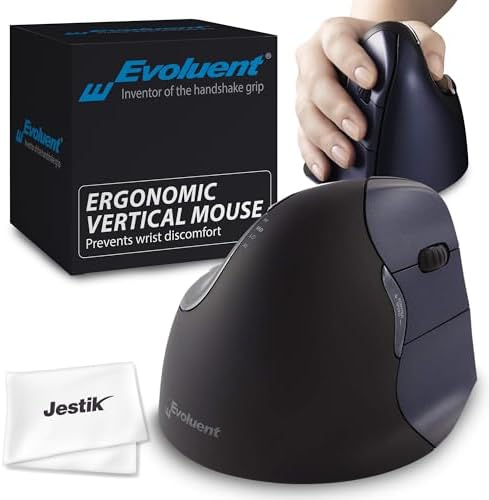
- PREVENTS WRIST DISCOMFORT – Evoluent’s ergonomic VM4RW VerticalMouse 4 gently supports your right hand in an upright neu…
- PROGRAM YOUR MOUSE TO YOUR NEEDS – Install the Evoluent Mouse Manager onto your computer to configure the VerticalMouse’…
- ADJUST MOUSE-SPEED FROM LOW TO HIGH – You can adjust the pointer speed from low to high with the optical sensor controls…
About the Product: The VerticalMouse 4 is an older design, and many Evoluent fans still prefer it. The wireless right-hand model is called VM4RW. It uses a USB receiver for standard USB-A ports.
Evoluent says the regular size fits hands of about 7 inches (178 mm) or more, measured from the tip of the middle finger to the wrist crease. Shorter hands may do better with the small version.
The VM4RW has six buttons, four pointer speeds, and top-mounted LED lights that show which speed you picked. On Windows, you can program all six buttons with the included driver.
Key Specs:
- Hand: Right-handed
- Size: Regular
- Connection: USB wireless receiver (USB-A)
- Buttons: 6, programmable in Windows with the driver
- Pointer speed: Adjustable, with LED indicators
- Power: AA battery
Pros:
- A long-running design with a loyal following
- Pointer speed lights are easy to read
- All six buttons are programmable on Windows
- Pinky support keeps your hand off the desk
Cons:
- Older design than the D series
- Right-handed only
- Full customization needs the Windows driver
Buyer Sentiment: A long-standing favorite among vertical mouse users.
What Buyers Are Saying: Many buyers say they stick with the VerticalMouse 4 because the shape and button layout are familiar. Feedback often highlights comfort during long desk days. Some say the learning curve is real, but they feel it was worth it.
6. Evoluent VerticalMouse 4 Right Mac Bluetooth (VM4RM) — Best for Mac (No Dongle)

- Ergonomic Design for Wrist Comfort – The Evoluent VM4RB Vertical Mouse 4 gently supports your hand in an upright neutral…
- Programmable Buttons for Personalized Use – Easily customize button functions using the included Evoluent Mouse Manager …
- Adjustable Pointer Speed – Effortlessly control your cursor with speed settings ranging from low to high using the contr…
Newer MacBooks often have only USB-C ports. A USB-A receiver means you need an adapter. The VM4RM avoids that problem. It connects by Bluetooth, so no receiver is needed.
The Amazon listing says it uses one AA battery, which lasts about three months with average use. Please confirm that on the live listing, because battery life depends on how you use the mouse.
This is the same regular-size VerticalMouse 4 shape. It is right-handed and suits hands of about 7 inches or more, per Evoluent’s sizing page.
Key Specs:
- Hand: Right-handed
- Size: Regular
- Connection: Bluetooth (no receiver)
- Power: 1 AA battery (included, per listing)
- Compatibility: Made for Mac, per the listing
Pros:
- No dongle or USB port needed
- Good match for USB-C-only MacBooks
- Same trusted VerticalMouse 4 shape
- Pinky support included
Cons:
- Right-handed only
- Designed with Mac in mind, so check compatibility if you use Windows
- Fewer customization options than the Windows driver offers
Buyer Sentiment: Solidly rated among Mac users.
What Buyers Are Saying: Mac users often say they like skipping the dongle. A common theme is that Bluetooth pairing is simple. Some buyers note that button customization is more limited than on Windows.
4 Best Alternatives to Evoluent Wireless Vertical Mice
Evoluent is great, but it is not for everyone. These four picks cover left-handed users, quiet-click fans, feature-hungry users, and budget shoppers.
7. Logitech Lift Vertical Ergonomic Mouse (Right-Handed) — Best Alternative: Quiet Clicks

- Lift yourself up: When the desk life gets you down, lift yourself up with Logitech Lift Vertical Ergonomic Mouse – a gre…
- Raise your hand into comfort: Rest on Lift upright mouse throughout the day, with a softly textured grip and snug thumb …
- 57 degrees of sooooothe: Lift’s vertical shape helps wrists feel like “ahhh” at work, and promotes a more natural postur…
The Logitech Lift is one of the best-known vertical mice besides Evoluent. It uses a gentler 57-degree angle. Logitech says it is built for small to medium hands. It connects by Bluetooth or the included Logi Bolt USB receiver. The clicks are quiet, which helps in shared spaces.
Logitech also says the Lift was developed and approved using criteria set by ergonomists. Treat that as the maker’s claim, not a medical promise.
Key Specs:
- Hand: Right-handed
- Hand size: Small to medium (per Logitech)
- Connection: Bluetooth or Logi Bolt receiver
- Buttons: 6, with 4 customizable
- Software: Logi Options+
- Clicks: Quiet
Pros:
- Quiet clicks suit offices and shared rooms
- Bluetooth plus receiver options
- Gentler angle can be easier to adjust to
- Works with Windows and Mac
Cons:
- Not made for large hands
- Fewer programmable buttons than Evoluent’s six
- Smaller shell than the Evoluent Large
Buyer Sentiment: Consistently well-rated on Amazon.
What Buyers Are Saying: Buyers often call it an easy first vertical mouse. Many like the quiet clicks. Some people with larger hands say it feels a bit small.
8. Logitech Lift Left-Handed — Best for Left-Handed Users

- Lift yourself up: When the desk life gets you down, lift yourself up with Logitech Lift Vertical Ergonomic Mouse – a gre…
- Raise your hand into comfort: Rest on Lift upright mouse throughout the day, with a softly textured grip and snug thumb …
- 57 degrees of sooooothe: Lift vertical shape helps wrists feel like “ahhh” at work, and promotes a more natural posture …
In my research, the Evoluent wireless models I found were right-handed. Left-handed users have fewer choices. The Logitech Lift Left-Handed fills that gap. It is a true left-hand shape, not a flipped right-hand mouse.
It has the same features as the right-hand Lift. That includes the 57-degree angle, quiet clicks, Bluetooth, and a Logi Bolt receiver. It is built for small to medium hands.
Key Specs:
- Hand: Left-handed
- Hand size: Small to medium
- Connection: Bluetooth or Logi Bolt receiver
- Buttons: 6, with 4 customizable
- Compatibility: Windows and Mac
Pros:
- A real left-hand design
- Quiet clicks
- Flexible wireless options
- Same trusted Lift platform
Cons:
- Smaller size is not ideal for large hands
- Fewer left-handed vertical mice to compare
- Less customizable than Evoluent on Windows
Buyer Sentiment: Well-rated among left-handed buyers.
What Buyers Are Saying: Left-handed buyers often say they are glad a proper left-hand vertical mouse exists. A common theme is relief at not using a right-hand shape with the wrong hand.
9. Razer Pro Click V2 Vertical — Best Feature-Rich Alternative

- VERTICAL 6 BUTTON ERGONOMIC DESIGN WITH BASE SUPPORT — Shaped for a natural handshake grip, its angled design promotes t…
- AI PROMPT MASTER — Summarize text, draft emails and more with just one click; unlock powerful shortcuts via Razer Synaps…
- LONG BATTERY LIFE — Powered by an efficient, long lasting battery, game and create for up to 6 months* without interrupt…
The Razer Pro Click V2 Vertical is aimed at office users who also want gaming-grade tech. It supports three connection modes: a 2.4GHz wireless dongle, Bluetooth, and wired USB-C. It has six buttons, an optical sensor with a very high maximum DPI, and Chroma RGB lighting.
It also has a one-click AI prompt button. The box includes the dongle and a USB-A to USB-C cable. Razer advertises long battery life. Check the listing for the current claim.
Key Specs:
- Hand: Right-handed
- Connection: 2.4GHz dongle, Bluetooth, or wired USB-C
- Buttons: 6
- Lighting: Chroma RGB
- Charging: USB-C
- Software: Works without Razer Synapse, per Razer’s listing
Pros:
- Three connection modes
- Rechargeable battery
- Strong sensor and RGB lighting
- Works on Windows and Mac
Cons:
- Gaming looks may not suit a plain office
- Right-handed only
- Often costs more than basic vertical mice
Buyer Sentiment: Popular with power users.
What Buyers Are Saying: Buyers who pick it often mention the three connection modes and the tidy tracking. Some say it feels more like a gaming mouse than a classic ergonomic mouse.
10. Anker 2.4G Wireless Vertical Ergonomic Mouse — Best Budget Alternative

- Experience enhanced comfort and productivity with the Anker 2.4G Wireless Vertical Ergonomic Optical Mouse. Its scientif…
- Enjoy superior sensitivity and precision with this wireless mouse. It boasts 800/1200/1600 DPI Resolution Optical Tracki…
- The Anker Ergonomic Mouse is not only convenient but also user-friendly. It comes with next/previous buttons for effortl…
If you only want to try a vertical mouse, Anker’s model is a low-risk way to start. It uses a 2.4GHz receiver that stores in the bottom of the mouse. It has three DPI levels (800, 1200, 1600) and a handshake-style shape.
The listing says it uses two AAA batteries, which are not included. This mouse has fewer features than Evoluent, and it does not come in sizes. It is a simple way to test whether the vertical style suits you.
Key Specs:
- Hand: Right-handed
- Connection: 2.4GHz USB receiver (stores in the mouse)
- DPI: 800 / 1200 / 1600
- Buttons: 5, per the Amazon listing
- Power: 2 AAA batteries (not included)
Pros:
- Budget-friendly way to try a vertical mouse
- Receiver stores neatly inside
- Simple setup
- Light and easy to move
Cons:
- Single size, so fit varies
- Fewer buttons and no advanced software
- Batteries are not included
Buyer Sentiment: A popular budget pick.
What Buyers Are Saying: Buyers often call it a good trial mouse. Many say it helps them learn whether they like the vertical style before they pay more for a premium option.
Your First Week With a Vertical Mouse: Simple Setup Tips
A vertical mouse feels strange at first. That is normal. These steps make the first week smoother.
- Set the pointer speed low. Start on a slow setting. Your hand is learning a new motion. Slow speeds give you more control.
- Use it in short sessions. Try one hour at a time on day one. Add more time each day.
- Rest your whole forearm. Let the mouse sit under your hand. Do not grip it hard. OSHA’s workstation guidance also warns against tightly gripping a mouse.
- Keep the mouse next to the keyboard. Reaching far away pulls your elbow out and strains your shoulder. Keep both at the same height.
- Use your wrist less and your arm more. Move the mouse with your forearm and elbow. This keeps your wrist neutral.
- Learn a few keyboard shortcuts. Copy, paste, and tab switching cut mouse use. That gives your hand a break.
- Take short breaks. Stand, stretch, and shake out your hands every 30 to 60 minutes.
- Customize your buttons on Windows. If you use Evoluent Mouse Manager, assign your most-used actions to the thumb buttons. Back, forward, and copy are popular choices.
If you work from a laptop, a stand and a separate keyboard make the whole setup easier. Our guide on how to use a laptop stand shows how to build it.
Who Should Skip a Vertical Mouse?
Vertical mice are not for everyone. Here are a few cases where you may want a different type.
- You game competitively. Some fast-paced games reward a palm-down grip. A standard gaming mouse may suit you better.
- You move between many computers daily and carry a mouse in a bag. Vertical mice are taller. A flat travel mouse packs easier.
- You have a very small hand. Even small vertical mice can feel large. A trackball or a small flat mouse may fit better.
- You want a quick fix for pain. A mouse alone will not solve everything. Posture, breaks, and workstation setup matter too. If pain continues, see a doctor.
If you are not sure, the Anker option is a low-risk way to test the style first.
How to Choose the Right Evoluent Vertical Mouse Wireless Model
Picking the right Evoluent is mostly about four things. Fit, connection, features, and desk setup.
1. Measure Your Hand First
Size is the single most important choice. A mouse that is too small makes you curl your fingers. A mouse that is too big makes you stretch.
Evoluent says its regular VerticalMouse 4 models suit hands of about 7 inches (178 mm) or longer, measured from the middle fingertip to the wrist crease. Hands shorter than that may fit the Small model better. For the VerticalMouse D line, one major retailer lists Small for hands up to 7 inches, Medium for about 7 to 7.8 inches, and Large for hands over 7.8 inches. Sources differ a little, so check Evoluent’s official size guide before you buy.
2. Pick Your Connection Type
- USB receiver (2.4GHz): Usually a stable, fast connection. You need a free USB-A port.
- Bluetooth: No dongle. Good for MacBooks and tablets.
- Dual mode: The VMC Classic can do both. It is the most flexible choice.
If your laptop has only USB-C ports, a Bluetooth model like the VM4RM or the VMC may be easier than a receiver model.
3. Decide How Much Customization You Want
Evoluent’s Mouse Manager software lets Windows users reassign buttons and wheel actions. If you love shortcuts, pick a D or VM4 model. If you want simple copy and paste buttons, the VMC may be enough.
4. Think About Handedness
Based on my research, Evoluent’s wireless models are right-handed. Left-handed buyers can look at the Logitech Lift Left-Handed. Confirm on Evoluent’s site if new left-handed wireless models have launched.
5. Plan for a Short Adjustment Period
Almost every vertical mouse takes a few days to get used to. Your hand moves differently. Start with short work sessions, then build up. A TechRadar writer who switched to a vertical mouse said it took some time to get used to, but the comfort was worth it.
6. Fix the Rest of Your Desk Too
A vertical mouse helps most when your whole setup is neutral. OSHA’s workstation guidance says to keep the mouse close to the keyboard, keep wrists straight, and avoid reaching. See OSHA’s pointer and mouse tips and its guide to good working positions.
Small desk changes can help. Raise your laptop with a stand. Use a separate keyboard. Put your mouse right next to it. Our laptop stand guide walks through the setup. A good mouse pad with a smooth surface also helps your mouse glide.
Evoluent D vs VerticalMouse 4 vs VMC: What Is the Difference?
Here is a plain-English summary.
- VerticalMouse D (VMDSW, VMDMW, VMDLW): The newest line. It comes in three sizes. The listings highlight smart scrolling and sensitivity settings up to 2600 DPI.
- VerticalMouse 4 (VM4RW, VM4RM): The classic design. It has pointer-speed LEDs and a long track record. It comes in a regular and a small size.
- VerticalMouse C (VMC Classic): A dual-mode wireless model with fixed copy and paste buttons for medium to large hands.
If you are unsure, start with the VMDMW. It fits the most hands and has the most features.
Wireless or Wired Evoluent: Which Should You Choose?
Evoluent also sells wired versions of many models, such as the VM4R, VMDM, VMDL, and VMDS. So it is fair to ask if wireless is worth it.
Why choose wireless:
- A cleaner desk. No cable dragging across your mouse pad.
- Easier movement. You can slide the mouse freely without cable drag.
- Flexible placement. This helps if you share a desk or move your setup often.
Why choose wired:
- No batteries. You never need to swap a battery.
- No receiver to lose. Nothing small to misplace.
- Steady connection. A cable cannot drop out the way wireless sometimes can.
A simple way to decide. If you hate cable clutter or use a laptop, go wireless. If you use a desktop and never move your mouse, a wired model may be easier. For most home offices, wireless is the more comfortable day-to-day choice.
One more point. Wireless models use a battery. Keep a spare AA on hand so you never get stuck mid-workday.
How to Care for Your Vertical Mouse
A good mouse can last for years if you look after it. A few small habits help.
- Wipe it weekly. Use a soft, slightly damp cloth on the shell. The Evoluent bundles on Amazon include a microfiber cloth for this reason.
- Clean the sensor area. Dust on the sensor can make the pointer jump. Blow it away gently.
- Use a smooth surface. A decent mouse pad helps tracking. See our Amazon mouse pad roundup for ideas.
- Remove old batteries. If you will not use the mouse for weeks, take the battery out.
- Store the receiver safely. Keep it plugged in or stored in the mouse, if your model has a slot for it.
Frequently Asked Questions
What is the best Evoluent vertical mouse wireless model?
For most adults, the Evoluent VerticalMouse D Medium Wireless (VMDMW) is the safest pick. It fits a wide range of hand sizes and has six customizable buttons. If you have large hands, choose the Large. If your hands are small, choose the Small. For Mac or tablets, look at a Bluetooth model.
Do vertical mice help with wrist pain?
They may feel more comfortable for some people because the handshake grip reduces forearm twisting. But they are not a cure. If you have ongoing pain, numbness, or tingling, talk to a doctor or a qualified ergonomics specialist.
How long does it take to get used to a vertical mouse?
Most people need a few days to a couple of weeks. Your hand moves in a new way. Start with short sessions. Lower the pointer speed at first. Raise it as you get comfortable.
Is there a left-handed wireless Evoluent mouse?
In my research, the Evoluent wireless models I found were right-handed. Left-handed users may want to look at the Logitech Lift Left-Handed. Check Evoluent’s website for any new left-handed wireless models.
Does an Evoluent mouse work with a Mac?
Evoluent has a Mac-focused Bluetooth model, the VM4RM. Some D and VMC models also list Mac support. Always check the listing for your exact model. Full button customization is a Windows feature through Evoluent’s Mouse Manager.
Should I choose Bluetooth or a USB receiver?
A USB receiver is simple and stable, but it needs a USB-A port. Bluetooth skips the dongle, which is handy on USB-C-only laptops. The VMC Classic offers both.
How long do the batteries last?
Amazon listings for Evoluent wireless mice mention about three months with average use on one AA battery. Your results will vary. Confirm on the live listing for your model.
Evoluent or Logitech Lift: which is better?
It depends on you. Evoluent offers more size options and six programmable buttons on Windows. Logitech Lift has quiet clicks and a gentler angle, and it is made for small to medium hands. If you have large hands, Evoluent’s Large model may fit better. If you want a quiet mouse, Lift is hard to beat.
Final Verdict: Which Evoluent Vertical Mouse Wireless Should You Buy?
If you want one answer, the Evoluent VerticalMouse D Medium Wireless (VMDMW) is the best overall pick for most people. It fits the widest range of hands, it has six buttons, and it uses a simple USB receiver.
Here is the quick version for everyone else:
- Large hands: Choose the VMDLW.
- Smaller hands: Choose the VMDSW.
- Multiple devices: Choose the VMC Classic for Bluetooth and USB.
- MacBook without a dongle: Choose the VM4RM.
- Left-handed: Choose the Logitech Lift Left-Handed.
- Tight budget: Try the Anker 2.4G Wireless Vertical Mouse.
Whichever Evoluent vertical mouse wireless model you choose, measure your hand first. Then check the live Amazon listing for the current price, size, color, and stock before you buy.
As an Amazon Associate I earn from qualifying purchases.

MD.HASAN is an experienced SEO expert and amazon products review writer passionate about helping people find right products on amzon for buy without confusion. With 4 years of hands-on experience in content strategy and search engine optimization, he specializes in writing SEO-friendly blog posts that rank, engage, and convert.


